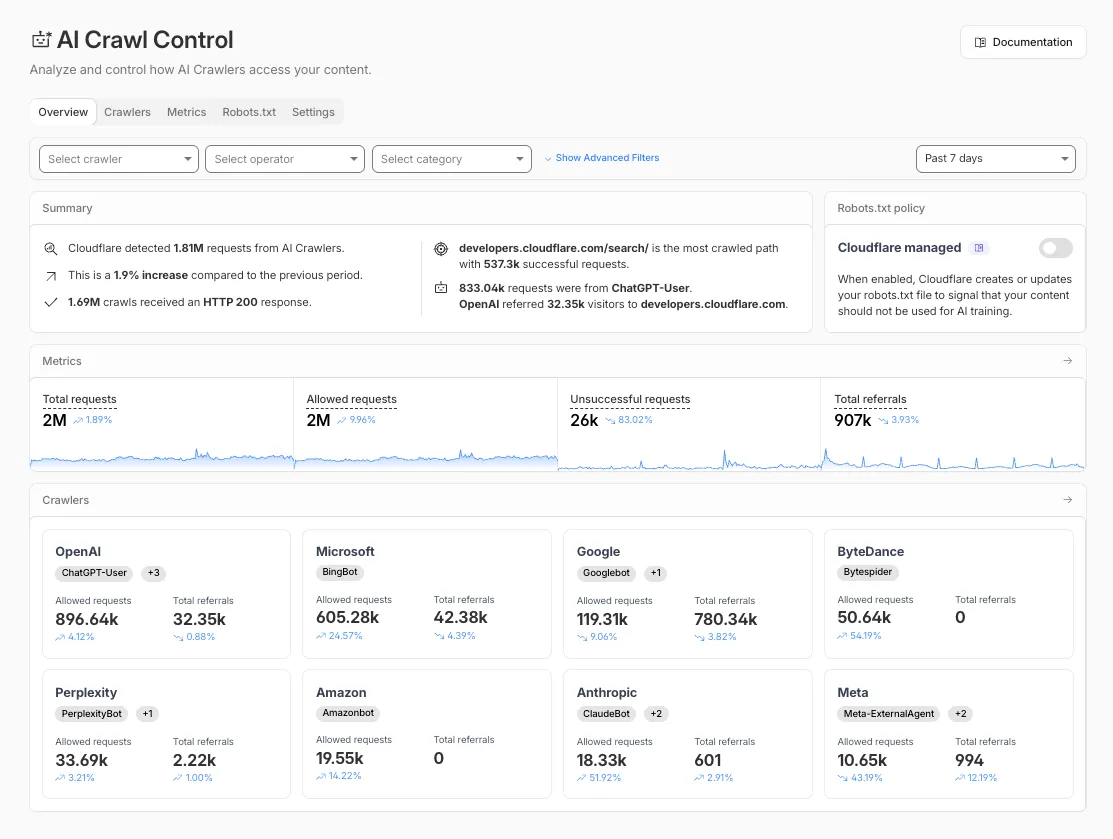
The Overview tab is now the default view in AI Crawl Control. The previous default view with controls for individual AI crawlers is available in the Crawlers tab.
What’s new
- Executive summary — Monitor total requests, volume change, most common status code, most popular path, and high-volume activity
- Operator grouping — Track crawlers by their operating companies (OpenAI, Microsoft, Google, ByteDance, Anthropic, Meta)
- Customizable filters — Filter your snapshot by date range, crawler, operator, hostname, or path
Get started
- Log in to the Cloudflare dashboard and select your account and domain.
- Go to AI Crawl Control, where the Overview tab opens by default with your activity snapshot.
- Use filters to customize your view by date range, crawler, operator, hostname, or path.
- Navigate to the Crawlers tab to manage controls for individual crawlers.
Learn more about analyzing AI traffic and managing AI crawlers.
Source: Cloudflare
Latest Posts
- Amazon ECS adds Amazon VPC Lattice support for blue/green, linear, and canary deployments

- MC1166852: Microsoft Viva Copilot Analytics Adds Agent Dashboard for Adoption and Credit Insights
- Access, Cloudflare One – New strict service token authentication setting for Access
- Rules – hash_in_range() is globally available for HTTP products