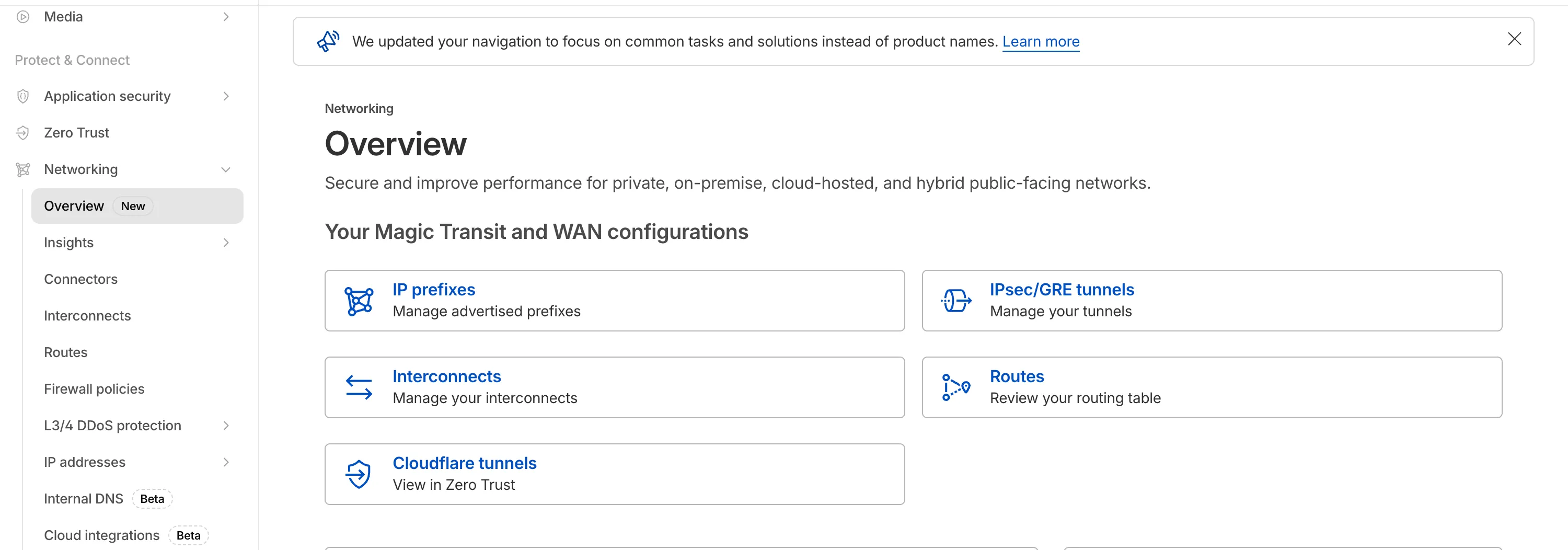
The Network Services menu structure in Cloudflare’s dashboard has been updated to reflect solutions and capabilities instead of product names. This will make it easier for you to find what you need and better reflects how our services work together.
Your existing configurations will remain the same, and you will have access to all of the same features and functionality.
The changes visible in your dashboard may vary based on the products you use. Overall, changes relate to Magic Transit, Magic WAN, and Magic Firewall.
Summary of changes:
- A new ‘Overview’ page provides access to the most common tasks across Magic Transit and Magic WAN.
- Product names have been removed from top-level navigation.
- Magic Transit and Magic WAN configuration is now organized under ‘Routes’ and ‘Connectors’. For example, you will find IP Prefixes under ‘Routes’, and your GRE/IPsec Tunnels under ‘Connectors.’
- Magic Firewall policies are now called ‘Firewall Policies.’
- Magic WAN Connectors and Connector On-Ramps are now referenced in the dashboard as ‘Appliances’ and ‘Appliance profiles.’ They can be found under ‘Connectors > Appliances.’
- Network analytics, network health, and real-time analytics are now available under ‘Insights.’
- Packet Captures are found under ‘Insights > Diagnostics.’
- You can manage your Sites from ‘Insights > Network health.‘
- You can find Magic Network Monitoring under ‘Insights > Network flow.’
If you would like to provide feedback, please use the form in the email sent on January 7th, 2026, titled ‘[FYI] Upcoming Network Services Dashboard Navigation Update.’
Source: Cloudflare
Latest Posts
- Web Search on AWS Bedrock now supports domain filtering and user location controls

- MC1523076: Microsoft Teams Shifts Loop Meeting Notes Storage to Meeting Organizer’s OneDrive
- MC1523090: Microsoft Teams Adds Side Conversations in Meeting Chat
- MC1523086: Microsoft Teams Adds Alternate Text Support for OneDrive and SharePoint Images






