Radar now includes content type insights for AI bot and crawler traffic. The new content_type dimension and filter shows the distribution of content types returned to AI crawlers, grouped by MIME type category.
The content type dimension and filter are available via the following API endpoints:
Content type categories:
- HTML – Web pages (
text/html) - Images – All image formats (
image/*) - JSON – JSON data and API responses (
application/json,*+json) - JavaScript – Scripts (
application/javascript,text/javascript) - CSS – Stylesheets (
text/css) - Plain Text – Unformatted text (
text/plain) - Fonts – Web fonts (
font/*,application/font-*) - XML – XML documents and feeds (
text/xml,application/xml,application/rss+xml,application/atom+xml) - YAML – Configuration files (
text/yaml,application/yaml) - Video – Video content and streaming (
video/*,application/ogg,*mpegurl) - Audio – Audio content (
audio/*) - Markdown – Markdown documents (
text/markdown) - Documents – PDFs, Office documents, ePub, CSV (
application/pdf,application/msword,text/csv) - Binary – Executables, archives, WebAssembly (
application/octet-stream,application/zip,application/wasm) - Serialization – Binary API formats (
application/protobuf,application/grpc,application/msgpack) - Other – All other content types
Additionally, individual bot information pages now display content type distribution for AI crawlers that exist in both the Verified Bots and AI Bots datasets.
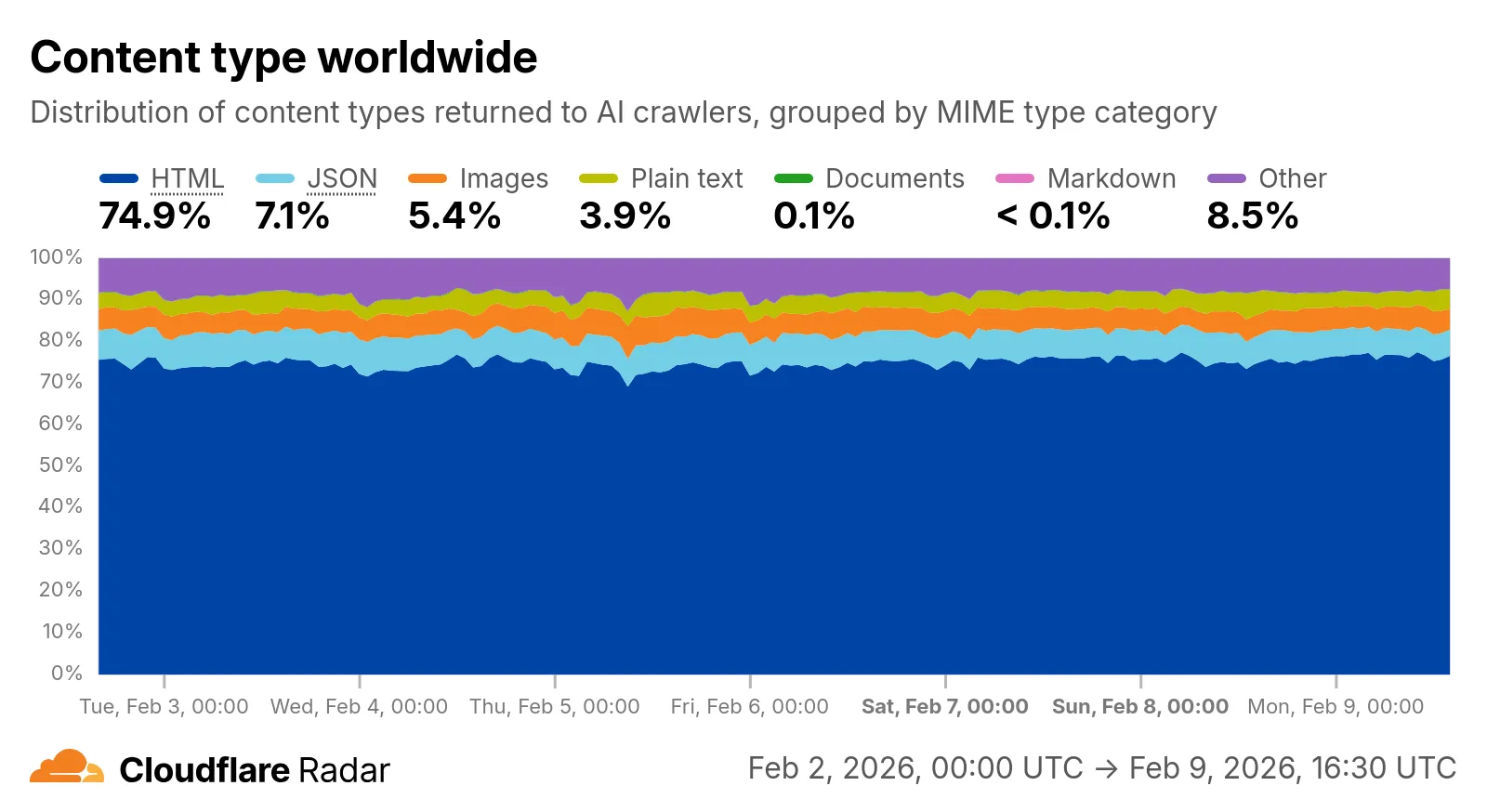
Check out the AI Insights page to explore the data.
Source: Cloudflare
Latest Posts
- (Updated) Updated Filter Pane in SharePoint Document Libraries and Lists [MC1229956]
![(Updated) Updated Filter Pane in SharePoint Document Libraries and Lists [MC1229956] 2 pexels scottwebb 305821](data:image/svg+xml;base64,PHN2ZyB3aWR0aD0iMSIgaGVpZ2h0PSIxIiB4bWxucz0iaHR0cDovL3d3dy53My5vcmcvMjAwMC9zdmciPjwvc3ZnPg==)
- (Updated) Outlook: Support for recommended and automatically applied sensitivity labels in Outlook for iOS and Android [MC1247891]
![(Updated) Outlook: Support for recommended and automatically applied sensitivity labels in Outlook for iOS and Android [MC1247891] 3 pexels olly 3778966](data:image/svg+xml;base64,PHN2ZyB3aWR0aD0iMSIgaGVpZ2h0PSIxIiB4bWxucz0iaHR0cDovL3d3dy53My5vcmcvMjAwMC9zdmciPjwvc3ZnPg==)
- Microsoft Dataverse – Discover, build, customize, and extend with management MCP server [MC1266693]
![Microsoft Dataverse - Discover, build, customize, and extend with management MCP server [MC1266693] 4 future 7700934 1920](data:image/svg+xml;base64,PHN2ZyB3aWR0aD0iMSIgaGVpZ2h0PSIxIiB4bWxucz0iaHR0cDovL3d3dy53My5vcmcvMjAwMC9zdmciPjwvc3ZnPg==)
- (Updated) Retirement of -Credential parameter when connecting to Exchange Online PowerShell [MC1248389]
![(Updated) Retirement of -Credential parameter when connecting to Exchange Online PowerShell [MC1248389] 5 pexels annamw 1106479](data:image/svg+xml;base64,PHN2ZyB3aWR0aD0iMSIgaGVpZ2h0PSIxIiB4bWxucz0iaHR0cDovL3d3dy53My5vcmcvMjAwMC9zdmciPjwvc3ZnPg==)

![(Updated) Updated Filter Pane in SharePoint Document Libraries and Lists [MC1229956] 2 pexels scottwebb 305821](https://mwpro.co.uk/wp-content/uploads/2024/08/pexels-scottwebb-305821-150x150.webp)
![(Updated) Outlook: Support for recommended and automatically applied sensitivity labels in Outlook for iOS and Android [MC1247891] 3 pexels olly 3778966](https://mwpro.co.uk/wp-content/uploads/2025/06/pexels-olly-3778966-150x150.webp)
![Microsoft Dataverse - Discover, build, customize, and extend with management MCP server [MC1266693] 4 future 7700934 1920](https://mwpro.co.uk/wp-content/uploads/2025/06/future-7700934_1920-150x150.webp)
![(Updated) Retirement of -Credential parameter when connecting to Exchange Online PowerShell [MC1248389] 5 pexels annamw 1106479](https://mwpro.co.uk/wp-content/uploads/2024/08/pexels-annamw-1106479-150x150.webp)
![(Updated) Microsoft 365 Copilot: Researcher agent output formats [MC1224569] 8 (Updated) Microsoft 365 Copilot: Researcher agent output formats [MC1224569]](https://mwpro.co.uk/wp-content/uploads/2025/06/pexels-pavel-danilyuk-8438918-96x96.webp)