Take a look and decide whether this affects your tenant, users or support teams.
Primary Audience
Why this score?
AT A GLANCE
END USERS
IT ADMINS
ROLLOUT TIMELINE
Now
📢 Official Microsoft Message Center Announcement
Introducing Auto-Attendant Call Flow Visualizer in Teams Admin Center
Message ID: MC1423105
[What and Why:]
We are introducing the Call Flow Visualizer in Teams Admin Center, a new interactive experience that provides a visual representation of Auto Attendant and Teams Phone agent call routing. This enhancement simplifies management of complex call flows, reduces configuration errors, and accelerates troubleshooting while improving admin productivity.
[Rollout Schedule:]
- General Availability (Worldwide, GCC): Began early June 2026; completed by late June 2026
- General Availability (GCC High, DoD): Will begin mid-August 2026; expected to complete by mid-September 2026
[Impact on Your Organization:]
Who is affected: Admins managing Auto Attendants and Teams Phone agents
Platforms/Services:
- Teams Admin Center (Web)
What will happen:
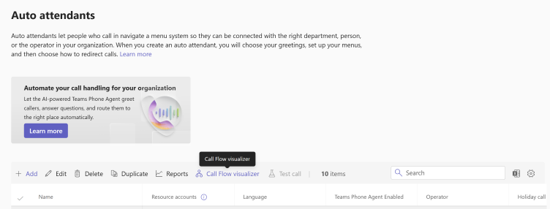
- A new “Call flow visualizer” option will be available on the Auto Attendants page.
- Admins can select an Auto Attendant or Teams Phone agent and select “Call flow visualizer” to view.
- Admins can view call routing in a tree-like, interactive diagram.
- The visualizer will display:
- Resource account assignments
- Greetings
- Business hours routing
- After-hours routing
- Holiday call flow branches
- Interactive controls such as zoom and pan will be supported.
- Upstream and downstream call routing relationships will be visible in a single view.
- Admins can select hierarchical call flows to dig deeper.
- The feature will be enabled by default; no configuration is required.
Screenshot: The Call flow visualizer option is available from the Auto attendants page in Teams admin center:
[Action Required/Recommendations:]
No action is required.
Recommended next steps:
- Review the new Call flow visualizer in Auto attendants page in Teams Admin Center.
- Update internal documentation or training materials for administrators.
- Inform helpdesk teams about the new troubleshooting capability.
[Compliance considerations:]
No compliance considerations identified, review as appropriate for your organization.
Source: Microsoft
Latest Posts
- MC1526697: Dynamics 365 and Dataverse Add New Canadian Time Zones for 2026 Regional Changes

- MC1532426: Power Apps Retires Proactive Control Rename Feature in Canvas Apps
- MC1532421: Power Apps Retires Copilot and Ideas Formula Assistance in Canvas Apps
- Amazon Connect Customer now supports versioning and aliasing for flows