Take a look and decide whether this affects your tenant, users or support teams.
Primary Audience
Why this score?
AT A GLANCE
END USERS
IT ADMINS
ROLLOUT TIMELINE
In progress
📢 Official Microsoft Message Center Announcement
(Updated) Copilot Notebooks: Suggested artifacts for faster content creation
Message ID: MC1411727 (Updated)
Updated July 20, 2026: We have updated the content. Thank you for your patience.
[What and Why:]
Copilot Notebooks will intelligently recommend relevant artifacts based on your Microsoft 365 knowledge and the content in your notebook, helping you move work forward faster without leaving the notebook experience. By automatically leveraging existing context and background information, Copilot reduces the need to repeatedly write prompts containing the same details when creating new content from notebook materials. Supported artifact types include Word documents, Excel workbooks, and PowerPoint presentations. Support for additional artifact types, including PDFs and Pages, will be introduced in a future release.
This message is associated with Roadmap ID 566870.
[Rollout Schedule:]
- Public Preview (Worldwide): Beginning in early July 2026; expected to complete by late August 2026.
- General Availability (Worldwide): Beginning in late July 2026; expected to complete by late September 2026.
[Impact on Your Organization:]
Who is affected:
- Users who can currently create artifacts within Copilot Notebooks.
- Organizations licensed for Microsoft 365 Copilot (Premium) with access to Copilot Notebooks.
Platforms/Services:
- Microsoft 365 Copilot
- Copilot Notebooks
- Word
- Excel
- PowerPoint
What will happen:
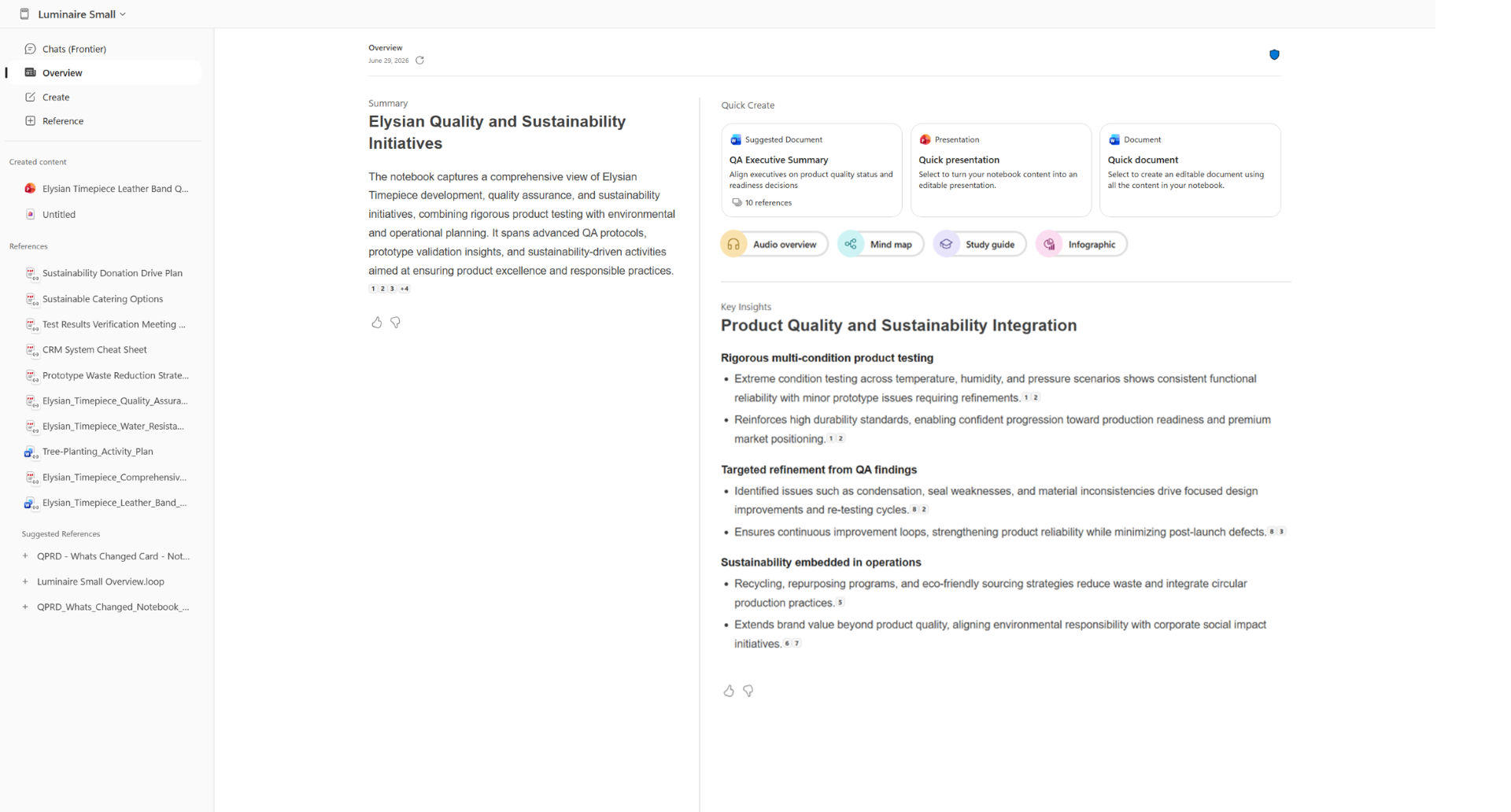
- Users will see proactive artifact recommendations within Copilot Notebooks.
- Suggestions are generated using notebook references, pages, and Microsoft 365 context.
- Supported artifact types include Word, Excel, and PowerPoint.
- Future releases are expected to add support for PDFs and Pages.
- The feature is available by default for eligible users.
- No admin configuration is required.
Screenshot – Copilot Notebooks screen with recommended artifacts
[Action Required/Recommendations:]
No action is required.
We recommend that you:
- Review user-facing communications regarding Copilot Notebooks.
- Inform help desk teams about the new recommendation experience.
- Update internal training and adoption materials as appropriate.
- Monitor roadmap communications for future artifact type support.
[Compliance Considerations:]
| Compliance consideration | Explanation |
| Does the change alter how existing customer data is processed, stored, or accessed? | Artifact suggestions are generated using content already available in Copilot Notebooks, including notebook references, pages, and the user’s Microsoft 365 context. This introduces additional AI-driven processing of existing customer data to determine relevant artifact recommendations. |
| Does the change introduce or significantly modify AI/ML or agent capabilities that interact with or provide access to customer data? | The feature adds proactive AI-generated artifact recommendations that analyze notebook content and Microsoft 365 context to suggest next-step deliverables such as Word documents, Excel workbooks, and PowerPoint presentations. |
| Does the change provide end users any new way of interacting with generative AI? | Users can receive contextual artifact recommendations directly within Copilot Notebooks and generate content from pre-populated prompts that incorporate relevant notebook information. |
| Does the change alter how admins can monitor, report on, or demonstrate compliance activities? | The announcement does not specify whether recommendation activity will be surfaced in existing audit, reporting, or compliance experiences. Organizations may wish to review future documentation for additional compliance-related details. |
| Does the change include an admin control and can it be controlled through Entra ID group membership? | No new administrative controls are described. The feature appears to be available to users who already have permission to create artifacts in Copilot Notebooks, but Microsoft has not explicitly documented control mechanisms. |
| Does the change allow a user to enable and disable the feature themselves? | The announcement states that users remain in control of whether they use suggested artifacts, but it does not specify whether the recommendation experience itself can be enabled or disabled by individual users. |
Source: Microsoft Message Center • Analysed by MWPro
<<< [MC1411727] Archive
Tooltip: View earlier revisions of this post