Take a look and decide whether this affects your tenant, users or support teams.
Primary Audience
Why this score?
AT A GLANCE
END USERS
IT ADMINS
ROLLOUT TIMELINE
In progress
📢 Official Microsoft Message Center Announcement
(Updated) Outlook for Mac: Paragraph options for composing emails
Message ID: MC1422017 (Updated)
Updated July 21, 2026: We have updated the content. Thank you for your patience.
[What and Why:]
Outlook for Mac is introducing enhanced paragraph formatting options to improve email composition. This update provides users with greater control over alignment, indentation, and spacing, helping create clearer and more professional communications and improving overall productivity.
[Rollout Schedule:]
General Availability (Worldwide, GCC, GCC High, DoD): Rollout begins in mid-July 2026; expected to complete by late July 2026
[Impact on Your Organization:]
Who is affected: All users of Outlook for Mac
Platforms/Services: Outlook for Mac (desktop)
What will happen:
- Users will have access to richer paragraph formatting options while composing emails.
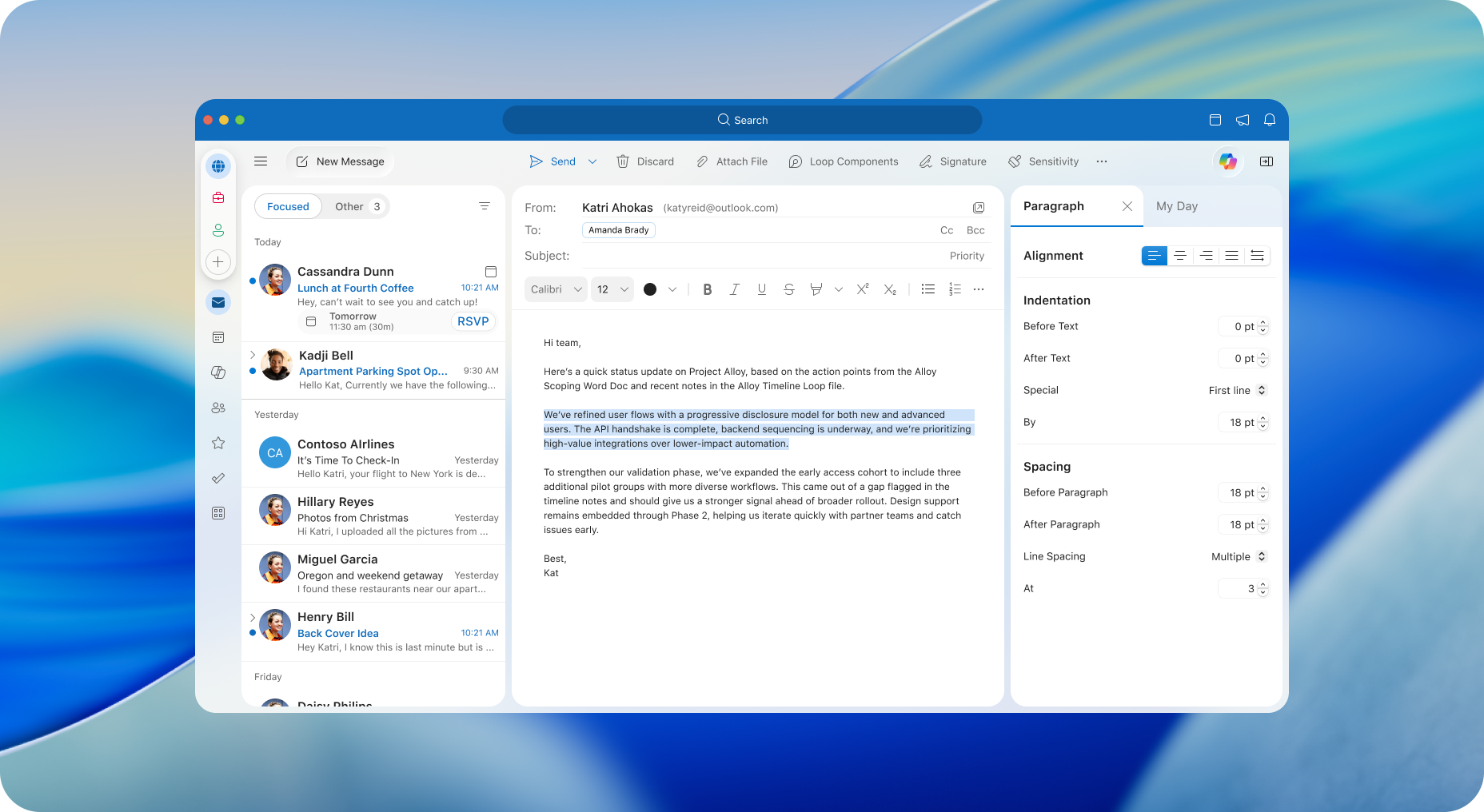
- A new Paragraph Options pane will be available from the line spacing menu.
- Users can adjust alignment, indentation, and spacing more precisely.
- The feature will be enabled by default.
- Existing formatting options will remain available and be extended.
Screenshot – New Paragraph Pane
[Action Required / Recommendations:]
- No action is required.
- Consider informing users about enhanced formatting capabilities.
- Update internal documentation if applicable.
[Compliance considerations:]
No compliance considerations identified, review as appropriate for your organization.
Source: Microsoft Message Center • Analysed by MWPro
<<< [MC1422017] Archive
Tooltip: View earlier revisions of this post