Take a look and decide whether this affects your tenant, users or support teams.
Primary Audience
Why this score?
AT A GLANCE
END USERS
IT ADMINS
ROLLOUT TIMELINE
Early to mid-August 2026
📢 Official Microsoft Message Center Announcement
Microsoft 365 Copilot: Unified management experience for connectors in the Microsoft 365 admin center
Message ID: MC1447677
[What and why]
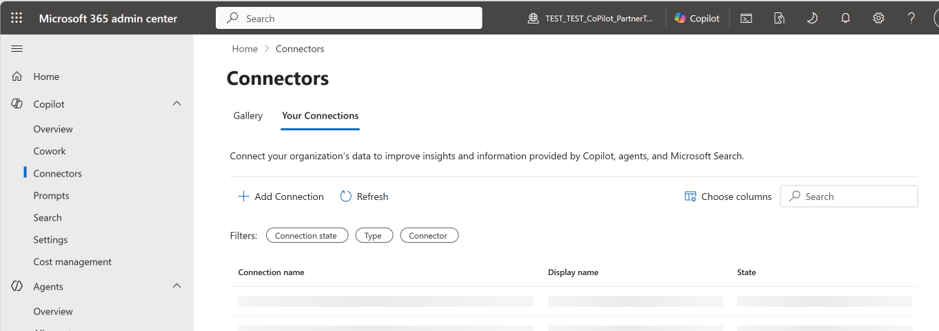
Microsoft is unifying Microsoft 365 Copilot connector management into a single experience in the Microsoft 365 admin center. After this rollout, administrators will manage Microsoft 365 Copilot connectors and Copilot plugins from one location: Microsoft 365 admin center > Copilot > Connectors.
We’re making this change to simplify administration, provide a consistent connector management experience, and make it easier for users to discover and use available connectors across supported Microsoft 365 Copilot experiences.
Connector governance, security, compliance capabilities, and existing administrative controls are not changing as part of this update.
[Rollout schedule]
- General Availability (Worldwide): Beginning in early August 2026 and expected to complete by mid-August 2026
[Impact on your organization]
Who is affected
- Organizations using Microsoft 365 Copilot connectors
- Organizations using supported Copilot plugins
- Administrators who manage Microsoft 365 Copilot connector deployments
- Independent software vendors (ISVs) and developers publishing Microsoft 365 Copilot connectors or supported plugins
Platforms and services
- Microsoft 365 admin center
- Microsoft 365 Copilot
What will happen
- Administrators will manage connector types from a single location in Microsoft 365 admin center > Copilot > Connectors.

- Users will discover available connectors through a unified connector catalog across supported Microsoft 365 Copilot experiences.
- Available connectors will appear in the Sources menu in supported Microsoft 365 Copilot experiences.
- ISVs and developers will publish connectors using a unified connector manifest and publishing pipeline.
- Existing governance, security, compliance, and administrative controls will remain unchanged.
- Existing administrative policies will continue to apply.
[Action required and recommendations]
No action is required before rollout. No new administrator configuration or policy changes are required.
We recommend that administrators:
- Review internal documentation and training materials that reference current connector management locations.
- Inform connector administrators about the new Microsoft 365 admin center > Copilot > Connectors experience.
- Validate any operational procedures that reference connector management workflows after rollout is complete.
[Compliance considerations]
No compliance considerations identified. Review as appropriate for your organization.
Source: Microsoft Message Center • Analysed by MWPro