What is mswarm-tunnel-health? Understanding Cloudflare Magic WAN Tunnel Health Checks
If you’ve searched for mswarm-tunnel-health, there’s a good chance you’ve encountered the term while investigating network connectivity, tunnel health alerts, monitoring data, or Cloudflare WAN behaviour.
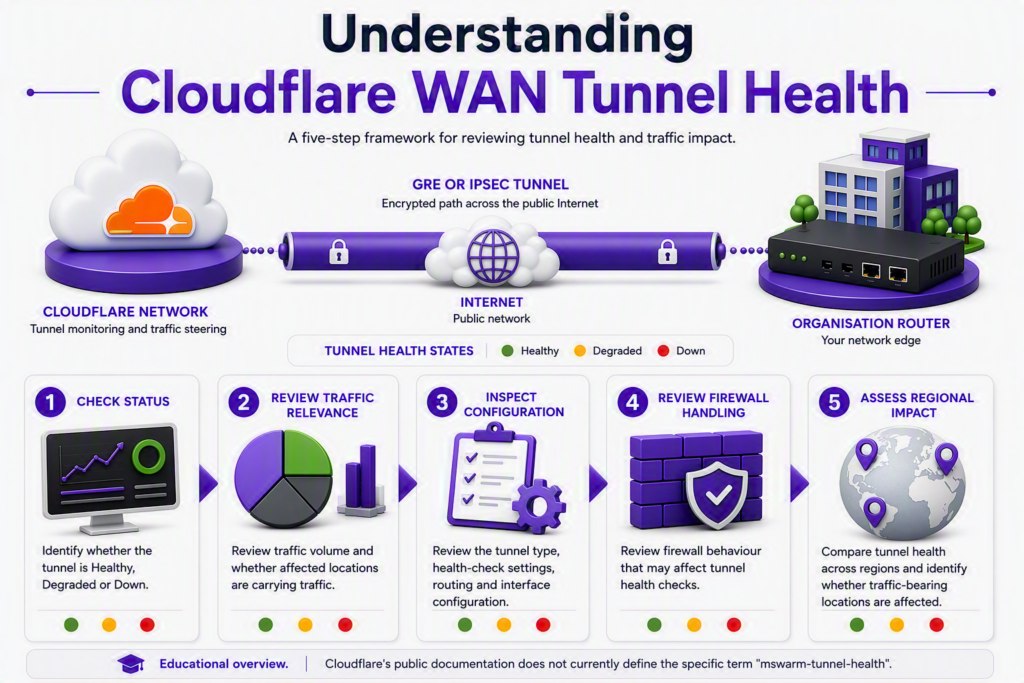
The challenge is that, at the time of writing, Cloudflare’s public documentation does not contain a dedicated article that explicitly defines the term mswarm-tunnel-health. However, the strongest documented technical context relates to Cloudflare WAN tunnel health checks, which are used to monitor GRE and IPsec tunnel availability and influence traffic-steering decisions across Cloudflare’s network.
Editorial Note
This article is based on Cloudflare’s published tunnel health-check architecture, dashboard guidance, and troubleshooting documentation. While the exact term mswarm-tunnel-health is not explicitly defined in Cloudflare’s public documentation reviewed for this article, the query appears closely related to Cloudflare WAN tunnel health monitoring and diagnostics.
Quick Answer
If you’re investigating mswarm-tunnel-health, the most useful starting point is to think of it as a tunnel-health monitoring or diagnostic indicator rather than an error message.
Cloudflare continuously monitors WAN tunnels to determine whether they are healthy, degraded, or down. Those health assessments are then used to help steer traffic across the best available routes.
In most cases, the important question is not:
“What does the term mean?”
but rather:
“Is tunnel health affecting production traffic?”
How Cloudflare Tunnel Health Checks Work
Cloudflare WAN continuously checks whether tunnels connecting customer networks to Cloudflare remain reachable and responsive. When a tunnel becomes unhealthy, Cloudflare can automatically steer traffic towards an alternative path without requiring manual intervention.
Tunnel health monitoring is performed using health-check probes.
According to Cloudflare, a health-check probe consists of an ICMP payload encapsulated within the tunnel protocol being tested. For example, where IPsec is being used, the ICMP payload is carried inside the encrypted tunnel. Cloudflare then evaluates the response and uses the result to calculate the health state of the tunnel.
This allows Cloudflare to determine whether a tunnel should be considered:
- Healthy
- Degraded
- Down
and make routing decisions accordingly.
Why Am I Seeing mswarm-tunnel-health?
Administrators may encounter searches for mswarm-tunnel-health while:
- Investigating Cloudflare WAN alerts
- Reviewing tunnel monitoring dashboards
- Troubleshooting GRE or IPsec connectivity
- Analysing route failover behaviour
- Researching Cloudflare tunnel health events
Because the exact term is not directly documented by Cloudflare, it is important to focus on the surrounding context.
If you are seeing the exact string mswarm-tunnel-health in:
- A dashboard
- A monitoring platform
- An API response
- A SIEM solution
- A network log
capture the surrounding information before beginning remediation work. The meaning of health-related messages often depends on which Cloudflare service generated them and where they were observed.
Is mswarm-tunnel-health an Error?
Not necessarily.
Cloudflare’s tunnel health system is designed to report the condition of tunnels using states such as Healthy, Degraded, and Down. A tunnel-health event does not automatically indicate service disruption.
Cloudflare specifically notes that:
- Some locations may report degraded health while others remain healthy.
- Different Cloudflare locations can observe different tunnel states.
- Internet path conditions vary between regions.
- A subset of unhealthy locations may have no impact on actual customer traffic.
This means a tunnel-health warning should be interpreted as an operational signal requiring investigation rather than immediate evidence of an outage.
How to Troubleshoot mswarm-tunnel-health
1. Check Tunnel Health in the Cloudflare Dashboard
Cloudflare recommends reviewing:
- Tunnel health status
- Health checks passed
- Traffic volume
- Status by location
The dashboard provides visibility into how Cloudflare locations currently view the health of your tunnels.
2. Check Whether Traffic Is Actually Affected
One of the most common mistakes is assuming that a degraded state automatically means users are experiencing issues.
Cloudflare explains that tunnel health must be considered alongside traffic volume. A location reporting degraded health may not be handling traffic for your organisation.
3. Review Health Check Configuration
Cloudflare documents several scenarios where:
- Health checks appear unhealthy
- Tunnel status appears degraded
- Production traffic continues working normally
These often involve the way health-check traffic is handled by intermediate network devices.
4. Check Firewall Behaviour
Stateful firewalls can interfere with health-check traffic.
Cloudflare specifically identifies situations where tunnel health checks fail because firewalls drop probe traffic while allowing business traffic to continue flowing successfully.
5. Review Tunnel Configuration
For IPsec deployments, Cloudflare highlights configuration-related causes including:
- IKE parameter mismatches
- Firewall restrictions
- Anti-replay protection behaviour
- Rekeying events
- Traffic selector issues
These should all be reviewed if tunnel health remains consistently degraded or down.
Can You Ignore mswarm-tunnel-health?
Sometimes.
Cloudflare states that it is normal for some locations to show degraded status because internet connectivity between Cloudflare and customer networks is not uniform across the globe.
You can usually treat tunnel-health information as informational when:
- Only a small number of locations are affected.
- Affected locations are carrying little or no traffic.
- Users are not reporting connectivity issues.
You should investigate when:
- Traffic-bearing locations show persistent degradation.
- Tunnel status remains down.
- User traffic is affected.
- Health alerts are recurring.
- Connectivity complaints are being reported.
How This Relates to Magic WAN Bidirectional Tunnel Health Checks
Cloudflare recently updated Magic WAN so that bidirectional health-check return packets can be accepted through any Magic on-ramp in a high-availability configuration.
Previously, a bidirectional health check would pass only when the return packet traversed the same tunnel used by the forward probe. Cloudflare’s update changed this behaviour so that return traffic can use any eligible tunnel within the high-availability design.
This improvement particularly benefits environments where SD-WAN platforms do not provide precise control over which tunnel return traffic uses.
Frequently Asked Questions
What is mswarm-tunnel-health?
Cloudflare’s public documentation does not currently provide a dedicated definition of the term. Based on available evidence, searches for the term appear closely related to Cloudflare WAN tunnel health monitoring and diagnostics.
Does mswarm-tunnel-health mean my tunnel is down?
No. Tunnel health monitoring includes multiple states, including healthy, degraded and down. Additional investigation is required to determine the actual condition of the tunnel.
Why does Cloudflare show some locations as degraded?
Cloudflare explains that internet conditions vary between locations. Some locations may report degraded health while others remain healthy.
Can traffic still work when health checks fail?
Yes. Cloudflare documents situations where health checks fail but traffic continues flowing normally, often due to firewall behaviour affecting health-check probes rather than production traffic.
Where can I check tunnel health?
Cloudflare WAN customers can review tunnel health through the Network Health views in the Cloudflare dashboard and associated analytics tools.
Final Thoughts
The most important thing to understand about mswarm-tunnel-health is that it should be viewed as a diagnostic starting point rather than a conclusion.
Cloudflare’s tunnel-health architecture exists to help identify connectivity issues, assess route quality, and support automated traffic steering decisions. Understanding whether a tunnel is healthy, degraded, or down is far more important than the label itself.
If you’re researching the term because of a Cloudflare WAN deployment, focus first on tunnel status, traffic impact, and health-check behaviour. Those will tell you whether action is required and help separate genuine connectivity problems from routine monitoring signals.