Take a look and decide whether this affects your tenant, users or support teams.
Primary Audience
Why this score?
AT A GLANCE
END USERS
IT ADMINS
ROLLOUT TIMELINE
Ends August 2026
📢 Official Microsoft Message Center Announcement
(Updated) Microsoft 365 Copilot: Change in accessing additional agents in Excel
Message ID: MC1287365 (Updated)
Updated August 10, 2026: We have updated the content and timeline. Thank you for your patience.
[Introduction]
We are updating the Chat-only Copilot experience in Excel to better align with the editing experience. As part of this update, users who want to access additional Copilot agents (such as Researcher or Analyst) can do so by selecting the “…” menu in the header and choosing M365 Copilot.
[When this will happen]
- General Availability (Worldwide): We began rolling out early August 2026 and expect to complete by end of August 2026.
[How this affects your organization]
Who is affected
All Excel users with Microsoft 365 Copilot licenses
What will happen
- Users can continue to use the chat‑only Copilot experience in Excel to ask questions, analyze data, and receive insights without modifying workbook content.
- Users can click the “…” menu in the Excel header and then can choose “All Agents”
Screenshot – New All Agents button
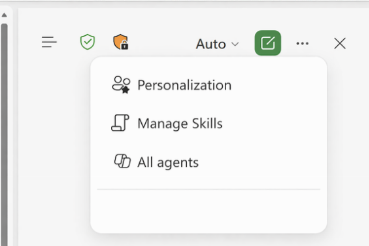
- The “All Agents” button will direct users to the Agent Store.
- Existing Microsoft 365 Copilot licensing and policy controls are respected.
- There is no change to workbook editing behavior or data permissions.
[What you can do to prepare]
No admin action is required.
- Inform helpdesk and support teams about the new access path to Microsoft 365 Copilot from Excel.
- Update internal documentation or training materials that describe Copilot experiences in Excel.
- Review Microsoft 365 Copilot documentation if you want to understand available agents and licensing requirements.
Learn more: Edit with Copilot in Excel | Microsoft Support
[Compliance considerations]
No compliance considerations identified. Review as appropriate for your organization.
Source: Microsoft Message Center • Analysed by MWPro
<<< [MC1287365] Archive
Tooltip: View earlier revisions of this post