Take a look and decide whether this affects your tenant, users or support teams.
Primary Audience
Why this score?
AT A GLANCE
END USERS
IT ADMINS
ROLLOUT TIMELINE
End Sept–Oct 2026
📢 Official Microsoft Message Center Announcement
(Updated) Rewrite with Microsoft 365 Copilot Chat coming soon to Edge for Business users
Message ID: MC1146821 (Updated)
Updated September 9, 2026: We have updated the timeline. Thank you for your patience.
Introduction
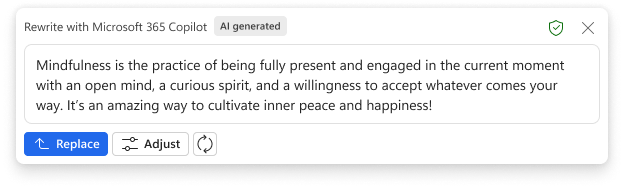
Microsoft Edge for Business will soon support Rewrite, a new feature powered by Microsoft 365 Copilot Chat. This capability helps users draft and rephrase editable text directly within Edge, enhancing productivity and writing quality. Users can access Rewrite by highlighting editable text and right-clicking to open the context menu.
This message is associated with Microsoft 365 Roadmap ID 420335.
When this will happen
General Availability (Worldwide): We will begin rolling end of September 2026 (previously late August) and expect to complete rollout by late October 2026.
How this affects your organization
- Rewrite will be enabled by default for Edge for Business users.
- Users can access Rewrite by highlighting editable text and right-clicking to open the context menu.
- If Microsoft 365 Copilot is restricted from accessing page content due to Data Loss Prevention (DLP) policies, Rewrite will not function on that content.
- Admins can manage this feature using the InlineComposeEnabled policy setting.
What you can do to prepare
No admin action is required before rollout.
We recommend:
- Reviewing your current DLP configurations to understand how they may impact Rewrite functionality.
- Notifying users about this new capability.
- Updating internal documentation to reflect this change.
Learn more about how DLP affects Copilot access to page content: Microsoft 365 Copilot Chat in Edge and Access to Page Content | Microsoft Edge | Microsoft Learn
Compliance considerations
| Does the change introduce or significantly modify AI/ML or agent capabilities that interact with or provide access to customer data? | Yes. This change introduces a new generative AI capability through Microsoft 365 Copilot Chat, allowing users to rewrite or draft text directly in Edge for Business. |
| Does the change provide end users any new way of interacting with generative AI? | Yes. Users can interact with Copilot Chat by highlighting editable text and using the right-click context menu to access Rewrite, enabling AI-assisted drafting and rephrasing. |
| Does the change modify Data Loss Prevention (DLP) policies or enforcement? | Yes. If DLP policies restrict Copilot from accessing page content, the Rewrite feature will not function on that content. |
| Does the change include an admin control and can it be controlled through Entra ID group membership? | Yes. Admins can manage the availability of this feature using the InlineComposeEnabled policy setting. |
| Does the change allow a user to enable and disable the feature themselves? | Yes. Users can choose to use the Rewrite feature by manually invoking it through the right-click context menu in Edge. |
Source: Microsoft Message Center • Analysed by MWPro
<<< [MC1146821] Archive
Tooltip: View earlier revisions of this post