MWPRO IMPACT SCORE
OPERATIONAL IMPACT
35
0
25
50
75
100
MODERATE IMPACT • ASSESS BUSINESS IMPACT
Recommended Action:
Take a look and decide whether this affects your tenant, users or support teams.
Take a look and decide whether this affects your tenant, users or support teams.
What is MWPro Impact Score?
Watch our 60‑second explainer
Primary Audience
SharePoint AdminsMicrosoft 365 AdminsIT ManagersService Owners
Why this score?
AI Confidence
HIGH
Enough detail is available to trust this assessment.
Assessment Reasoning
This is a new enhancement to SharePoint page authoring that adds element-level selection for Copilot editing. It affects page authors with Copilot licences and improves precision in editing but requires no configuration or action. Admin impact is moderate for awareness and support readiness, while user impact is limited to page authors adapting to the updated Copilot workflow.
35
Admin Impact
45
User Impact
30
Urgency
25
Effort
WHAT YOU NEED TO KNOW
AT A GLANCE
SharePoint page authors using Copilot can now choose specific page sections or web parts to refine edits, giving more control and accuracy when updating content.
END USERS
Page authors with Copilot may notice a new option to select sections or web parts before editing.
IT ADMINS
No immediate admin action required.
ROLLOUT TIMELINE
Available:
Now
Now
📢 Official Microsoft Message Center Announcement
Microsoft SharePoint Online: Select page canvas elements for Copilot-assisted editing
Message ID: MC1478958
[What and why]
We have introduced an enhancement to Copilot in SharePoint page authoring that allows page authors to directly select specific page canvas elements before submitting a prompt to Copilot. This improvement helps authors provide more precise context for Copilot, making it easier to target edits to specific sections or web parts and improving the page editing experience.
[Rollout schedule]
- General Availability (Worldwide, GCC, GCC High, DoD): This feature is available now.
Who is affected
- SharePoint page authors with a Microsoft 365 Copilot license.
Platforms and services
- SharePoint Online
- Microsoft 365 Copilot
What will happen
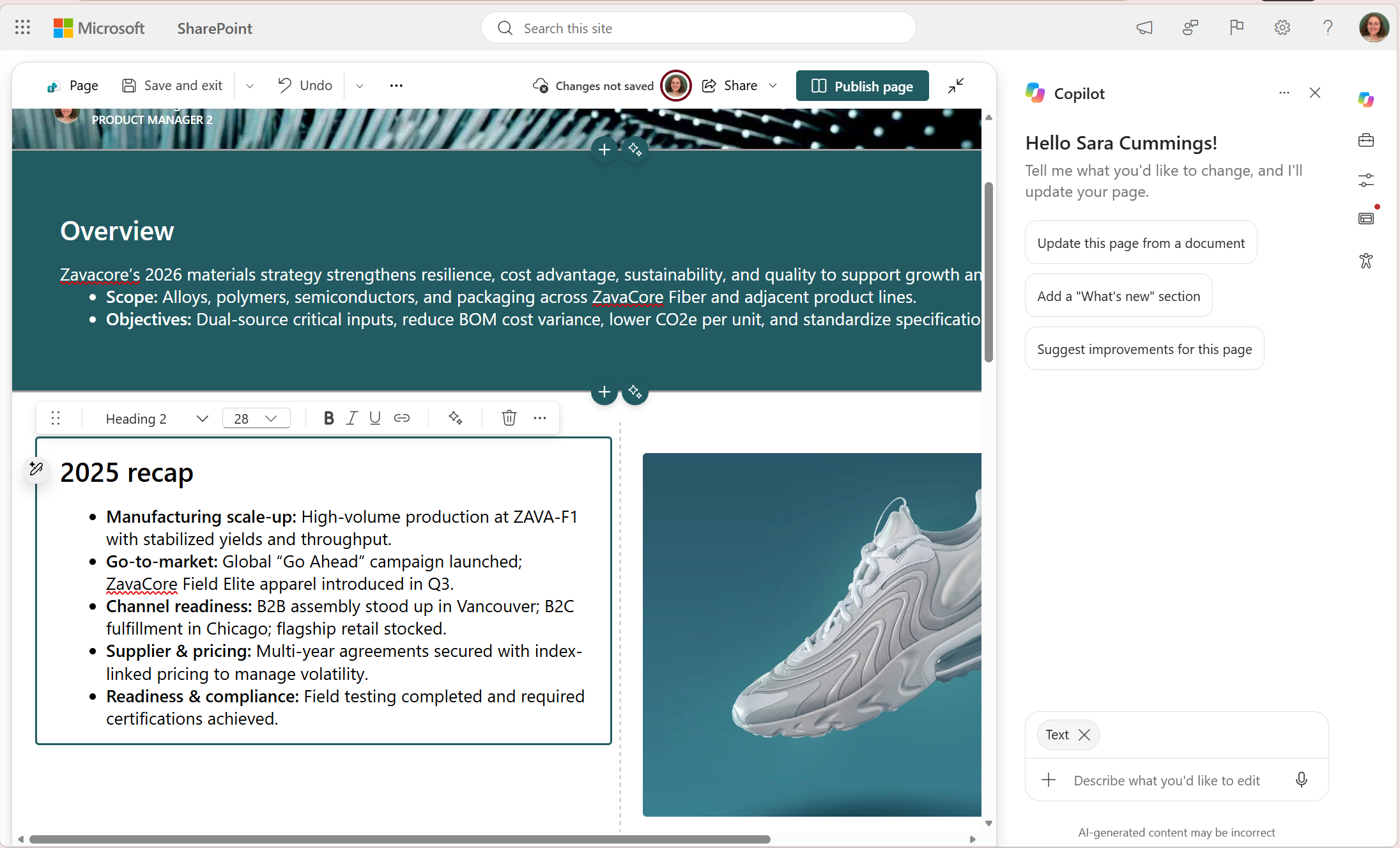
- Authors editing a SharePoint page with Copilot can directly select specific page canvas elements before submitting a prompt.
- Selected elements will appear as a selection indicator above the Copilot chat box.
- Authors can select entire sections or individual web parts for editing.
- Copilot will use the selected element(s) as the context for requested changes. If no canvas element is selected, Copilot will continue to determine the most appropriate area of the page to update based on the prompt.
Editing a page canvas element with Copilot:
[Action required and recommendations]
No action is required.
[Learn more]
[Compliance considerations]
No compliance considerations identified. Review as appropriate for your organization.
Source: Microsoft Message Center • Analysed by MWPro