Take a look and decide whether this affects your tenant, users or support teams.
Primary Audience
Why this score?
AT A GLANCE
END USERS
IT ADMINS
ROLLOUT TIMELINE
To late Oct 2026
📢 Official Microsoft Message Center Announcement
(Updated) Microsoft Teams: Modernized Gallery view in Teams Rooms on Android
Message ID: MC1446797 (Updated)
Updated October 5, 2026: We have updated the timeline. Thank you for your patience.
[What and why]
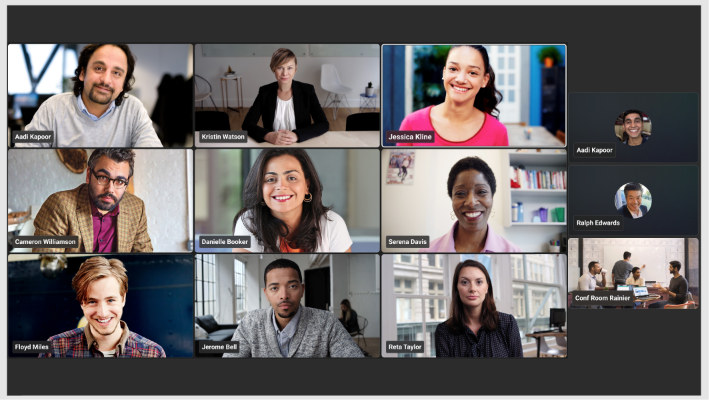
We’re introducing a modernized Gallery view experience for Microsoft Teams Rooms on Android. This update aligns the experience more closely with Teams Rooms on Windows by improving participant visibility, creating more consistent layouts, and providing additional meeting display controls for users and administrators.
This message is associated with Microsoft 365 Roadmap ID 567468.
[Rollout schedule]
- General Availability (Worldwide, GCC): Beginning in mid-August 2026 and is expected to complete by late October 2026 (previously mid-August)
- General Availability (GCC High and DoD): Beginning in early September 2026 and expected to complete in late October 2026 (previously late September)
[Impact on your organization]
Who is affected
- Organizations using Microsoft Teams Rooms on Android devices.
Platforms and services
- Microsoft Teams
- Teams Rooms on Android
What will happen
Today, Teams Rooms on Android devices may display participants using a mix of aspect ratios and provide a different gallery experience than Teams Rooms on Windows.
After this rollout:
- Gallery view will prioritize video participants on the meeting stage by default:

- Participant tiles will be displayed using more consistent aspect ratios, including 16:9, 4:3, and 1:1 layouts.
- Audio participants will be deprioritized when video participant prioritization is enabled, helping display more video participants on screen.
- Meeting participants will be able to:
- Hide the room self-preview video for a meeting.
- Display audio and video participants equally instead of prioritizing video participants.
- Gallery updates will be more stable, with reduced tile movement when active speakers are promoted to the meeting stage.
- Admin controls will be available through device settings and the Pro Management portal.
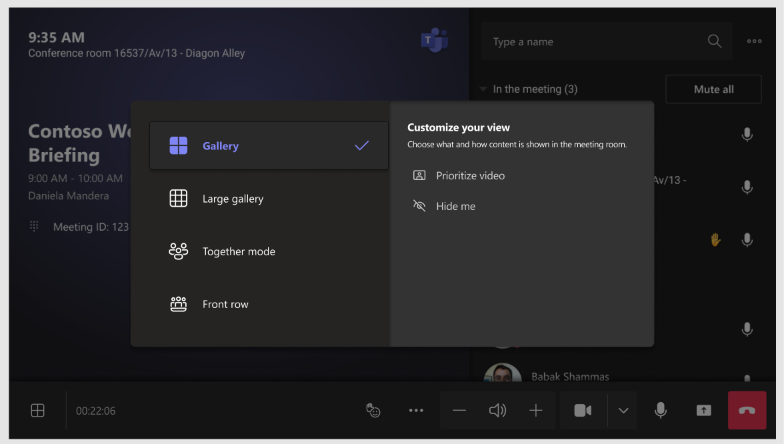 Hide the room self-preview video for a meeting.
[Action required and recommendations]
No action is required before the rollout.
Administrators can configure the default Gallery view behavior through local device settings and the Teams Rooms Pro Management portal.
Communicate these visual changes to Teams Rooms users if your organization provides end-user training or adoption materials.
Learn more
[Compliance considerations]
No compliance considerations identified.
Source: Microsoft Message Center • Analysed by MWPro
<<< [MC1446797] Archive
Tooltip: View earlier revisions of this post