Review the update and plan any required actions before rollout.
Primary Audience
Why this score?
AT A GLANCE
END USERS
IT ADMINS
ROLLOUT TIMELINE
Late October 2026
📢 Official Microsoft Message Center Announcement
Microsoft Planner: AI-generated status reports in Planner Agent
Message ID: MC1506735
[What and why]
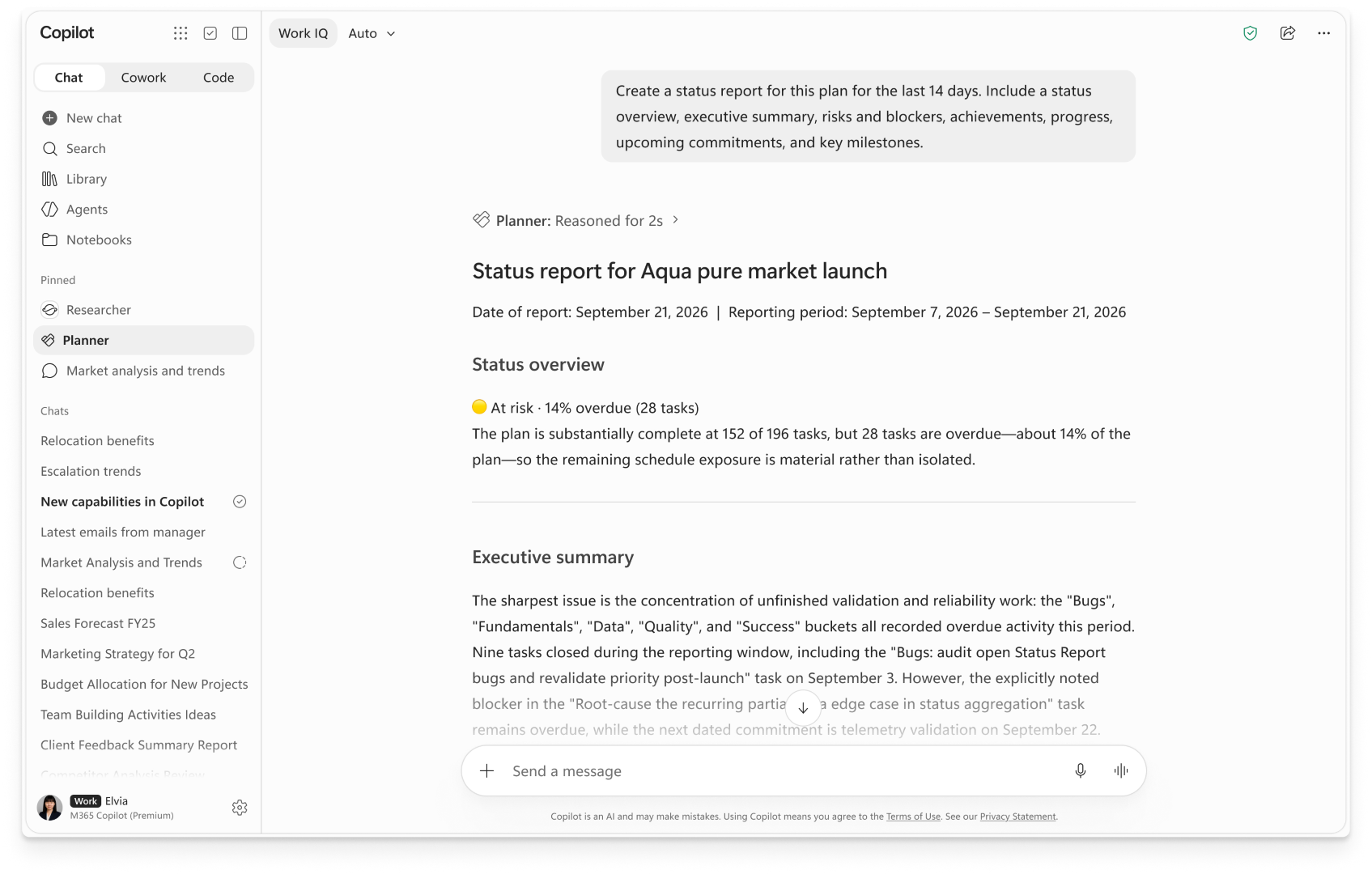
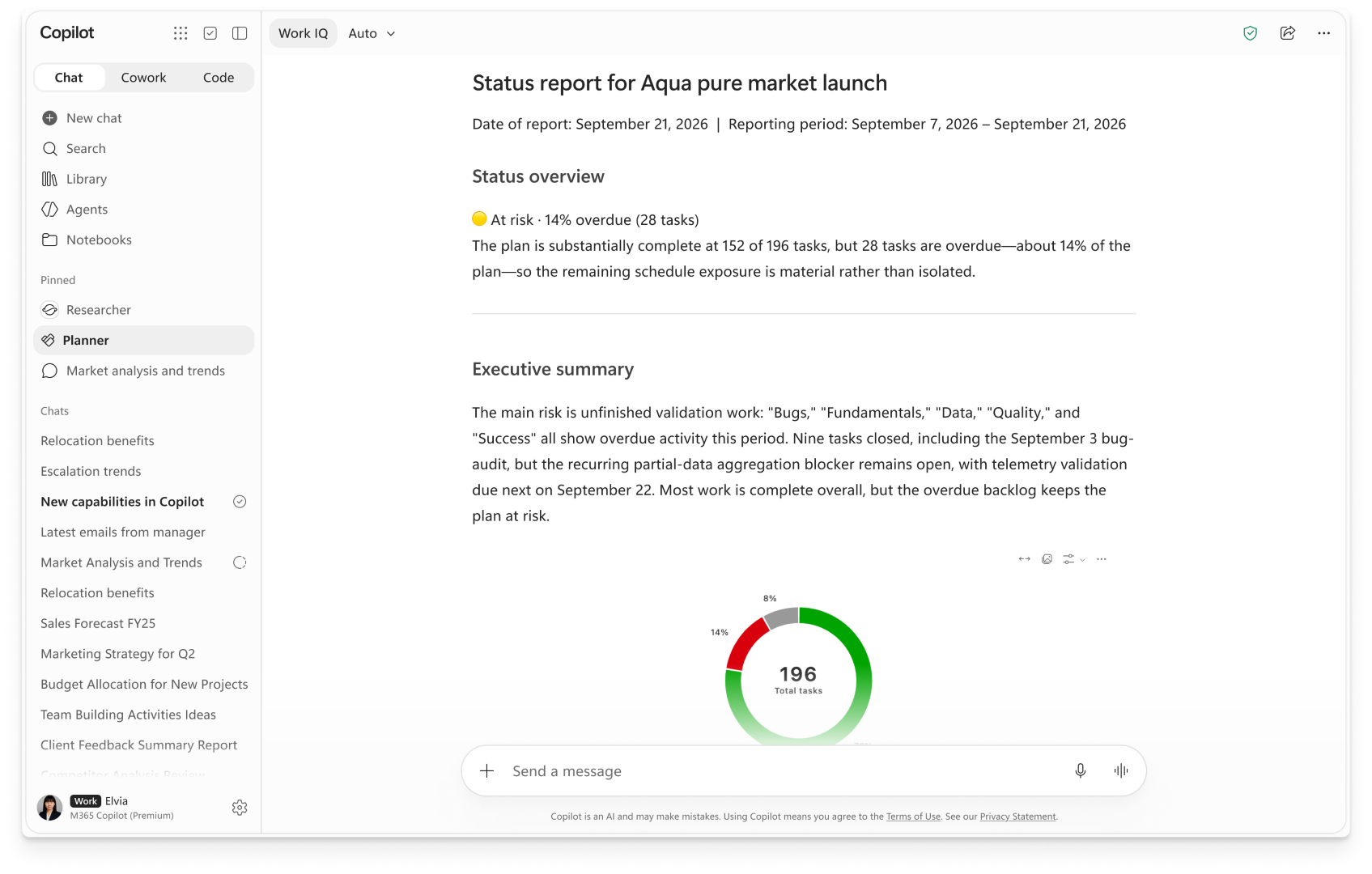
We are introducing AI-generated status reports in Planner Agent. This feature uses Planner plan data to generate a status report that summarizes overall status, progress, risks, and next steps. Users can customize reports by specifying items such as audience, tone, length, reporting period, and report sections before reviewing and refining the generated content.
[Rollout schedule]
- Public Preview (Worldwide): Rollout has completed.
- General Availability (Worldwide): Rollout begins in late October 2026 and is expected to complete by mid-November 2026.
[Impact on your organization]
Who is affected
- Organizations who have Planner agent enabled as part of the Microsoft 365 Copilot app.
- Within those organizations, users with an active Microsoft 365 Copilot license who use Planner Agent.
- Note: Users who view or edit reports do not require a Microsoft 365 Copilot license; a Copilot license is required only to generate reports.
Platforms and services
- Microsoft Planner
- Microsoft 365 Copilot
What will happen
- Planner Agent will be able to generate AI-powered status reports from Planner plan data within Microsoft 365 Copilot app.
- Reports will be generated only from Planner content that users already have permission to access. Existing Planner sharing permissions, Copilot policies, and agent controls continue to apply.
- Reports will synthesize plan information, including tasks, owners, due dates, status, buckets, and recent activity, into sections such as executive summary, progress, risks and blockers, achievements, milestones, and next steps.
- Users can customize reports by reporting period, sections, tone, length, audience, and additional instructions before reviewing and refining the generated content.
- Reports can be exported to a Copilot Page and shared by link or exported to Word and PDF.
- This feature adds new functionality and does not replace existing Planner capabilities.
Copilot-generated status report
[Action required and recommendations]
No action is required. We recommend that you:
- Confirm that intended users have an active Microsoft 365 Copilot license.
- Review Planner Agent and Copilot agent availability and settings in the Microsoft 365 admin center. If needed, the agent can be blocked tenant-wide.
- Inform support teams and users about the new status report generating capability, which can be accessed via the Planner Agent in Copilot or the Reports tab in Planner.
- Note that generating a report requires a plan that is shared with a Microsoft 365 Group and contains sufficient task data.
- Update internal documentation, training, and change management materials as appropriate.
[Compliance considerations]
To assist our customers with identifying compliance concerns, review the questions below and provide details for impact if appropriate:
- Does the change store new customer data?
- [Answer] Yes. A status report generated from your plan appears in the Microsoft 365 Copilot conversation. If a user chooses to export it, the report is also saved as a copilot page or a word document.
- Does the change alter how existing customer data is processed, stored, or accessed (e.g., documents, emails, chats, etc.)?
- [Answer] Yes. When an authorized user requests a report, Planner Agent uses information from a plan they can access to create a status report. If the user attaches a file as a template, that file will also be used for the request. This change does not edit the source plan or its tasks.
- Does the change introduce or significantly modify AI/ML or agent capabilities that interact with or provide access to customer data?
- [Answer] Yes. It adds the ability to generate and refine a status report through Planner Agent chat using accessible plan information. It does not grant the agent access to plans the requesting user cannot access.
Source: Microsoft Message Center • Analysed by MWPro