Review the update and plan any required actions before rollout.
Primary Audience
Why this score?
AT A GLANCE
END USERS
IT ADMINS
ROLLOUT TIMELINE
Sept–Dec 2026
📢 Official Microsoft Message Center Announcement
(Updated) M365 Copilot: Tell Copilot what you need directly from the Copilot button in Word, Excel, and PowerPoint
Message ID: MC1470885 (Updated)
Updated November 11, 2026: We have updated the content. Thank you for your patience.
[What and Why:]
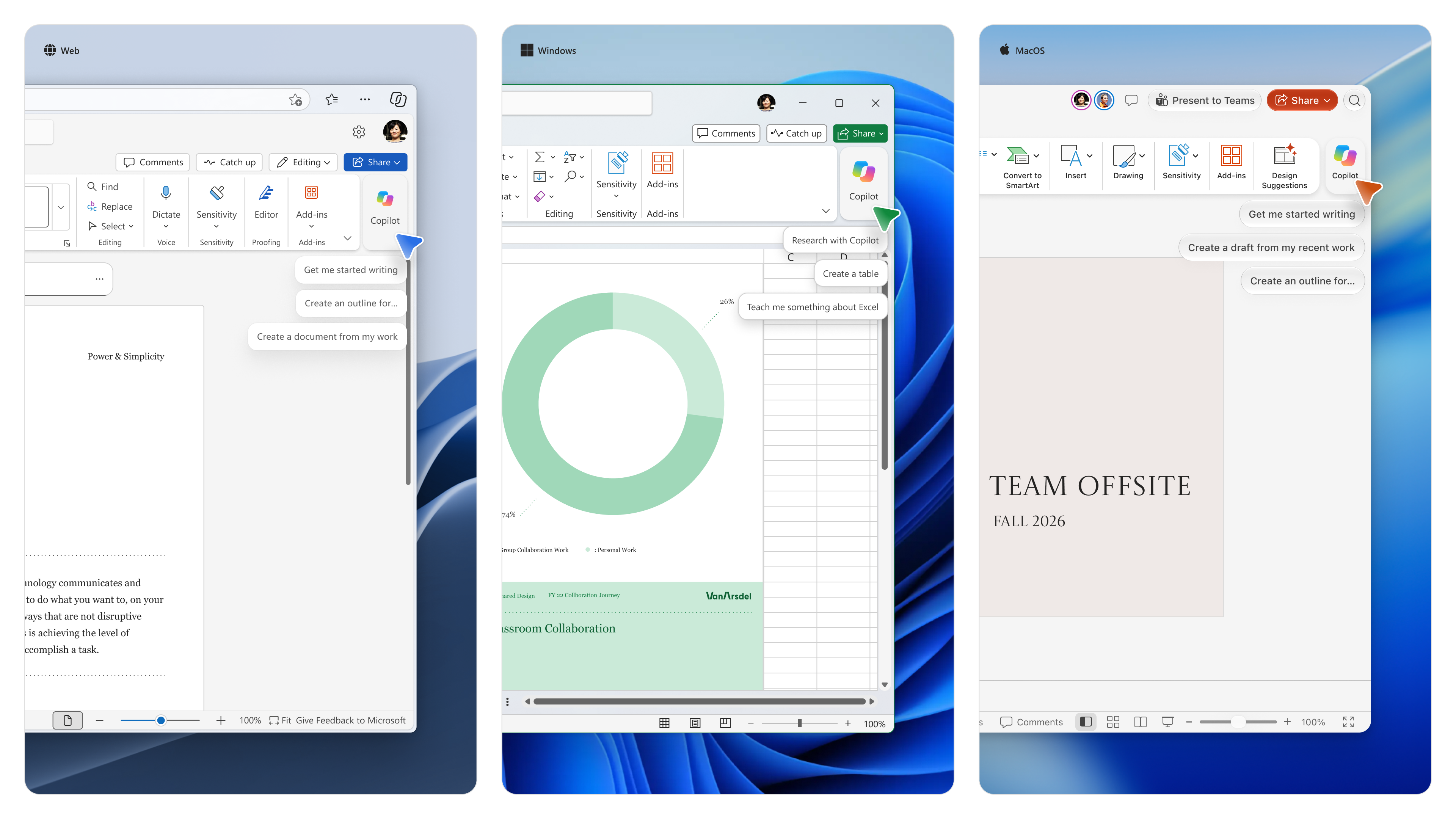
Microsoft is making Copilot more accessible within Word, Excel, and PowerPoint by adding a new prompt input directly to the Copilot button and providing contextual prompt experiences when users select content. This update helps users engage with Microsoft 365 Copilot without leaving their workflow, enabling faster content creation, editing, and task completion. This change supports personal and team productivity by bringing Copilot assistance directly into the document experience.
[Rollout Schedule:]
- General Availability (Worldwide): Rollout begins September 2026 and is expected to complete by the end of December 2026.
- Available in Word, Excel, and PowerPoint on Windows desktop, macOS, and web.
- Rollout may occur on different platforms at different times.
[Impact on Your Organization:]
Who is affected:
- Microsoft 365 users eligible for Microsoft 365 Copilot using Word, Excel, or PowerPoint on Windows desktop, macOS, or web.
Platforms/Services:
- Microsoft 365 Copilot
- Word
- Excel
- PowerPoint
- Windows desktop
- macOS desktop
- Web
What will happen:
- Users will see a new button and prompt in the top right (by default).

- Users can type or dictate prompts without opening the Copilot pane.
- Users can reference Microsoft 365 content directly from the prompt input experience.
- When content is selected in Word or PowerPoint, a contextual Copilot input will appear.
- Suggested actions such as Rewrite and Shorten will be shown when appropriate.
- Windows shortcut: Alt + C.
- Mac shortcut: Command + Control + I.
- The feature is enabled by default for eligible users.
- Existing Copilot administration controls continue to apply.
- No separate admin control is available for the prompt input experience.

[Action Required / Recommendations:]
No admin action is required.
- Update user training and adoption materials.
- Update help desk documentation.
- Review the Pin Microsoft 365 Copilot Chat setting.
- Communicate the change to end users.
- Review Manage Microsoft 365 Copilot Chat documentation.
- Review Pin Microsoft 365 Copilot Chat in Microsoft 365 apps documentation.
- Review The Copilot Dynamic Action Button in Word, Excel, and PowerPoint documentation.
[Compliance Considerations:]
- New generative AI interaction entry points are introduced.
- The update expands how users invoke existing Copilot capabilities.
- Existing admin controls remain available through the Pin Microsoft 365 Copilot Chat setting.
Source: Microsoft Message Center • Analysed by MWPro
<<< [MC1470885] Archive
Tooltip: View earlier revisions of this post