AI Crawl Control now provides enhanced metrics and CSV data exports to help you better understand AI crawler activity across your sites.
What’s new
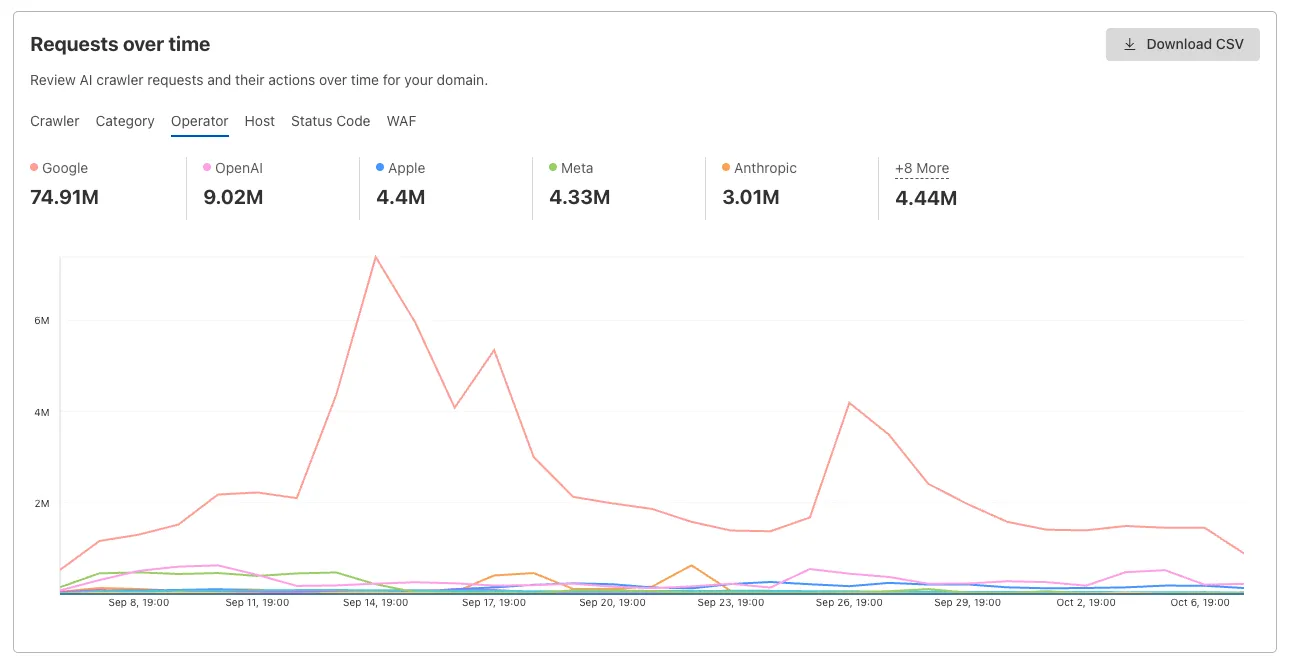
Track crawler requests over time
Visualize crawler activity patterns over time, and group data by different dimensions:
- By Crawler — Track activity from individual AI crawlers (GPTBot, ClaudeBot, Bytespider)
- By Category — Analyze crawler purpose or type
- By Operator — Discover which companies (OpenAI, Anthropic, ByteDance) are crawling your site
- By Host — Break down activity across multiple subdomains
- By Status Code — Monitor HTTP response codes to crawlers (200s, 300s, 400s, 500s)
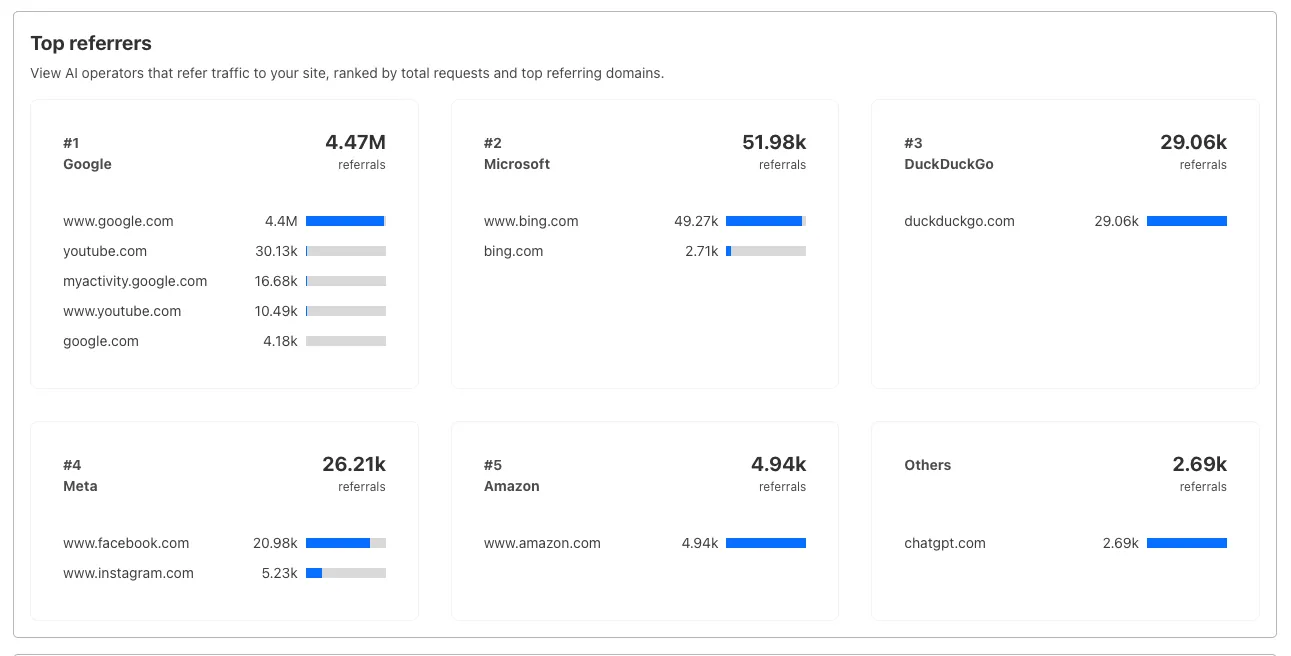
Analyze referrer data (Paid plans)
Identify traffic sources with referrer analytics:
- View top referrers driving traffic to your site
- Understand discovery patterns and content popularity from AI operators
Export data
Download your filtered view as a CSV:
- Includes all applied filters and groupings
- Useful for custom reporting and deeper analysis
Get started
- Log in to the Cloudflare dashboard, and select your account and domain.
- Go to AI Crawl Control > Metrics.
- Use the grouping tabs to explore different views of your data.
- Apply filters to focus on specific crawlers, time ranges, or response codes.
- Select Download CSV to export your filtered data for further analysis.
Learn more about AI Crawl Control.
Source: Cloudflare
Latest Posts
- (Updated) Introducing Surveys Agent and Copilot Chat in Microsoft Forms [MC1229954]
![(Updated) Introducing Surveys Agent and Copilot Chat in Microsoft Forms [MC1229954] 2 pexels leah newhouse 50725 325521](data:image/svg+xml;base64,PHN2ZyB3aWR0aD0iMSIgaGVpZ2h0PSIxIiB4bWxucz0iaHR0cDovL3d3dy53My5vcmcvMjAwMC9zdmciPjwvc3ZnPg==)
- Microsoft 365: Organizational Data – Granular access policy controls for custom attributes [MC1385586]
![Microsoft 365: Organizational Data – Granular access policy controls for custom attributes [MC1385586] 3 pexels pixabay 163036](data:image/svg+xml;base64,PHN2ZyB3aWR0aD0iMSIgaGVpZ2h0PSIxIiB4bWxucz0iaHR0cDovL3d3dy53My5vcmcvMjAwMC9zdmciPjwvc3ZnPg==)
- Notifications Delivery Tracker for immediate Community announcements [MC1385582]
![Notifications Delivery Tracker for immediate Community announcements [MC1385582] 4 pexels atahandemir 28779687](data:image/svg+xml;base64,PHN2ZyB3aWR0aD0iMSIgaGVpZ2h0PSIxIiB4bWxucz0iaHR0cDovL3d3dy53My5vcmcvMjAwMC9zdmciPjwvc3ZnPg==)
- OneDrive: New Shortcuts folder option when adding shortcuts [MC1385585]
![OneDrive: New Shortcuts folder option when adding shortcuts [MC1385585] 5 pexels karolina grabowska 4039487](data:image/svg+xml;base64,PHN2ZyB3aWR0aD0iMSIgaGVpZ2h0PSIxIiB4bWxucz0iaHR0cDovL3d3dy53My5vcmcvMjAwMC9zdmciPjwvc3ZnPg==)

![(Updated) Introducing Surveys Agent and Copilot Chat in Microsoft Forms [MC1229954] 2 pexels leah newhouse 50725 325521](https://mwpro.co.uk/wp-content/uploads/2024/08/pexels-leah-newhouse-50725-325521-150x150.webp)
![Microsoft 365: Organizational Data – Granular access policy controls for custom attributes [MC1385586] 3 pexels pixabay 163036](https://mwpro.co.uk/wp-content/uploads/2024/08/pexels-pixabay-163036-150x150.webp)
![Notifications Delivery Tracker for immediate Community announcements [MC1385582] 4 pexels atahandemir 28779687](https://mwpro.co.uk/wp-content/uploads/2025/06/pexels-atahandemir-28779687-150x150.webp)
![OneDrive: New Shortcuts folder option when adding shortcuts [MC1385585] 5 pexels karolina grabowska 4039487](https://mwpro.co.uk/wp-content/uploads/2024/08/pexels-karolina-grabowska-4039487-150x150.webp)