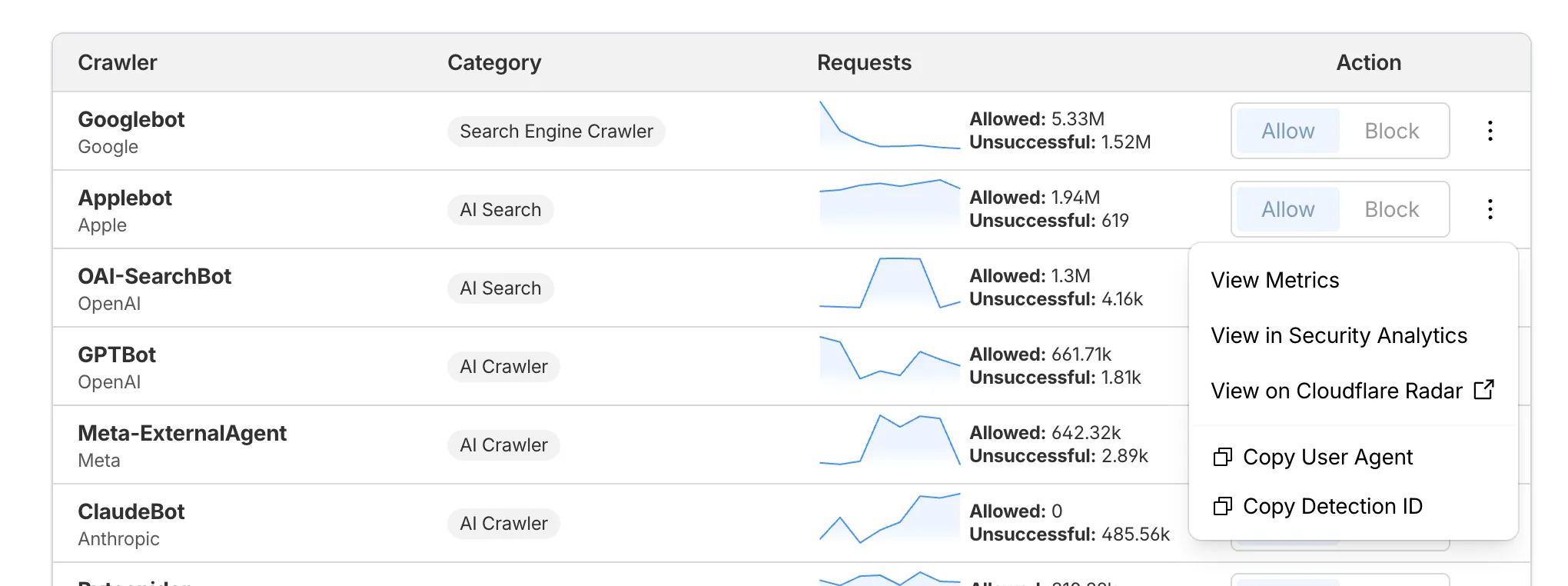
AI Crawl Control now supports per-crawler drilldowns with an extended actions menu and status code analytics. Drill down into Metrics, Cloudflare Radar, and Security Analytics, or export crawler data for use in WAF custom rules, Redirect Rules, and robots.txt files.
What’s new
Status code distribution chart
The Metrics tab includes a status code distribution chart showing HTTP response codes (2xx, 3xx, 4xx, 5xx) over time. Filter by individual crawler, category, operator, or time range to analyze how specific crawlers interact with your site.
Extended actions menu
Each crawler row includes a three-dot menu with per-crawler actions:
- View Metrics — Filter the AI Crawl Control Metrics page to the selected crawler.
- View on Cloudflare Radar — Access verified crawler details on Cloudflare Radar.
- Copy User Agent — Copy user agent strings for use in WAF custom rules, Redirect Rules, or robots.txt files.
- View in Security Analytics — Filter Security Analytics by detection IDs (Bot Management customers).
- Copy Detection ID — Copy detection IDs for use in WAF custom rules (Bot Management customers).
Get started
- Log in to the Cloudflare dashboard, and select your account and domain.
- Go to AI Crawl Control > Metrics to access the status code distribution chart.
- Go to AI Crawl Control > Crawlers and select the three-dot menu for any crawler to access per-crawler actions.
- Select multiple crawlers to use bulk copy buttons for user agents or detection IDs.
Learn more about AI Crawl Control.
Source: Cloudflare
Latest Posts
- Dynamics 365 Contact Center – Automatically handle waiting conversations when queues close or become unstaffed [MC1323827]
![Dynamics 365 Contact Center - Automatically handle waiting conversations when queues close or become unstaffed [MC1323827] 2 pexels isaquepereira 394377](data:image/svg+xml;base64,PHN2ZyB3aWR0aD0iMSIgaGVpZ2h0PSIxIiB4bWxucz0iaHR0cDovL3d3dy53My5vcmcvMjAwMC9zdmciPjwvc3ZnPg==)
- Dynamics 365 Project Operations – Enable Project Revenue recognition using cost estimate instead of EAC [MC1323835]
![Dynamics 365 Project Operations - Enable Project Revenue recognition using cost estimate instead of EAC [MC1323835] 3 pexels scottwebb 532574](data:image/svg+xml;base64,PHN2ZyB3aWR0aD0iMSIgaGVpZ2h0PSIxIiB4bWxucz0iaHR0cDovL3d3dy53My5vcmcvMjAwMC9zdmciPjwvc3ZnPg==)
- Updates available for Microsoft 365 Apps for Current Channel [MC1323310]
![Updates available for Microsoft 365 Apps for Current Channel [MC1323310] 4 pexels anniroenkae 2798881.bak](data:image/svg+xml;base64,PHN2ZyB3aWR0aD0iMSIgaGVpZ2h0PSIxIiB4bWxucz0iaHR0cDovL3d3dy53My5vcmcvMjAwMC9zdmciPjwvc3ZnPg==)
- Data Privacy: Microsoft Online Services Subprocessor Disclosure [MC1323272]
![Data Privacy: Microsoft Online Services Subprocessor Disclosure [MC1323272] 5 pexels energepic com 27411 313690](data:image/svg+xml;base64,PHN2ZyB3aWR0aD0iMSIgaGVpZ2h0PSIxIiB4bWxucz0iaHR0cDovL3d3dy53My5vcmcvMjAwMC9zdmciPjwvc3ZnPg==)

![Dynamics 365 Contact Center - Automatically handle waiting conversations when queues close or become unstaffed [MC1323827] 2 pexels isaquepereira 394377](https://mwpro.co.uk/wp-content/uploads/2025/06/pexels-isaquepereira-394377-150x150.webp)
![Dynamics 365 Project Operations - Enable Project Revenue recognition using cost estimate instead of EAC [MC1323835] 3 pexels scottwebb 532574](https://mwpro.co.uk/wp-content/uploads/2025/06/pexels-scottwebb-532574-150x150.webp)
![Updates available for Microsoft 365 Apps for Current Channel [MC1323310] 4 pexels anniroenkae 2798881.bak](https://mwpro.co.uk/wp-content/uploads/2024/08/pexels-anniroenkae-2798881.bak_-150x150.webp)
![Data Privacy: Microsoft Online Services Subprocessor Disclosure [MC1323272] 5 pexels energepic com 27411 313690](https://mwpro.co.uk/wp-content/uploads/2024/08/pexels-energepic-com-27411-313690-150x150.webp)