Resource Tagging is now in public beta and rolling out to all Cloudflare accounts over the coming days. You can attach custom key-value metadata to your Cloudflare resources and query across your entire account to find what you need.
What’s included
- Broad resource type support — Tag zones, custom hostnames, Cloudflare Tunnels, Workers scripts, D1 databases, R2 buckets, KV namespaces, Durable Objects, Queues, Stream videos, Images, Access applications, Gateway rules, AI Gateways, and more. Refer to the full list of supported resource types.
- Powerful filtering — Query tagged resources using AND/OR logic, negation, and key-only matching. Combine up to 20 filters per query to build precise resource views.
- Account and zone-level endpoints — Full CRUD operations across both scopes.
- Token-based authentication — Tagging supports Account Owned Tokens that persist independently of individual users, so your automation keeps running through credential rotations and team changes.
- Flexible role support — Super Administrators, Workers Admins, and Tag Admins can all manage tags.
API-first by design
The API is the primary interface for Resource Tagging and the recommended path for all workflows — scripting tag assignments, building CI/CD pipelines, or integrating with your infrastructure-as-code toolchain.
Dashboard UI
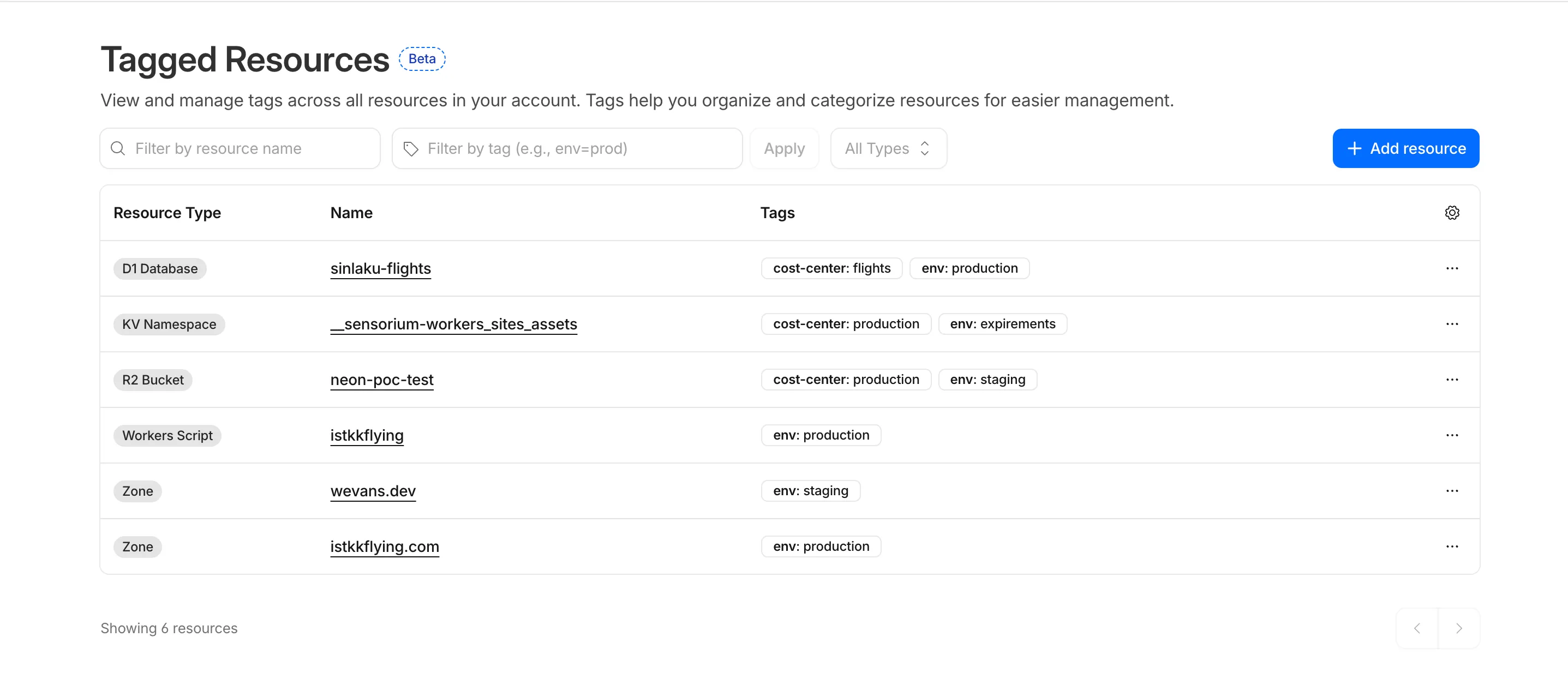
You can also view and manage tagged resources directly in the Cloudflare dashboard. Navigate to Manage Account > Resource Tagging to see all tagged resources across your account, filter by resource name or tag, and add or edit tags inline.
What’s coming next
In future releases, expect support for additional resource types across the Cloudflare platform, tag-based access control policies for scoping user permissions to tagged resources, billing and usage attribution by tag for breaking down costs by team, project, or environment, and Terraform provider support for managing tags declaratively.
Current limitations
PUTreplaces all tags on a resource (no partial update). Use the GET, merge, PUT workflow to modify individual tags safely.DELETEremoves all tags from a resource. To remove a single tag, PUT the remaining tags back.- Querying tags for a resource that has never been tagged returns
500instead of404. This is a known beta limitation.
To get started, refer to the Resource Tagging documentation.
Source: Cloudflare
Latest Posts
- MC1450134: Microsoft Entra Recognizes Windows Hello for Business and macOS Platform SSO as Standalone MFA Factors

- MC1506982: Microsoft 365 Apps Gets October 2026 Updates for All Channels
- AWS Agent Registry now supports custom metadata for registry records
- Amazon Location Service launches an interactive API Playground featuring Places, Routes and Maps APIs