Review the update and plan any required actions before rollout.
Primary Audience
Why this score?
AT A GLANCE
END USERS
IT ADMINS
ROLLOUT TIMELINE
24 July 2026
📢 Official Microsoft Message Center Announcement
OpenAI models will soon be available as a subprocessor in Microsoft 365 Copilot
Message ID: MC1422074
[What and why:]
To enable OpenAI-operated models in Microsoft 365 Copilot, Microsoft has onboarded OpenAI as a subprocessor, creating the foundation for more model flexibility and quicker access to new AI model innovations. This includes OpenAI’s new family of models, beginning with GPT-5.6, which is now available in Microsoft 365 Copilot. These models are governed by the Microsoft Product Terms and the Data Protection Addendum (DPA), with the same enterprise-grade security, compliance, and data protection commitments you already rely on, except as otherwise disclosed in Microsoft Learn documentation. This setting does not apply to OpenAI models operated by Microsoft Azure OpenAI.
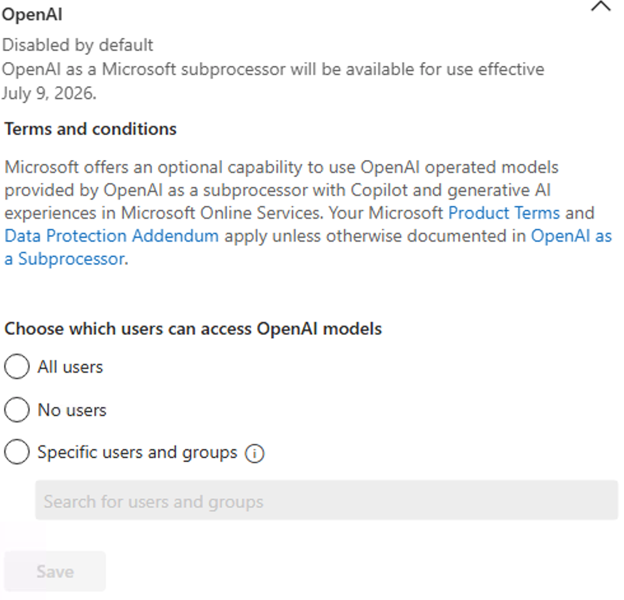
The setting will initially be disabled by default on July 9, 2026. Admins can review and configure the setting at any time in the Microsoft 365 admin center. For eligible customers, if no action is taken prior to July 24, 2026, the setting will be automatically enabled. Admins who do not wish to enable access to OpenAI-operated models should select “No users” before the setting is enabled.
OpenAI-operated models in the Microsoft 365 admin center are designed to provide administrators with the option to access new AI model capabilities as they become available.
[Rollout schedule:]
- Worldwide (General Availability): The OpenAI subprocessor setting will begin rolling out in the admin center on July 9, 2026, and become enabled by default for your tenant on July 24, 2026.
[Impact on your organization:]
Who is affected
- Admins managing Microsoft 365 Copilot and Microsoft Copilot Studio
- Microsoft 365 Copilot and Microsoft Copilot Studio users
Platforms / services
- Microsoft 365 Copilot
- Copilot in Microsoft 365 apps
- Microsoft Copilot Studio
What will happen
- A new admin setting in the Microsoft 365 admin center lets eligible customers enable or disable OpenAI-operated models.
- This setting will be initially Disabled by default, for your tenant, admins can choose to enable to use OpenAI-operated model for quicker access to the latest AI model innovation.
- Selecting “No users” prevents use of OpenAI models running on OpenAI infrastructure—some Microsoft 365 Copilot features may be unavailable as a result.
- Prompts and responses continue to receive enterprise data protection aligned with Microsoft 365 commitments
[Action required / recommendations:]
Admin action required. If no action is taken prior to July 24, 2026, the setting will be automatically enabled.
If you prefer to enable OpenAI as a subprocessor, follow the steps in OpenAI as a subprocessor in Microsoft Online Services to enable the setting.
Learn more
- OpenAI as a subprocessor in Microsoft Online Services
- Overview of AI Subprocessors
- Enterprise data protection in Microsoft 365 Copilot
- Microsoft Product Terms
- Data Protection Addendum
- Subprocessor data access
Source: Microsoft Message Center • Analysed by MWPro
Latest Posts
- Amazon Bedrock now offers Canada cross-Region inference for Claude Haiku 5.5

- AWS Marketplace now enables partners to list once and sell through multiple subsidiary accounts
- MC1526697: Dynamics 365 and Dataverse Add 2026 Canadian Time Zone Definitions
- MC1530954: Microsoft 365 apps Add Draft Mode for Brand Kits