Take a look and decide whether this affects your tenant, users or support teams.
Primary Audience
Why this score?
AT A GLANCE
END USERS
IT ADMINS
ROLLOUT TIMELINE
Now
📢 Official Microsoft Message Center Announcement
Microsoft 365 Copilot: Import Executive Assistant data with People connectors
Message ID: MC1457229
[What and why]
Microsoft 365 People connectors now support ingesting Executive Assistant information from external HR and people systems into Microsoft 365. Organizations can use supported connectors, including SAP SuccessFactors, Workday, and custom People connectors, to bring Executive Assistant data into Microsoft 365 while keeping the source system as the authoritative record.
After Assistant data is ingested, it becomes available across Microsoft 365 experiences such as profile cards, organizational views, Org Explorer and Microsoft 365 Copilot, helping users more easily identify and connect with the appropriate point of contact.
[Rollout schedule]
- General Availability (Worldwide): Available now
[Impact on your organization]
Who is affected
- Microsoft 365 administrators who manage People connectors or organizational profile data
- Users whose Assistant information is ingested into Microsoft 365
Platforms and services
- Microsoft 365 profile cards
- Org Explorer
- Outlook on the web
- New Outlook
- SharePoint
- Microsoft Teams
- Microsoft 365 Copilot experiences
What will happen
After Executive Assistant data is ingested into Microsoft 365:
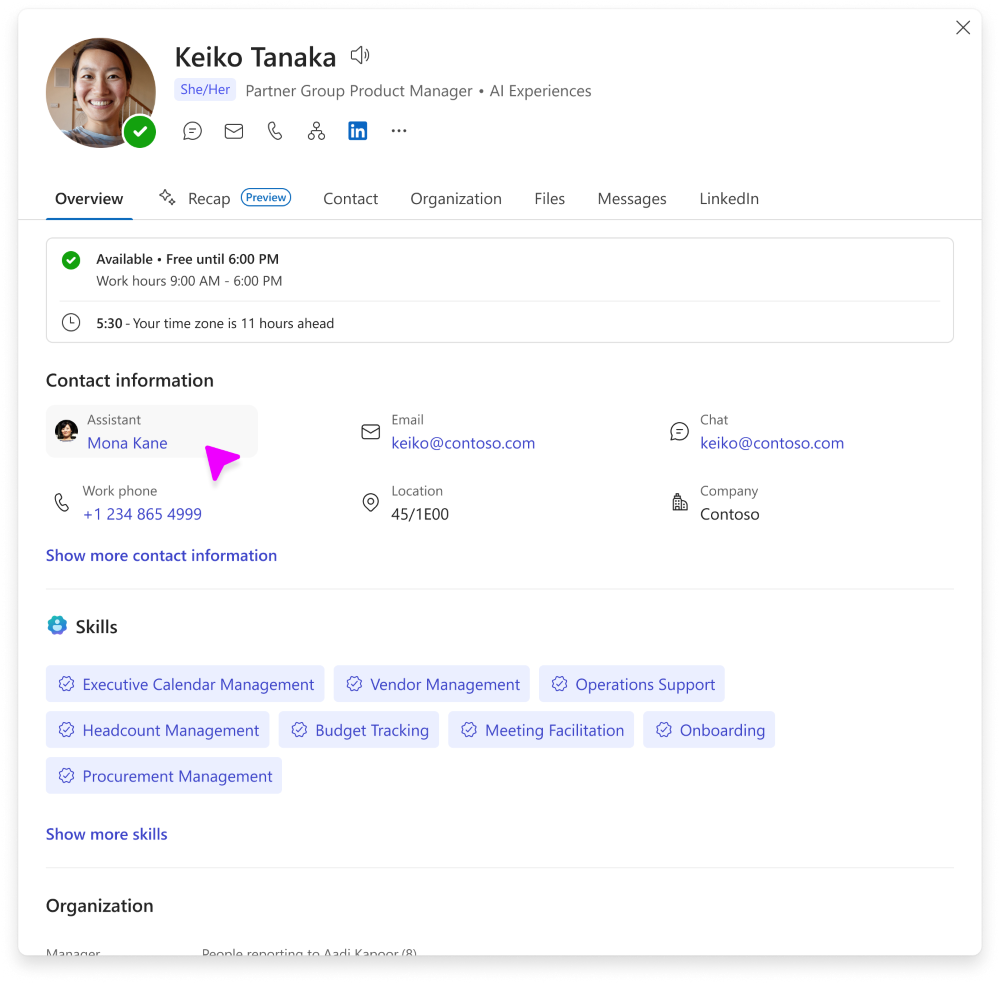
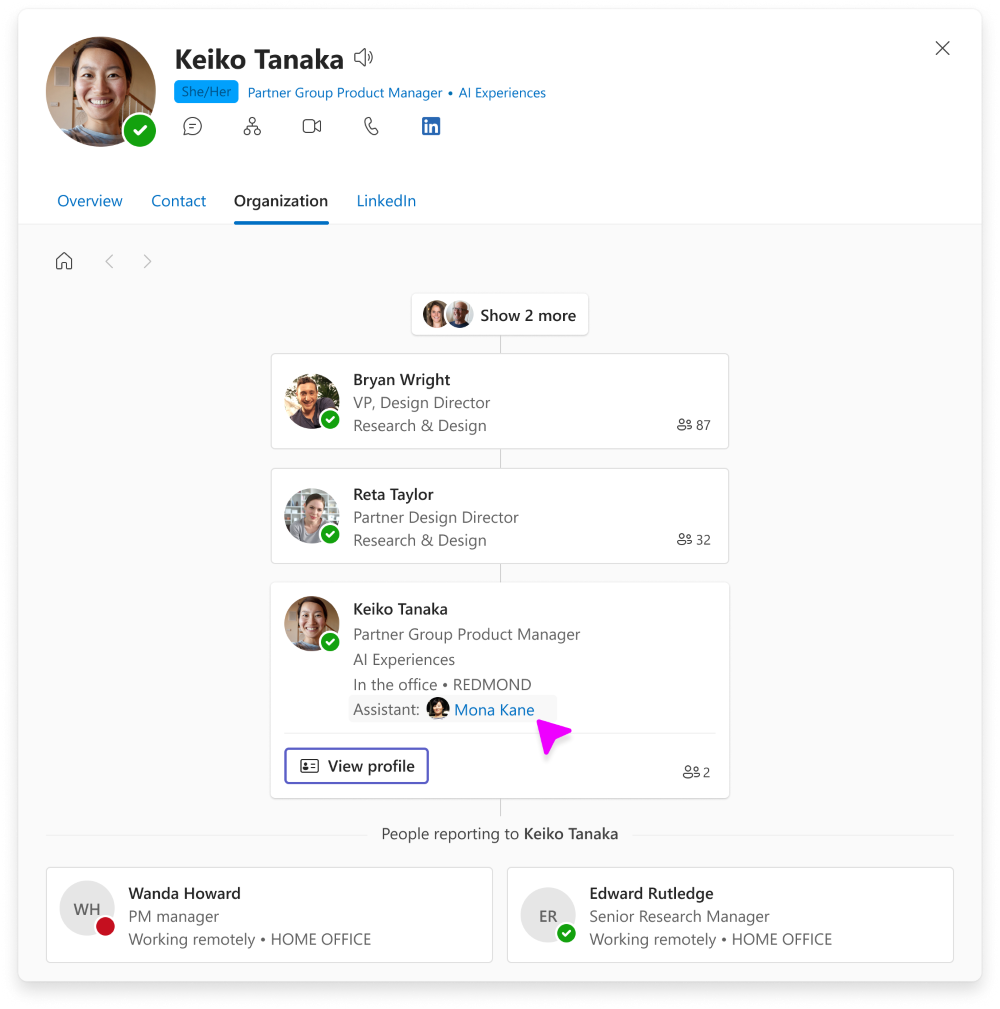
- Assistant information can appear in Microsoft 365 profile experiences, including profile cards in Outlook on the web, new Outlook, Teams, SharePoint, and Microsoft 365 Copilot, as well as Org Explorer.
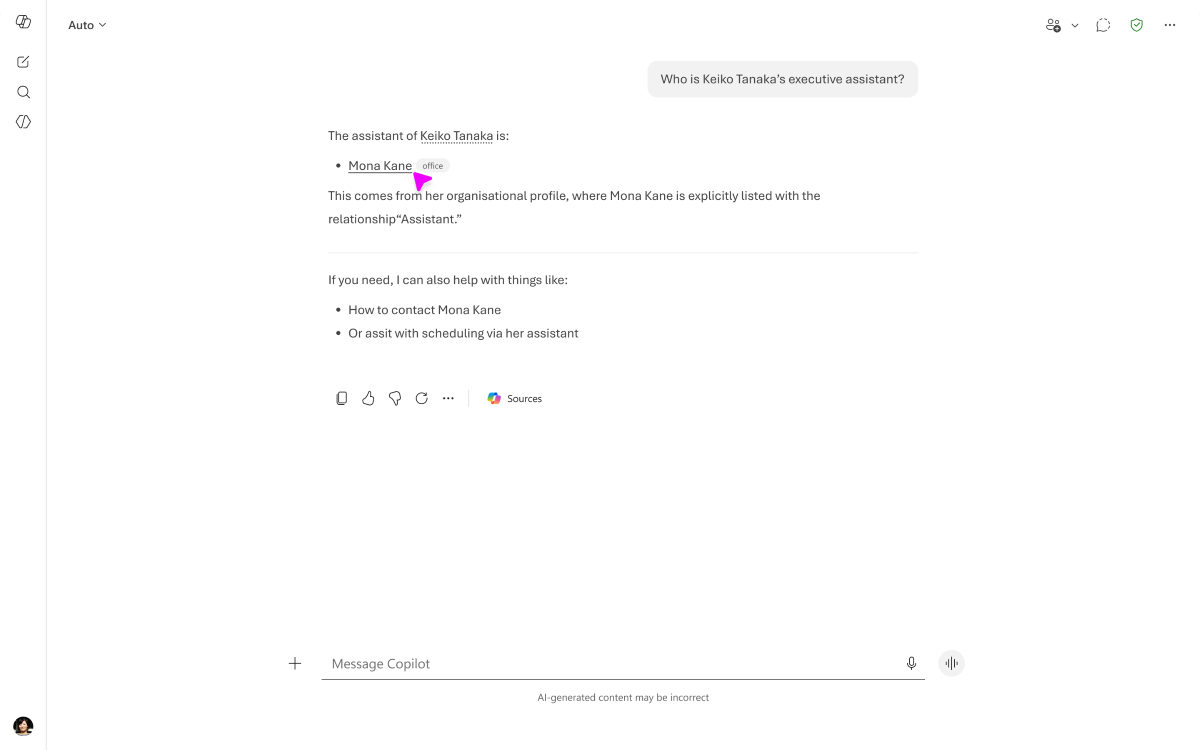
- Microsoft 365 Copilot can use the ingested Assistant information as part of people-related grounding and responses.
- Microsoft 365 Copilot can reason over all Assistant values associated with a user.
- If multiple sources provide Assistant information, source precedence settings determine which value is displayed in Microsoft 365 profile experiences.
- If both user-entered and connector-ingested Assistant values exist, the first value from the highest-priority connected-ingested source is used for display.
- Assistant information is informational profile data and does not grant permissions, modify reporting structures, or create delegated access.
Screenshot 1 – View of Assistant in Contacts tab:
Screenshot 2 – View of Assistant in Copilot:
Screenshot 3 – View of Assistant in Organization tab:
[Action required and recommendations]
No action is required to maintain your current environment.
If your organization wants Assistant information to be available in Microsoft 365 experiences, administrators can ingest the data using supported People data ingestion methods, including:
- SAP SuccessFactors
- Workday
- Custom People connectors
Organizations that use multiple profile data sources should review profile source precedence settings to determine which source is authoritative for overlapping profile attributes.
Learn more
- Add an assistant on your profile in Microsoft 365 | Microsoft Support
- Import organizational data from SAP SuccessFactors | Microsoft Viva | Microsoft Learn
- Import organizational data from Workday | Microsoft Viva | Microsoft Learn
- Manage profile source precedence in Microsoft 365 | Microsoft Graph | Microsoft Learn
- Use people data connectors with Microsoft 365 Copilot | Microsoft Graph | Microsoft Learn
- Use your organizational data in Microsoft 365 and Microsoft Viva | Microsoft Viva | Microsoft Learn
[Compliance considerations]
| Question | Answer |
| Does this change store new customer or organizational data in Microsoft 365? | Yes. Executive Assistant information from third-party systems can be ingested into Microsoft 365 profiles through People connectors and Organizational Data in Microsoft 365. The ingested data is stored as part of the Microsoft 365 user profile and is available across Microsoft 365 experiences. |
| Does this change alter how customer or organizational data is processed, stored, or accessed? | Yes. Assistant information that originates in external HR or people systems can be ingested along with other profile data sources, and surfaced in Microsoft 365 profile experiences based on configured source precedence rules. |
| Does this change introduce or significantly modify AI capabilities that interact with customer data? | Yes. Microsoft 365 Copilot can use ingested Assistant information to provide grounding for assistant-related prompts and responses, helping users identify and coordinate with the appropriate point of contact. |
| Does this change provide end users with a new way to interact with generative AI? | Yes. Users can ask assistant-related questions in Microsoft 365 Copilot, and Copilot can use the ingested Assistant information when generating responses. |
| Does this change modify how users access, export, delete, or correct personal data? | Yes. Assistant information displayed in Microsoft 365 experiences originates from connected data sources. Updates must be made in the source system and then synchronized through the connector. Users can export profile data, and administrators can manage deletion and correction processes through the connected source and Microsoft 365 data management capabilities. |
| Does this change add an integration with third-party software or services? | Yes. The feature supports ingesting Assistant information from external systems through Microsoft-built and custom People connectors, including supported HR systems and custom people data sources. |
| Does this change include an admin control? | Yes. Administrators control whether Assistant information is ingested by configuring People connectors and can manage source precedence to determine which Assistant value is displayed when multiple sources provide the same attribute. |
Source: Microsoft Message Center • Analysed by MWPro