Take a look and decide whether this affects your tenant, users or support teams.
Primary Audience
Why this score?
AT A GLANCE
END USERS
IT ADMINS
ROLLOUT TIMELINE
Early Aug–Early Sep 2026
📢 Official Microsoft Message Center Announcement
(Updated) Microsoft Teams: Multilingual meeting recaps support personalized recap translation
Message ID: MC1446799 (Updated)
Updated August 25, 2026: We have updated the timeline. Thank you for your patience.
[What and why]
We are improving the multilingual meeting experience in Microsoft Teams by personalizing meeting recaps based on the language each participant selected during the meeting through translated captions or Teams Interpreter.
After a meeting ends, users will initially see the meeting recap in the translation or interpretation language they selected during the meeting. They can also choose a different supported language after the recap is generated.
This update helps participants review meeting content in the language they used during the meeting, improving accessibility and continuity for multilingual collaboration.
This message is associated with Microsoft 365 Roadmap ID 567458.
[Rollout schedule]
- Targeted Release: Beginning in early August 2026 and expected to complete by mid-August 2026
- General Availability (Worldwide, GCC, GCC High): Beginning in mid-August 2026 and expected to complete by early September 2026 (previously late August)
[Impact on your organization]
Who is affected
Users who:
- Access meeting recaps in Microsoft Teams
- Use translated captions during meetings
- Use Teams Interpreter during meetings
- Have the required licenses and access to Teams meeting recap features
Platforms and services
- Microsoft Teams for Windows and Mac desktop
- Microsoft Teams on the web
- Microsoft Teams for iOS
- Microsoft Teams for Android
- Teams meeting recap
What will happen
After rollout:
- Meeting recaps will initially be displayed in the translation or interpretation language selected by each participant during the meeting.
- Different participants in the same meeting may see the recap in different languages based on their own language selections.
- Users can change the recap language after it is generated by selecting another supported language:

- Changing the recap language affects only how the recap is displayed for that user. It does not modify the original transcript, recording, or source meeting content.
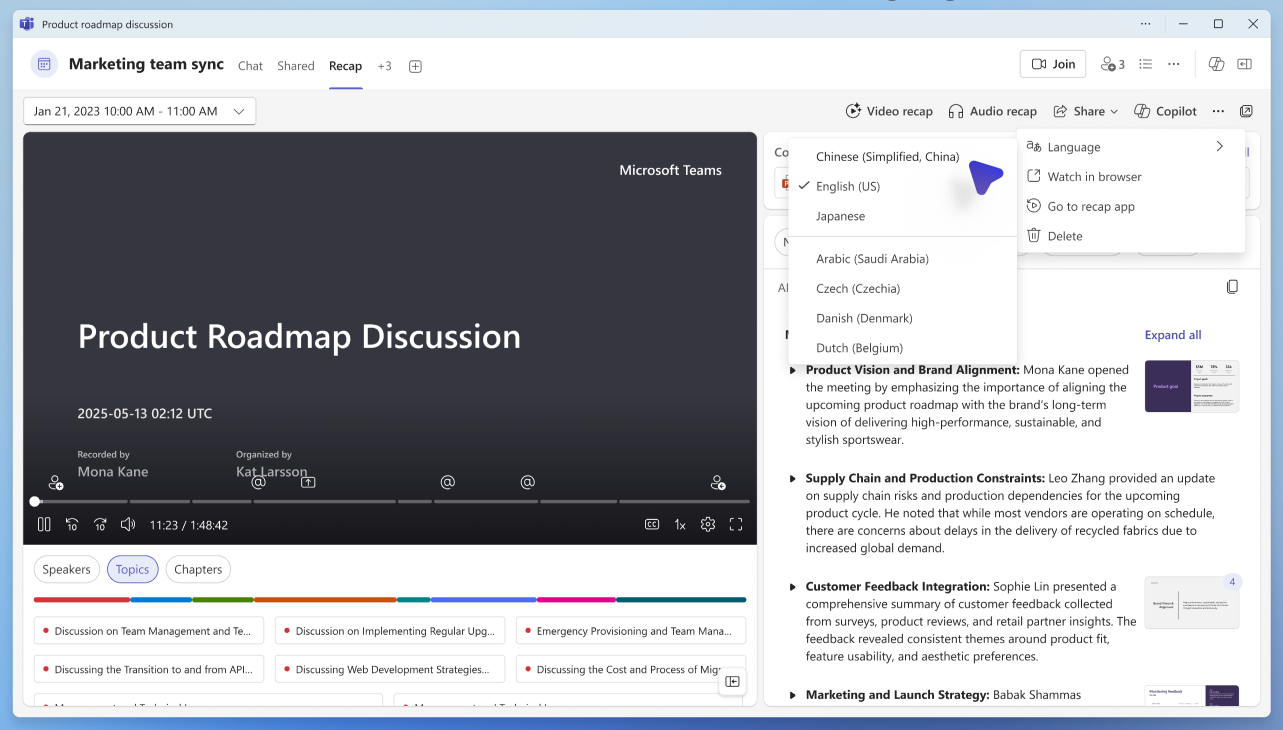
For example, if a participant selects Japanese as their translation or interpretation language during an English-language meeting, their meeting recap will initially be displayed in Japanese.
Availability depends on supported languages and meeting configuration.
[Action required and recommendations]
No administrative action is required.
We recommend that you:
- Inform help desk and support teams about this updated multilingual recap experience.
- Update internal documentation for translated captions, Teams Interpreter, and meeting recap experiences.
- Verify that eligible users have the licenses required to access Teams meeting recap features.
- Review organizational policies related to transcription, recording, captions, Teams Interpreter, and meeting recap experiences, as applicable.
- Inform users that meeting recaps may initially appear in the language they selected during the meeting and that they can choose a different supported language from the recap experience.
The feature will be enabled automatically as rollout reaches your organization.
Learn more
[Compliance considerations]
No compliance considerations identified. Review as appropriate for your organization.
Source: Microsoft Message Center • Analysed by MWPro
<<< [MC1446799] Archive
Tooltip: View earlier revisions of this post