Take a look and decide whether this affects your tenant, users or support teams.
Primary Audience
Why this score?
AT A GLANCE
END USERS
IT ADMINS
ROLLOUT TIMELINE
Late September 2026
📢 Official Microsoft Message Center Announcement
Teams Admin Center – Single pane for monitoring
Message ID: MC1462463
[What and Why:]
We’re excited to introduce an org-wide single pane for monitoring and troubleshooting meetings and calls in the Teams admin center. IT administrators will be able to find all the meetings and calls in one place, get quick insights, and get started with troubleshooting right away.
The new experience helps administrators:
- View in-progress and completed meetings across the organization from a single location.
- Quickly identify meetings that may require attention.
- Search for meetings using meeting identifiers and other filters.
[Rollout Schedule:]
- General Availability (Worldwide): Rollout will begin in late September 2026 and is expected to complete by mid October 2026.
- General Availability (GCC): Rollout will begin in late September 2026 and is expected to complete by mid October 2026.
[Impact on Your Organization:]
Who is affected
- Teams administrators responsible for monitoring and troubleshooting meeting and call quality across their organization.
Platforms and services
- Microsoft Teams
- Teams admin center
What will happen
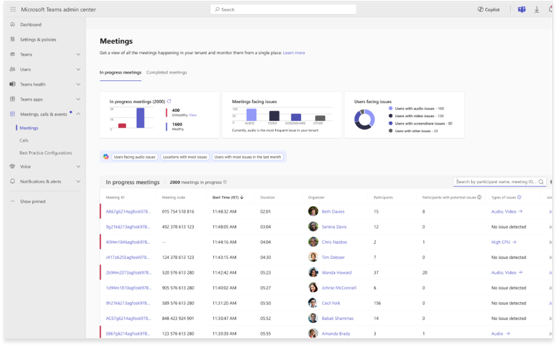
After rollout, administrators will see a new Meetings experience in the Teams admin center under Meetings & Calls.
- Navigate to Teams admin center > Meetings & Calls > Meetings or Calls to access the updated troubleshooting experience.
- View and monitor meetings across the organization from a centralized Meetings experience.
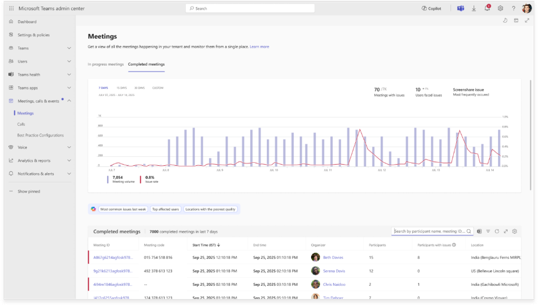
- Review both in-progress and completed meetings, search for specific meetings, apply filters, and open meeting details for troubleshooting.
- Review completed calls across the organization to identify and troubleshoot call quality issues.
Available capabilities include:
- In-progress meetings: View meetings, town halls, and webinars currently occurring in the organization when at least one participant has a Teams Premium license or Teams Rooms Pro license.
- Completed meetings: View meetings that occurred across the organization during the previous 30 days.
- Completed calls: Review completed calls across the organization to investigate call quality issues.
- Issue details: Quickly identify issues experienced by participants and access additional details.
- Detailed diagnostics: Drill down into telemetry and diagnostic information to support root cause analysis and troubleshooting.
- Microsoft 365 Copilot for Admins: Use Copilot to investigate individual meetings or analyze trends across the organization.
- Filtering and search: Refine results using filters such as:
- Time range (last 7 days, 15 days, 30 days, or a custom date range)
- Meetings with issues
- Organizer
- Meeting type
- Additional meeting and participant attributes
- Export: Export meeting and call data for offline analysis, reporting, and investigation.
[Action Required / Recommendations:]
No action is required. The updated experience will be available automatically after rollout. Once available, administrators can begin using the new capabilities to monitor and troubleshoot meetings and calls across their organization.
[Compliance Considerations:]
No compliance considerations identified, review as appropriate for your organization.
Source: Microsoft Message Center • Analysed by MWPro