MWPRO IMPACT SCORE
OPERATIONAL IMPACT
57
0
25
50
75
100
HIGH IMPACT • REVIEW RECOMMENDED
Recommended Action:
Review the update and plan any required actions before rollout.
Review the update and plan any required actions before rollout.
What is MWPro Impact Score?
Watch our 60‑second explainer
Primary Audience
Microsoft 365 AdminsTenant AdminsIT ManagersService OwnersSecurity TeamsCompliance Teams
Why this score?
AI Confidence
HIGH
Enough detail is available to trust this assessment.
Assessment Reasoning
The announcement introduces a new admin control for regulating advanced agents and plugin uploads in Microsoft 365 Copilot. Admins must review and configure the setting before it defaults to allow all users on October 25th, which adds compliance and governance implications. While user-facing changes are indirect, failure to act could lead to broader access than intended. Administrators need moderate effort to plan, configure, and communicate changes internally.
70
Admin Impact
20
User Impact
65
Urgency
55
Effort
WHAT YOU NEED TO KNOW
AT A GLANCE
New admin control lets you decide who can upload advanced Copilot agents and plugins. Worth reviewing if your users create these packages.
END USERS
Users may find advanced uploads blocked or restricted, depending on admin settings.
IT ADMINS
Review and set the advanced-upload policy between 25 September and 25 October; update docs and inform support if needed.
ROLLOUT TIMELINE
Upcoming:
Starts 25 Sept 2026
Starts 25 Sept 2026
📢 Official Microsoft Message Center Announcement
Manage who can upload advanced agents and plugins
Message ID: MC1472007 (Updated)
[What and Why:]
To help organizations manage the deployment of advanced Copilot extensibility scenarios, we are introducing a new admin control that determines who can upload advanced agents and plugins. This enhancement strengthens enterprise governance and manageability by allowing administrators to limit advanced-package uploads to specific users or Microsoft Entra ID groups while maintaining flexibility for organizations that want broader access.
[Rollout Schedule:]
- General Availability (Worldwide): Rollout begins September 25th
- Expected completion by the end of October 2026.
[Impact on Your Organization:]
Who is affected:
- Microsoft 365 administrators responsible for managing Copilot agents and plugins.
- Organizations that allow users to upload advanced agents or plugins.
- Users who create or upload advanced agents and plugins after this feature becomes available.
Platforms/Services:
- Microsoft 365 Copilot and Cowork surfaces
- Copilot agents
- Copilot plugins
- Microsoft Entra ID
What will happen:
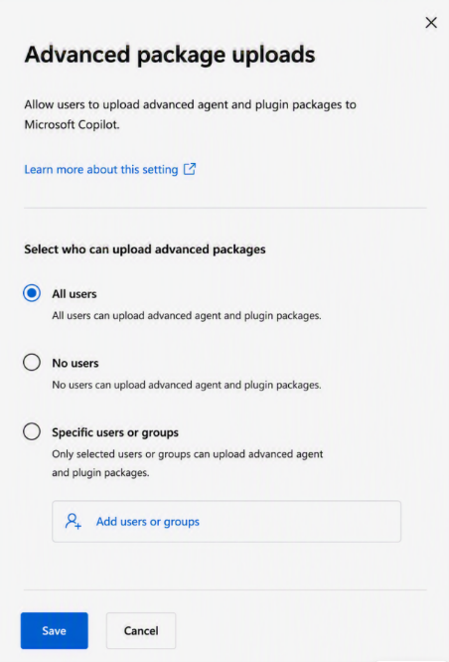
- On September 25th, the control will be visible in MAC (see Advanced package uploads screenshot) and admins will have until October 25th to select their preference of all users, no users or specific users or groups.

- Starting October 25th, Advanced-package uploads will be enabled by default unless the admin has selected no users or specific users or groups.
- Admins can configure uploads for all users, selected users, Entra ID groups, or no users.
- Basic package uploads remain allowed and are not impacted.
- The setting applies only to advanced agents and plugins uploaded after the control becomes available.
- No action is required to maintain current behavior,
[Action Required/Recommendations:]
- Review the advanced-package upload setting when it becomes available on September 25th.
- Determine whether advanced-package uploads should be available to all users, selected users, groups, or no users prior to October 25th.
- Update internal administrator and help desk documentation as needed.
- Inform support teams of the new governance control.
- If no action is taken, advanced-package uploads remain allowed by default.
[Compliance Considerations:]
- The change introduces new administrative governance controls for advanced agents and plugins.
- The feature supports administration through Microsoft Entra ID group membership.
Source: Microsoft Message Center • Analysed by MWPro
<<< [MC1472007] Archive
Tooltip: View earlier revisions of this post