Take a look and decide whether this affects your tenant, users or support teams.
Primary Audience
Why this score?
AT A GLANCE
END USERS
IT ADMINS
ROLLOUT TIMELINE
Early October 2026
📢 Official Microsoft Message Center Announcement
Microsoft Teams: Hide organizer names in calendar view on Teams Panels
Message ID: MC1484010
[What and why]
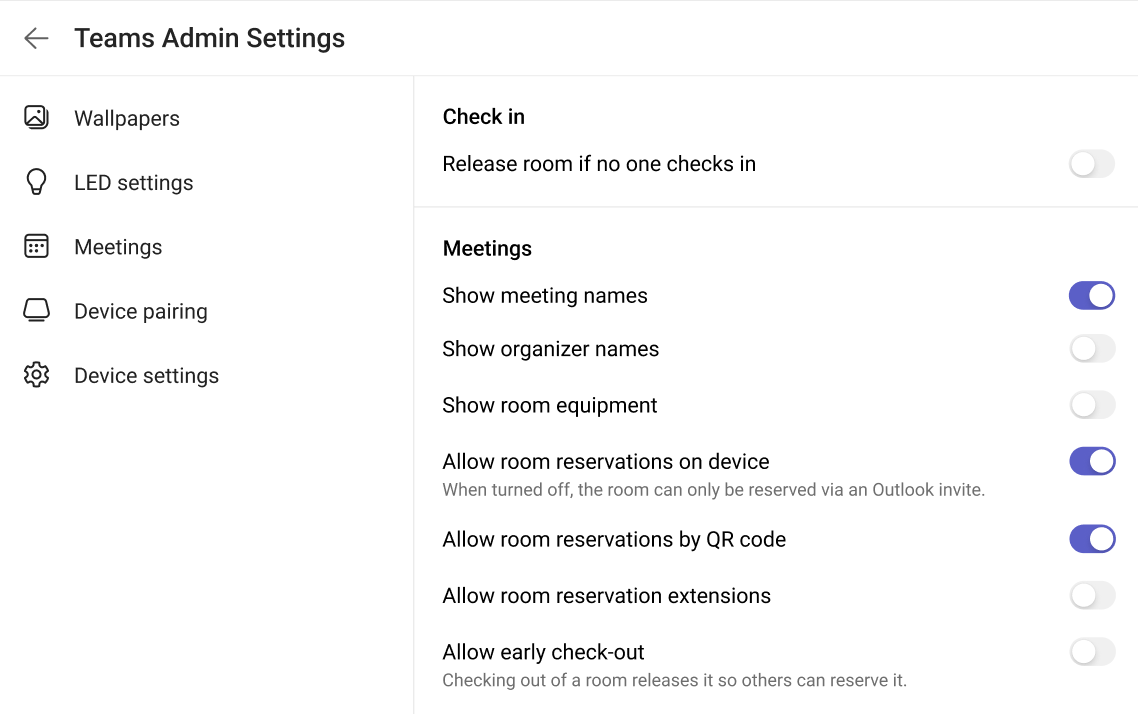
Microsoft Teams Panels will introduce a new administrator setting that allows administrators to choose whether organizer names are shown in Calendar View on Teams Panels.
Admins can toggle the Show organizer name setting ON or OFF in the Teams Rooms Pro Management portal or on the panel device. When organizer names are hidden, the organizer name is not shown in Calendar View on the panel device.
This feature is available with Teams Rooms Pro and Teams Shared Spaces licenses.
[Rollout schedule]
- General Availability (Worldwide): Beginning in early October 2026 and expected to complete by early October 2026
[Impact on your organization]
Who is affected
- Administrators who manage Microsoft Teams Panels
- Organizations using Teams Rooms Pro licenses
- Organizations using Teams Shared Spaces licenses
- Users who view meeting information on Teams panel devices
Platforms and services
- Microsoft Teams Panels
- Teams Rooms Pro Management portal
What will happen
- A new setting, Show organizer name, will be available for Teams panel devices.
- Administrators can choose whether organizer names are displayed in Calendar View.
- The setting can be configured from the Teams Rooms Pro Management portal or directly on a Teams panel device.
- By default, organizer names will continue to be displayed in Calendar View.
[Action required and recommendations]
No action is required if you want organizer names to continue appearing in Calendar View on Teams panel devices.
If you want to hide organizer names:
- Review your room privacy and display requirements.
- Update the Show organizer name setting in the Teams Rooms Pro Management portal or on individual Teams panel devices.
Learn more
[Compliance considerations]
| Question | Answer |
| Does the change include an admin control, and can it be controlled through Entra ID group membership? | Yes. Administrators can enable or disable the display of organizer names on Teams Panels. The available information does not indicate support for management through Entra ID group membership. |
Source: Microsoft Message Center • Analysed by MWPro