Review the update and plan any required actions before rollout.
Primary Audience
Why this score?
AT A GLANCE
END USERS
IT ADMINS
ROLLOUT TIMELINE
Oct–Nov 2026
📢 Official Microsoft Message Center Announcement
Microsoft Defender for Office 365: Post-delivery protection for malicious QR codes in Microsoft Teams
Message ID: MC1490905
[What and why]
We’re extending Microsoft Teams URL protection in Microsoft Defender for Office 365 to detect and respond to malicious URLs embedded in QR codes. As attackers increasingly use QR codes to conceal malicious destinations, this update helps protect users by analyzing URLs extracted from QR codes after message delivery and applying post-delivery protections when malicious content is identified.
For organizations using Microsoft Defender for Office 365, this enhancement builds on existing Teams URL protection capabilities and improves visibility for security operations teams investigating QR-code-based threats. Security teams will also be able to identify QR code URL detections in Advanced Hunting through the MessageUrlInfo table.
[Rollout schedule]
- General Availability (Worldwide): Beginning in early October 2026 and expected to complete by early November 2026
[Impact on your organization]
Who is affected
- Organizations using Microsoft Teams with Microsoft Defender for Office 365
- Organizations using Microsoft Teams
- Organizations licensed for Microsoft Defender for Office 365
- Security operations teams that use Microsoft Defender XDR Advanced Hunting
- Organizations that have Zero-hour Auto Purge (ZAP) for Teams enabled can receive additional protection for eligible internal messages
Platforms and services
- Microsoft Teams
- Microsoft Defender for Office 365
- Microsoft Defender XDR Advanced Hunting
What will happen
- Teams messages containing QR codes will be analyzed after message delivery.
- URLs extracted from QR codes will be evaluated for malicious content.
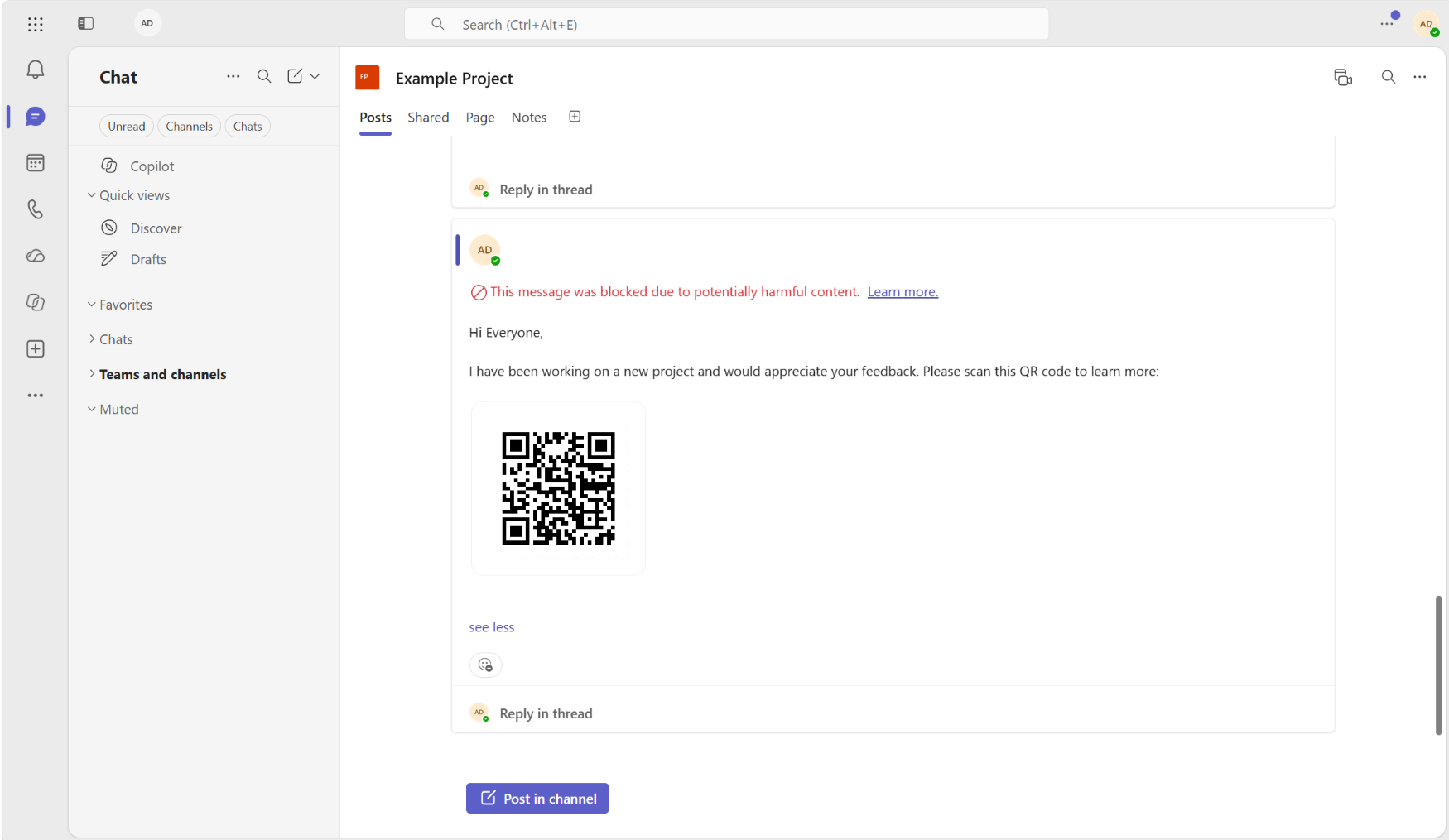
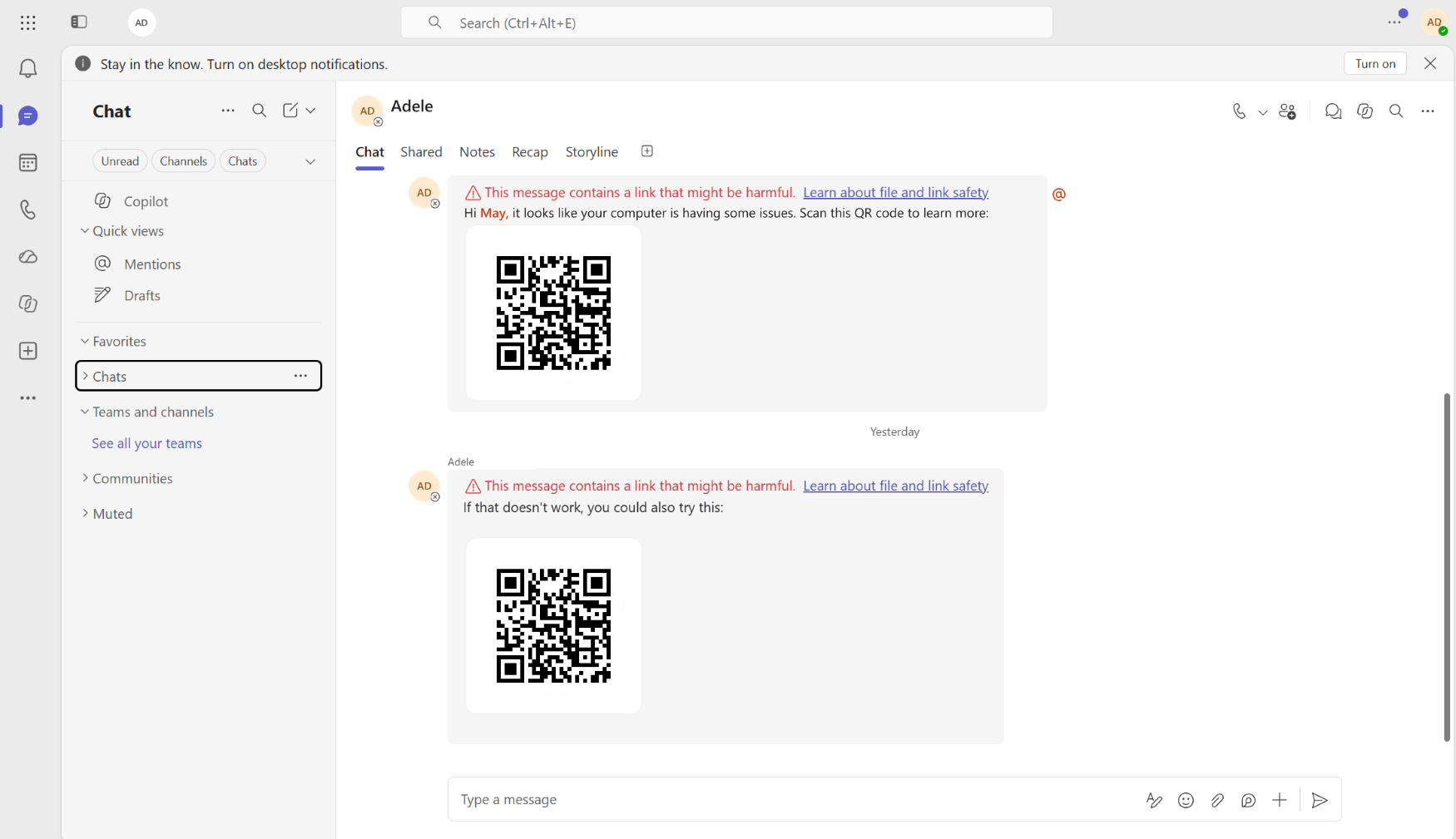
- When a malicious URL is identified in an external conversation, users will see a warning on the affected Teams message.
- When a malicious URL is identified in an internal conversation, users will see a warning on the affected Teams message.
- Organizations with Microsoft Defender for Office 365 Plan 1 or Plan 2 and Teams ZAP enabled may have eligible malicious internal messages blocked through existing post-delivery protection mechanisms.
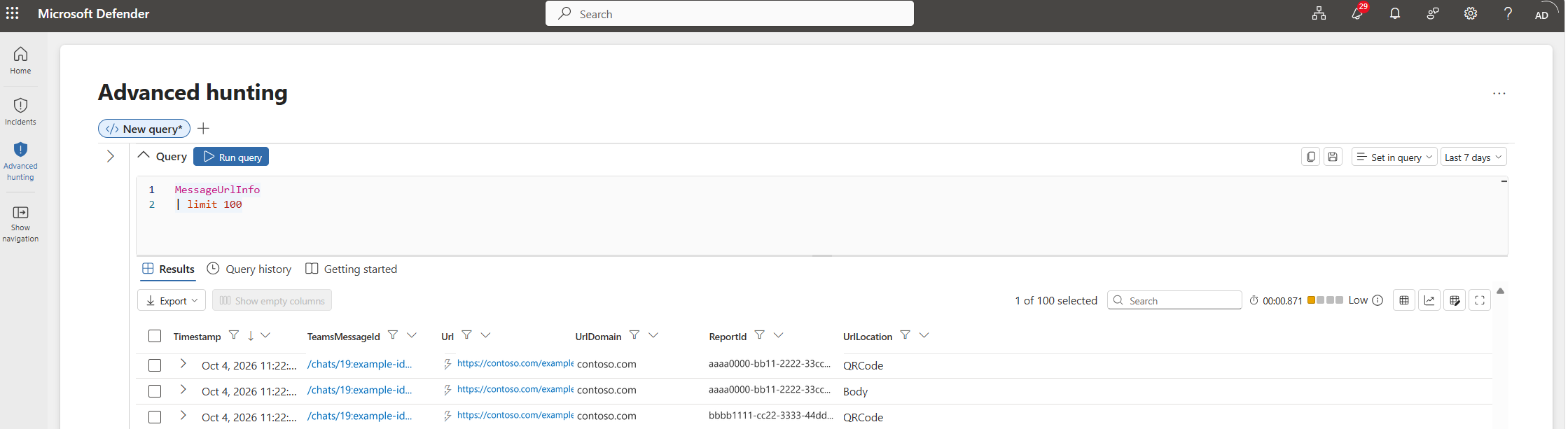
- Security teams will gain visibility into QR code URL detections through Advanced Hunting.
- URLs extracted from QR codes will appear with QRCode in the UrlLocation column of the MessageUrlInfo table.
- The feature is enabled as part of existing Teams URL protection capabilities. No separate end-user configuration is required.
Screenshot 1 – QR-code-blocking:
Screenshot 2 – QR-warning-protection:
Screenshot 3 – QR-Code Advanced Hunting:
[Action required and recommendations]
No action is required.
We recommend that administrators:
- Review existing Microsoft Defender for Office 365 Teams protection settings and Teams ZAP configuration to understand how blocking behavior applies in your organization.
- Inform security operations teams that QR code URL detections will become available in Advanced Hunting.
- Review your incident investigation and threat hunting processes to incorporate QR code detections where applicable.
Learn more
- Configure ZAP for Teams protection in Defender for Office 365 – Microsoft Defender for Office 365 | Microsoft Learn
- Zero-hour auto purge (ZAP) in Microsoft Teams – Zero-hour auto purge (ZAP) in Microsoft Defender for Office 365 – Microsoft Defender for Office 365 | Microsoft Learn
[Compliance considerations]
No compliance considerations identified, review as appropriate for your organization.
Source: Microsoft Message Center • Analysed by MWPro