Take a look and decide whether this affects your tenant, users or support teams.
Primary Audience
Why this score?
AT A GLANCE
END USERS
IT ADMINS
ROLLOUT TIMELINE
October 2026
📢 Official Microsoft Message Center Announcement
Microsoft 365 Copilot in PowerPoint: ‘Clarify my thinking’ skill for Mac
Message ID: MC1492159
[What and Why:]
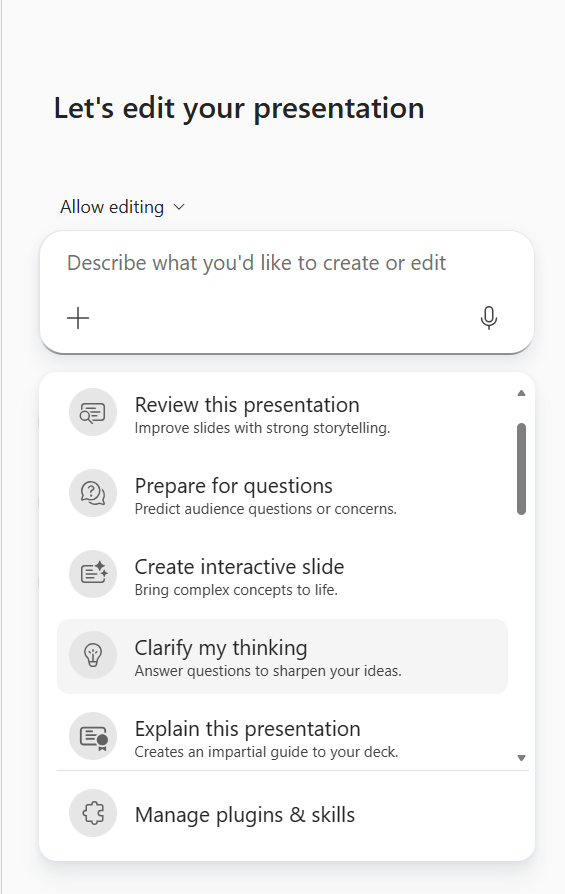
Microsoft 365 Copilot in PowerPoint is introducing the built-in Clarify my thinking skill for PowerPoint on Mac. This skill was previously referred to as “GrillMe” and has been renamed to use more customer-friendly wording.
With this skill, users can ask Copilot to answer questions that help sharpen their ideas and improve their presentation before sharing or presenting. This can help users refine messaging, clarify points, and strengthen the overall quality of a presentation.
[Rollout Schedule:]
General Availability (Worldwide): Rollout begins on October 8, 2026.
[Impact on Your Organization:]
Who is affected:
- Users with access to Microsoft 365 Copilot in PowerPoint on Mac.
- Organizations that use Copilot in PowerPoint to draft, refine, or review presentation content.
Platforms/Services:
- Microsoft 365 Copilot
- Microsoft PowerPoint on Mac
What will happen:
- Users will see the built-in Clarify my thinking skill in Copilot for PowerPoint.
- The skill helps users answer questions designed to sharpen ideas and improve presentation clarity.
- The feature is enabled as part of the existing Microsoft 365 Copilot in PowerPoint experience.
- Existing Microsoft 365 Copilot admin controls and licensing requirements continue to apply.
[Action Required/Recommendations:]
No admin action is required before rollout.
You may want to inform users that the Clarify my thinking skill is becoming available in Copilot for PowerPoint and update any internal Copilot guidance or training materials as appropriate.
[Compliance considerations:]
- Does the change introduce or significantly modify AI/ML or agent capabilities that interact with or provide access to customer data? Yes. The Clarify my thinking skill uses Microsoft 365 Copilot in PowerPoint to analyze presentation content and generate feedback.
- Does the change provide end users any new way of interacting with generative AI? Yes. The skill gives users a new prompt-based way to request presentation feedback from Copilot in PowerPoint.
Source: Microsoft Message Center • Analysed by MWPro