Take a look and decide whether this affects your tenant, users or support teams.
Primary Audience
Why this score?
AT A GLANCE
END USERS
IT ADMINS
ROLLOUT TIMELINE
Mid-November 2026
📢 Official Microsoft Message Center Announcement
Microsoft OneDrive: Copilot actions in the File Explorer context menu are being retired
Message ID: MC1515940
[What and why]
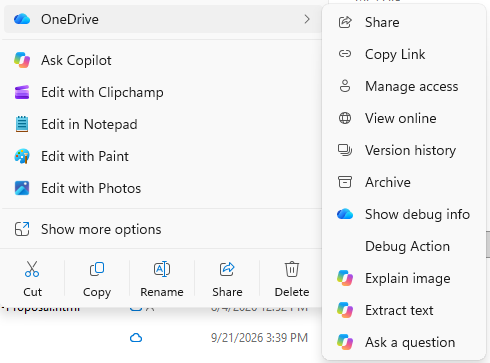
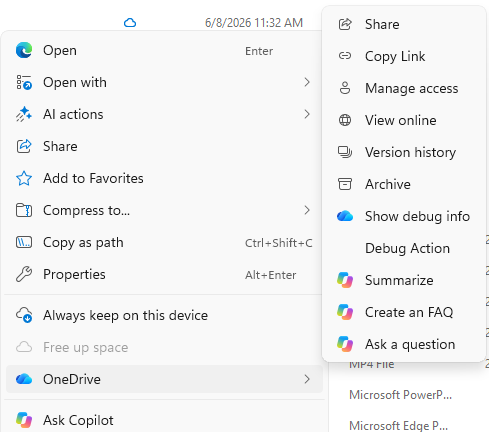
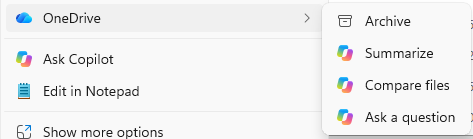
We’re simplifying how people use Copilot with their OneDrive files in File Explorer. As part of this change, we’re retiring the OneDrive Copilot Summarize, Create FAQ, Compare Files, Ask a question, Explain image, Explain images, Compare images, Extract text actions from the File Explorer context menu.
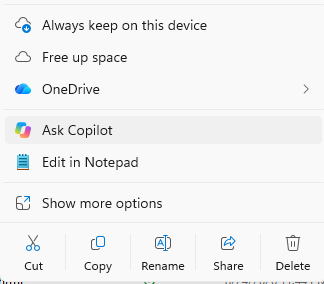
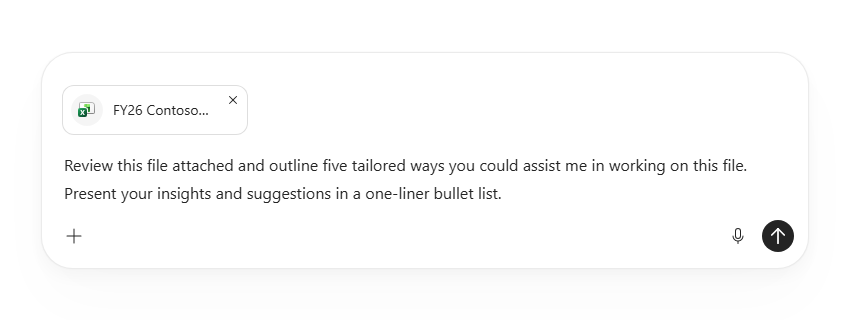
Users can continue to work with their OneDrive files in Copilot from one central place by right-clicking a file and selecting Ask Copilot, or by hovering over a file in File Explorer Home and selecting the Copilot icon. The OneDrive Copilot actions will also remain available in the OneDrive activity center.
[Rollout schedule]
- General Availability (Worldwide): Retirement will begin in mid-November 2026 and is expected to complete by early December 2026.
[Impact on your organization]
Who is affected
- Users who use Copilot with OneDrive files in File Explorer.
Platforms and services
- OneDrive
- Copilot
- File Explorer
What will happen
- The OneDrive Copilot Summarize, Create FAQ, Compare Files, Ask a question, Explain image, Explain images, Compare images, and Extract text actions will be retired from the File Explorer context menu. The OneDrive Copilot actions will remain available in the OneDrive activity center.
- Users can either right-click a OneDrive file and select Ask Copilot or hover over a file in File Explorer Home and select the Copilot icon to open a new Copilot conversation with the file attached. Files are attached by reference, so their existing permissions and protections continue to apply.
Simplified Copilot experience for OneDrive files in File Explorer

Retired context menu actions for OneDrive files in File Explorer
[Action required and recommendations]
No administrative action is required. We recommend that you notify users about this change and update any training or help desk documentation that references the retiring File Explorer context menu actions.
Source: Microsoft Message Center • Analysed by MWPro