Review the update and plan any required actions before rollout.
Primary Audience
Why this score?
AT A GLANCE
END USERS
IT ADMINS
ROLLOUT TIMELINE
November–December 2026
📢 Official Microsoft Message Center Announcement
Microsoft Defender for Office 365: Move email messages to quarantine with a new remediation action
Message ID: MC1523084
[What and why]
We are introducing Move to Quarantine, a new remediation action in Microsoft Defender for Office 365. It enables security teams to move potentially malicious email messages from users’ mailboxes directly to Microsoft Defender quarantine. This provides a safer and more flexible way to contain suspicious messages that bypassed initial detection while preserving the ability to investigate, release, or permanently delete them later.
This capability is available with Microsoft Defender for Office 365 Plan 2, including eligible Microsoft 365 subscriptions that include Plan 2.
[Rollout schedule]
- General Availability (Worldwide): Beginning in early November 2026 and expected to complete by mid-December 2026
[Impact on your organization]
Who is affected
- Organizations with Microsoft Defender for Office 365 Plan 2
- Authorized security administrators who remediate email threats
Platforms and services
Microsoft Defender for Office 365, including:
- Threat Explorer
- Advanced Hunting
- Custom detection rules for email results
- Email entity and email summary experiences
- Unified Action Center
What will happen
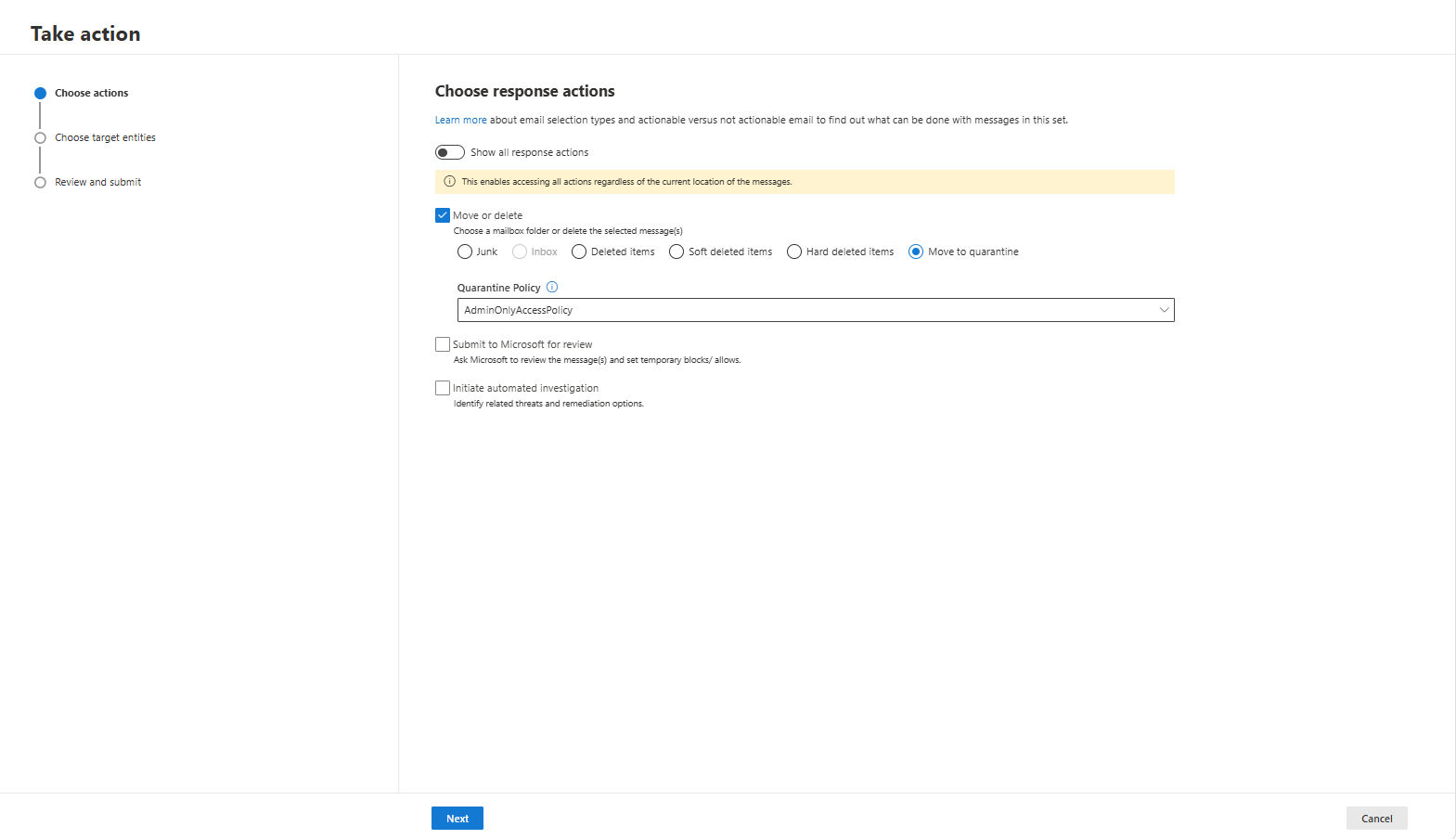
Authorized administrators will see a new Move to Quarantine remediation action.
When an administrator selects Move to Quarantine:
- Selected email messages are removed from user-accessible mailbox locations and placed in Microsoft Defender quarantine.
- Supported source locations include Inbox, Junk Email, Deleted Items, and recoverable soft-deleted locations.
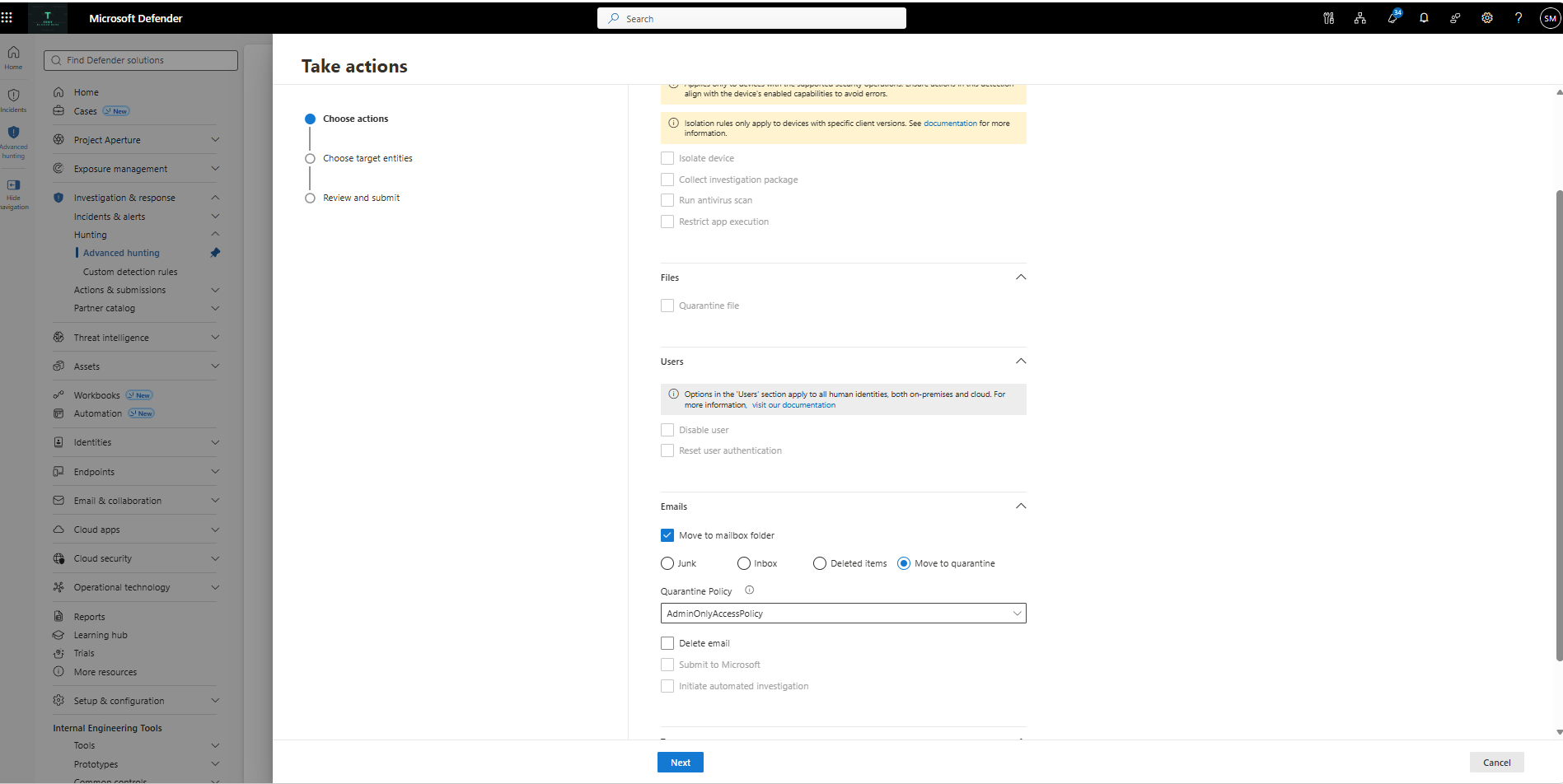
- Admins can select the quarantine policy when using the Move to quarantine action. The selected policy determines how end users can interact with the quarantined messages. By default, quarantined messages are accessible only to admins.
- The remediation action and status are tracked in the Unified Action Center and related investigation experiences.
- Quarantined messages are identified with the quarantine reason Admin triggered.
- Authorized users can preview, release, or permanently delete quarantined messages according to the applicable quarantine policy.
- Releasing a message from quarantine delivers the message to the user’s Inbox.
- The Search and Purge role is required to approve remediation actions.
- If one or more messages cannot be moved, eligible messages continue processing and administrators can review the results for partial failures.
Screenshot 1 – Move to Quarantine option in the Take Action wizard:
Screenshot 2 – Admin-triggered message and action details displayed in Advanced Hunting:
The following existing functionality is unchanged:
- Existing remediation actions, including Move to Junk, Move to Deleted Items, Soft delete, and Hard delete
- Threat verdict assignments
- Existing remediation approval workflows and permissions
- Automated Investigation and Response (AIR) actions
- Microsoft Graph API capabilities
- Messages in unsupported locations, including hard-deleted messages and messages hosted in on-premises or external mailboxes
[Action required and recommendations]
No action is required to enable this capability.
We recommend that you:
- Review your organization’s quarantine policies.
- Verify that appropriate administrators have the required Search and Purge role.
- Update incident response playbooks and security operations procedures to include Move to Quarantine as a remediation option.
- Update internal training and operational documentation as appropriate.
- Inform security analysts and responders about the new containment action.
Learn more
- (To be updated during rollout) Remediate malicious email that was delivered in Office 365 – Microsoft Defender for Office 365 | Microsoft Learn
[Compliance considerations]
| Question | Answer |
| Does the change alter how existing customer data is processed, stored, or accessed? | Yes. Authorized administrators can move selected email messages from supported user mailbox locations into Microsoft Defender quarantine. |
| Does the change modify how users can access, export, delete, or correct their personal data within Microsoft 365 services? | Yes. Selected messages can be removed from user-accessible mailbox locations. Authorized users can later preview, release, or permanently delete quarantined messages according to the applicable quarantine policy. |
Source: Microsoft Message Center • Analysed by MWPro