Take a look and decide whether this affects your tenant, users or support teams.
Primary Audience
Why this score?
AT A GLANCE
END USERS
IT ADMINS
ROLLOUT TIMELINE
Mid-August 2026
📢 Official Microsoft Message Center Announcement
Microsoft Viva: Targeted audience surveys in the Copilot dashboard
Message ID: MC1446805
[What and why]
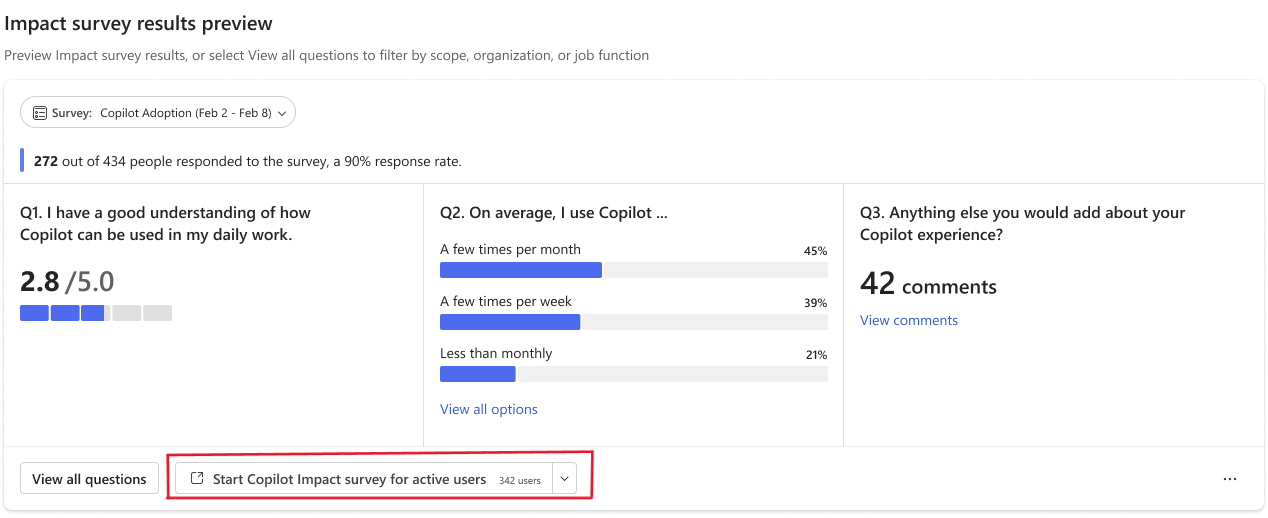
We’re introducing targeted audience surveys in the Copilot dashboard. This feature enables authorized users to launch Microsoft Viva Pulse surveys for predefined Copilot user populations without creating or maintaining recipient lists.
Survey audiences are dynamically based on Copilot dashboard data and can be scoped using existing dashboard filters. This helps organizations gather feedback from Copilot users while reducing administrative effort associated with audience management.
This message is associated with Microsoft 365 Roadmap ID 568072.
[Rollout schedule]
- Public Preview: Beginning mid-August 2026 and expected to complete by late September 2026
- General Availability (Worldwide): Beginning late September 2026 and expected to complete by late September 2026
[Impact on your organization]
Who is affected
- Organizations with 50 or more Copilot licenses
- Users assigned the CxO or CxO-delegate role in the Copilot dashboard
- Organizations using Microsoft Viva Pulse and the Copilot dashboard
Platforms and services
- Microsoft Viva Pulse
- Copilot dashboard
- Microsoft Viva Insights
What will happen
- The feature will be enabled by default for eligible organizations.
- Survey results appear in your existing Pulse and dashboard surfaces.
- Authorized users with the CxO or CxO-delegate role can send Viva Pulse surveys to predefined Copilot user cohorts from the Copilot dashboard.
- Available survey audiences include:
- All Copilot Licensed Users
- All Copilot Active Users
- Survey audiences will be generated using Copilot dashboard data and respect supported dashboard filters.
- Individual employee identities are not exposed through audience selection.
- Viva Insights exclusion lists continue to be honored for survey distribution.
[Action required and recommendations]
No action is required to enable this feature.
We recommend that administrators:
- Review who has been assigned the CxO or CxO-delegate role in the Copilot dashboard.
- Inform change leaders that targeted audience surveys are available.
- Verify that Viva Insights exclusion lists are current and accurately reflect users who should be excluded from surveys.
Administrators can disable this feature in the Microsoft 365 admin center by navigating to Setup > Microsoft Viva > Feature access management > Viva Pulse and turning off Targeted Audience Surveys.
[Compliance considerations]
| Question | Answer |
| Does this change include an admin control? | Yes. Administrators can disable the feature through Feature access management in Microsoft Viva Pulse. |
| Does this change affect how users communicate or provide feedback within Microsoft 365? | Yes. This feature provides a new method for authorized users to collect employee feedback by sending Viva Pulse surveys to predefined Copilot user audiences from Copilot dashboard. |
| Does this change process customer or organizational data in a new way? | Yes. Survey audiences are generated using Copilot dashboard data and existing audience filters to identify eligible recipients for Viva Pulse surveys. |
| Can users be assigned access to this feature through role-based permissions? | Yes. Only users assigned the CxO or CxO-delegate role in Copilot dashboard can create surveys for the predefined Copilot audiences. |
Source: Microsoft Message Center • Analysed by MWPro