No immediate action needed. Keep this on your radar.
Primary Audience
Why this score?
AT A GLANCE
END USERS
IT ADMINS
ROLLOUT TIMELINE
Now
📢 Official Microsoft Message Center Announcement
(Updated) Microsoft Viva Copilot Analytics: Daily Copilot usage snapshot with fresh data
Message ID: MC1314949 (Updated)
Updated September 15, 2026: This feature completed rollout early September and the timeline has been updated. Thank you for your patience.
[Introduction]
To help organizations access more up-to-date Microsoft 365 Copilot insights, we are introducing a new Power BI report and query named Microsoft 365 Copilot latest usage snapshot for analyst users in Viva Insights Advanced Insights.
This report provides Copilot usage data updated daily and includes three months of activity, typically available within two to three days prior to the current date. This capability helps analysts monitor recent adoption trends and better understand short term usage patterns across their organization.
This message is associated with Microsoft 365 Roadmap ID 561325.
[When this will happen]
- Public Preview: We will begin rolling out in early July 2026 and expect to complete by late July 2026.
- General Availability (Worldwide): We began rolling out in early September 2026 (previously early November) and completed early September 2026 (previously late November).
[How this affects your organization]
Who is affected
- Viva Insights users with the Insights Analyst role
- Users who work in the Viva Insights web app and use Power BI for advanced analysis
What will happen
- A new Power BI report and query named Microsoft 365 Copilot latest usage snapshot will be available to eligible analysts.
- Daily Copilot usage data will be available with up to three months of activity history.
- Activity data typically reflects usage up to two to three days before the current date, actual timing may vary.
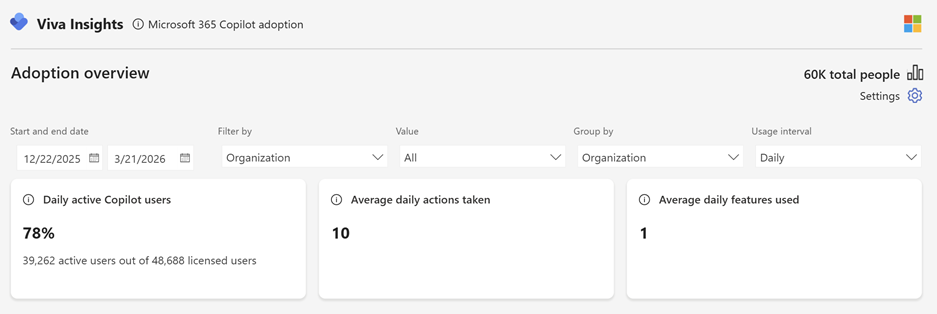
- The Adoption overview page provides an organization-wide view of Copilot usage, including:
- adoption trends
- group-level adoption
- usage by app and feature

- Data can be filtered and segmented using organizational attributes and time ranges to identify patterns and areas of strong or low adoption.
- Custom analysis is supported through the included query based on daily data, with export options through CSV download, the Power BI connector, or Microsoft Fabric.
- Microsoft 365 Copilot licenses and Viva Insights licenses must be assigned to users included in the analysis.
- Availability requires at least 50 Microsoft 365 Copilot licenses in the organization.
- The report is available by default to eligible users, and no additional admin configuration is required.
- Existing Copilot Analytics reports and queries are not changed.
The following metrics are not supported in this report or query at this time:
- Meeting hours recapped by Copilot
- Meeting hours summarized by Copilot in Teams
- Meetings recapped by Copilot
- Total meeting hours summarized or recapped by Copilot
- Total meetings summarized or recapped by Copilot
- Copilot assisted hours or dollar value
- All Copilot for Sales metrics
- Any metrics related to power users
[What you can do to prepare]
No admin action is required if your organization already meets the prerequisites.
You can prepare by taking the following steps:
- Confirm that appropriate users are assigned the Insights Analyst role in Viva Insights.
- Ensure users have the latest version of Power BI Desktop installed. If users have an older version installed, they should uninstall it and install the latest version before using the report.
- Verify that users included in the analysis have the required licenses assigned.
- Communicate this new capability to analyst users in your organization so they know what to expect.
Learn more:
- Advanced analysis introduction | Viva Insights | Microsoft Viva | Microsoft Learn
- Getting started with Power BI | Microsoft
- Export query data to Power BI | Viva Insights | Microsoft Viva | Microsoft Learn
- Export query data to Microsoft Fabric | Viva Insights | Microsoft Viva | Microsoft Learn
- Power BI report templates | Viva Insights | Microsoft Viva | Microsoft Learn
[Compliance considerations]
No compliance considerations identified. Review as appropriate for your organization.
Source: Microsoft Message Center • Analysed by MWPro
<<< [MC1314949] Archive
Tooltip: View earlier revisions of this post