Take a look and decide whether this affects your tenant, users or support teams.
Primary Audience
Why this score?
AT A GLANCE
END USERS
IT ADMINS
ROLLOUT TIMELINE
October 2026
📢 Official Microsoft Message Center Announcement
Microsoft Teams: Admins can control profanity filtering in meeting transcripts
Message ID: MC1478003
[What and why:]
Microsoft Teams is adding a meeting policy that lets administrators control whether profane words are masked in live transcription and saved meeting transcripts. This gives organizations a policy-controlled option for workflows in which words that are currently masked need to remain visible in the transcript.
Filtering remains on by default. If an administrator turns filtering off for the policy assigned to a meeting organizer, words that would otherwise be masked can appear in both the live and saved transcript for that organizer’s scheduled meetings. This change does not add an organizer-level control and does not change each participant’s live-caption profanity preference.
[Rollout schedule:]
Targeted Release (Worldwide): We will begin rolling out on early October 2026 and expect to complete by mid-October 2026.
General Availability (Worldwide, GCC): We will begin rolling out on mid-October 2026 and expect to complete by late October 2026.
[Impact on your organization:]
Who is affected
- Teams administrators who manage meeting policies.
- Meeting organizers whose assigned policy has transcript profanity filtering turned off.
- Users who view live or saved transcripts for affected scheduled meetings.
Who is not affected
- Users whose meeting organizer is assigned a policy that keeps filtering on.
- Each participant’s live-caption profanity preference; live captions continue to use the participant’s existing setting.
What will happen
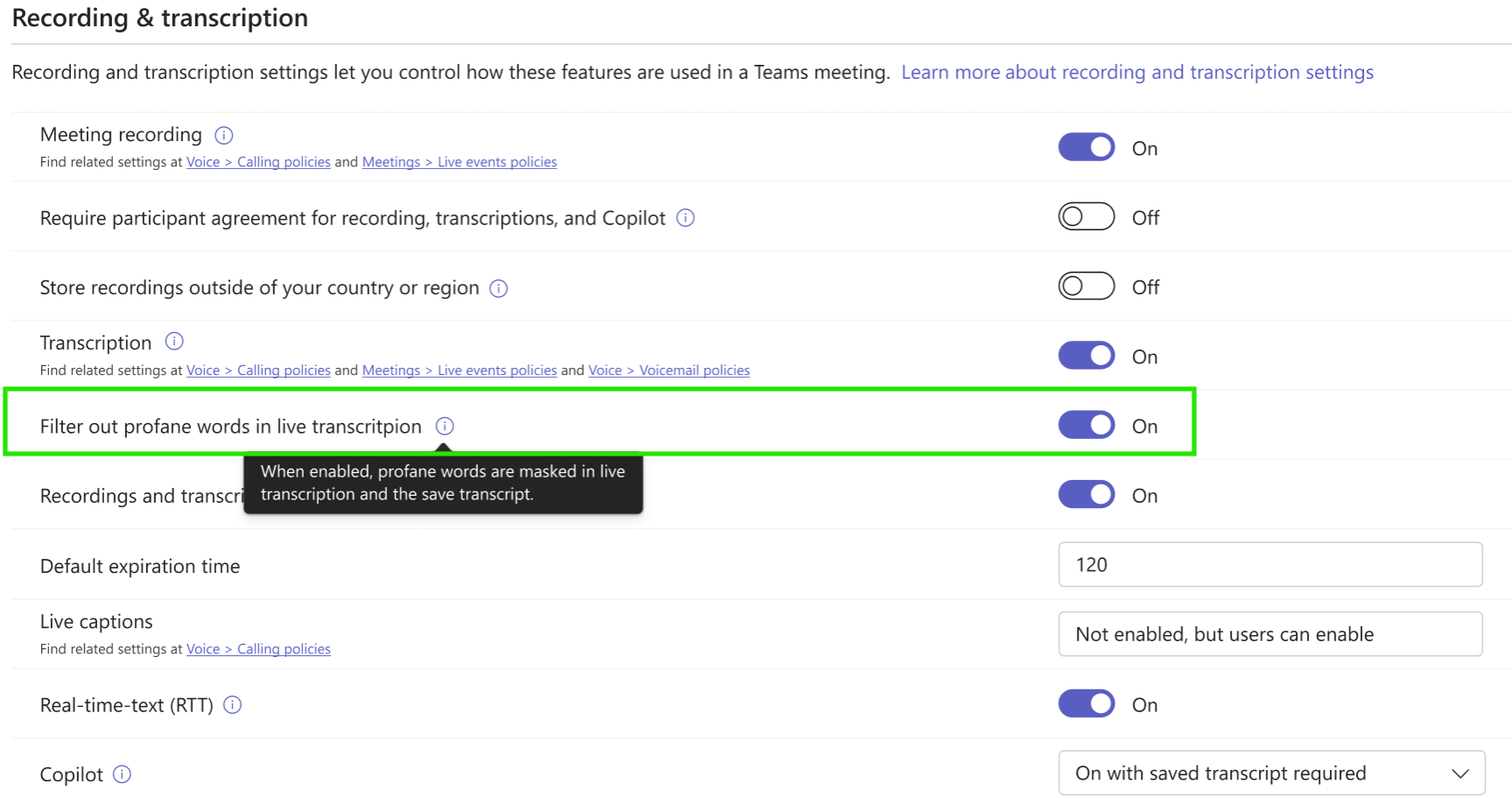
- A new Filter out profane words in live transcription setting will be available in the applicable Teams meeting policy under Meeting settings > Recording and transcription.

- The setting will be on by default, preserving the current transcript-masking behavior unless an administrator changes the assigned policy.
- When the setting is on, profane words are masked in live transcription and in the saved transcript.
- When the setting is off, words that would otherwise be masked can appear in live transcription and in the saved transcript.
- The meeting organizer’s assigned policy determines the behavior for the meeting. Organizers and co-organizers do not receive a per-meeting override.
[Action required / Recommendations:]
No action is required to preserve current behavior.
- Before turning filtering off, confirm the business need and review whether the change aligns with your organization’s compliance policies and transcript requirements.
- Notify compliance, legal, and helpdesk teams that saved transcripts may contain profane words that were previously masked.
- Update internal transcript guidance if your organization changes the default policy behavior.
Source: Microsoft Message Center • Analysed by MWPro