Microsoft has quietly but decisively ended feature investment in the Power Platform Center of Excellence (CoE) Starter Kit, its once-essential governance toolkit. Instead, governance and monitoring capabilities are being built directly into the Power Platform — primarily through the Power Platform Admin Center and Managed Environments. This article explains why the CoE Starter Kit’s lifecycle is ending, what Microsoft’s new governance strategy entails, and practical guidance for Power Platform administrators on how to adapt. Spoiler: this shift is good news for admins, bringing more support, integration, and stability to governance.
Table of Contents
1. The Rise and End of the Power Platform CoE Starter Kit
From Launch to Widespread Use: Microsoft’s Power Platform CoE Starter Kit debuted in 2019 as a sample toolkit for Power Platform governance, built by the Power CAT (Customer Advisory Team). At the time, Power Platform was exploding in popularity, but lacked built-in tools for monitoring apps and flows, enforcing governance, or cultivating a community of makers. The CoE Starter Kit filled this gap by providing Power Apps, flows, and Power BI reports for inventory, analytics, compliance workflows, and ALM – essentially a do-it-yourself governance suite. It was freely available on GitHub (open-source under Microsoft’s terms), and over the next few years it became a de facto standard for any organisation serious about Power Platform governance.
A “Reference” Solution, Not a Product: From the outset, Microsoft positioned the CoE Starter Kit as a reference implementation or template, not an official product with full support. The kit demonstrated what could be built using Power Platform’s own capabilities (Power Apps, Dataverse, etc.), but it required DIY setup and maintenance by each organisation. In Microsoft’s own words, the CoE Kit “represents sample implementations” and companies would need to “customize the kit’s features to reflect [their] goals”. Also, Microsoft Support was not obligated to fix kit issues – instead, users reported bugs on GitHub to the Power CAT team (which had limited resources as an engineering advisory group) and community contributors. In practice, the CoE Starter Kit saw substantial community-driven enhancements and regular updates through 2020–2024, but it remained a best-effort solution rather than a formal product. [learn.microsoft.com]
The Writing on the Wall – Microsoft’s Shift in Emphasis: Around late 2022, Microsoft introduced Managed Environments (in preview) – native governance features that signalled a new direction. By 2023, official guidance began urging admins to “start with the out-of-box” governance features in the Power Platform Admin Center and use the CoE Kit only as a complement if needed. This subtle shift hinted that Microsoft was focusing future investments on the platform itself, not the CoE kit. While the CoE Starter Kit continued to get periodic updates, many observers (including Microsoft MVPs) sensed that feature development was slowing and that “the CoE Kit’s days might be numbered.”
Official Confirmation – CoE Starter Kit Maintenance Ends: In early 2026, Microsoft made it explicit: the CoE Starter Kit is no longer actively maintained, and issues or new features will not be addressed. Microsoft Learn documentation now states, “The Power Platform CoE Starter Kit is no longer actively maintained. Its core capabilities are part of the Power Platform admin center. Issues are no longer reviewed or addressed.”. This is the clearest public confirmation that Microsoft has ceased investment in the CoE kit, effectively marking an end-of-life (though not a formal “product retirement” since it was never a product per se). [learn.microsoft.com]
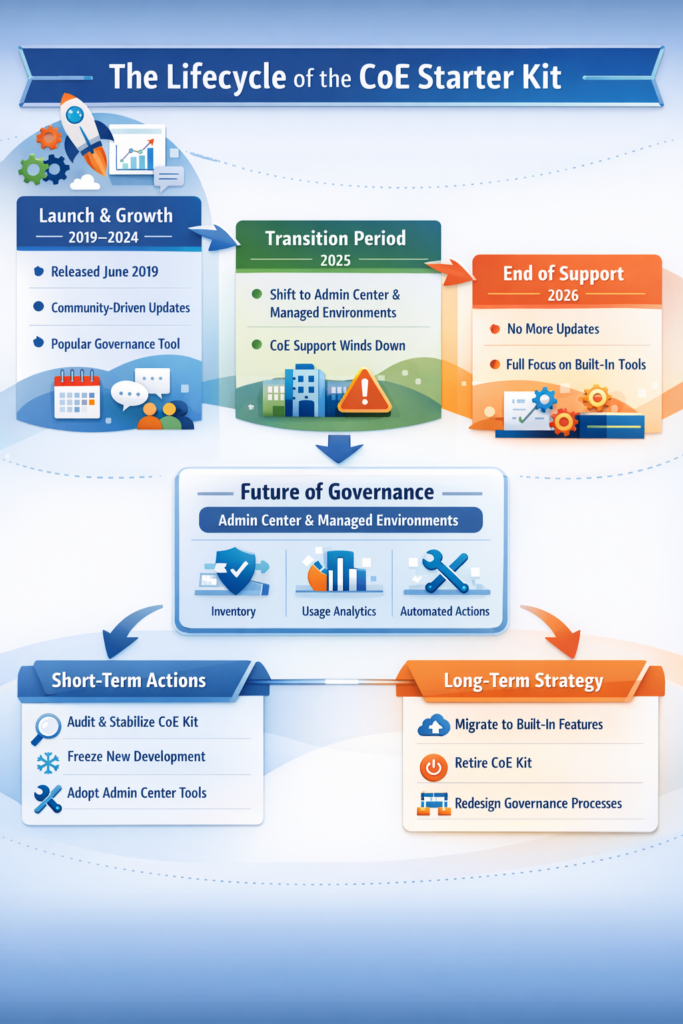
Why End the CoE Kit? Simply put, Power Platform matured. What started as a helpful community toolkit became less necessary as the platform’s built-in governance features caught up and surpassed what the kit offered. Microsoft’s Power Platform engineering (including Power CAT) chose to “shift governance features into the platform” where they can be natively integrated, fully supported, and automatically updated for new services (like Copilot features). Maintaining a separate toolkit no longer made strategic sense – for Microsoft or its customers.
“We have transitioned the core capabilities of the CoE Starter Kit into first-party features of the Power Platform Admin Center and Managed Environments.” (This is essentially Microsoft’s message now, even if not a direct quote from a press release. The benefit: you get official support, regular updates, and less overhead compared to running a custom kit.)
A Note on Microsoft’s Messaging: Microsoft approached this transition gradually:
- Mid-2025: Microsoft representatives (e.g. in GitHub discussions) acknowledged emphasis on Managed Environments and minimal new kit investments, but stopped short of full deprecation.
- Early 2026: Documentation and pinned posts explicitly state no more active maintenance for the kit. This cautious messaging may have caused some confusion, but by now it’s unequivocal: the CoE Starter Kit era is over. [learn.microsoft.com]
2. The New Standard: Power Platform Governance via Admin Center & Managed Environments
So what’s replacing the CoE Starter Kit? The answer: Power Platform governance is moving in-platform, primarily through:
- Power Platform Admin Center – the central admin portal (admin.powerplatform.microsoft.com) now packed with governance, analytics, and management features.
- Managed Environments – a premium set of capabilities that, when enabled on an environment, unlock advanced governance controls and automation at scale.
Consider how key CoE Starter Kit features are now handled natively:
• Unified Inventory & Visibility: Previously, the CoE toolkit’s sync flows would aggregate lists of apps, flows, makers, connectors, etc. into Dataverse for reporting – a somewhat heavy, scheduled process. Today, the Power Platform Admin Center’s Inventory feature provides a real-time, unified view of all resources across the tenant. It updates within 15 minutes of any change (new app, deleted flow, etc.), eliminating stale data. You can search, filter, and export this inventory instantly. This built-in Inventory (GA as of January 2026) essentially replaces the kit’s entire inventory sync mechanism with an easier, faster, and fully-supported solution. Bonus: the inventory includes new resource types (like Copilot AI agents, environment groups) that the CoE kit never covered. [learn.microsoft.com], [learn.microsoft.com][learn.microsoft.com][m365admin….sontek.net]
• Built-in Analytics & Monitoring: The CoE kit offered a Power BI “Governance” dashboard to track app usage, makers, and adoption over time. Now, Microsoft has introduced a Usage Analytics page (preview) in the Admin Center, showing engagement metrics for Power Apps, Power Automate flows, and Copilot agents (with daily active users, runs, etc.). It’s not yet as comprehensive as a custom BI report, but it’s quickly improving and directly integrated. Meanwhile, Managed Environments provide weekly email digests for environment admins summarizing activity (so you no longer need to schedule your own email flows). Over time, expect Microsoft to continue enhancing these native analytics – meaning less custom reporting overhead for you. [learn.microsoft.com]
• Proactive Governance (“Why manually fix what the platform can flag?”): One standout new feature is Power Platform “Actions” (formerly called Advisor) in the Admin Center. This gives admins a list of recommended governance actions – for example, unused apps detected, orphaned resources (owned by users who left), or async flow failures – along with the ability to auto-remediate or notify owners, often via one-click or a Power Automate template. Essentially, the Admin Center is starting to do what many CoE kit flows used to do, but in a more controlled and centrally-managed way. This is a huge win: where previously you had to maintain dozens of custom flows for governance tasks (and hope they kept working through platform changes), now Microsoft is building these into the platform’s logic. [learn.microsoft.com], [learn.microsoft.com]
• ALM & Solution Governance: The kit’s ALM Accelerator for Maker CI/CD was a valuable addition, but now Microsoft provides Power Platform Pipelines – a built-in ALM deployment pipeline tool integrated in the Solutions interface. The Pipelines feature (GA in late 2022) is now the recommended way to implement ALM in Power Platform, offering an easier experience and official support. Microsoft has even deprecated the CoE Starter Kit’s ALM Accelerator in favour of pipelines. If you used the ALM Accelerator, it’s time to switch to pipelines.
• Data Policies & Security: The CoE kit helped surface data about connectors and environment settings, but actual policy enforcement was always done by Admins manually. Now, with Managed Environments, Microsoft has delivered fine-grained control features like Connectors Endpoint Filtering (block or allow specific third-party connector endpoints), IP address filtering for API calls, Conditional Access on individual apps, and more. These controls go beyond what the CoE kit could do (which was often limited to sending alerts or reports if someone used a risky connector). In short, Power Platform governance has evolved from “detect and report” (via CoE kit) to “prevent and automate” (via platform features). [learn.microsoft.com]
• Other Gov & Nurture Features: Managed Environments bundle other handy capabilities that partially overlap with the CoE kit’s ancillary features:
- Environment management: Environment Groups (organize environments at scale) and the ability to lock down environment creation or auto-cleanup unused environments.
- User & sharing controls: Limit Sharing sets a maximum audience size per app (so, for example, apps can’t be broadly shared beyond X users or groups – something CoE admins used to chase down manually). [learn.microsoft.com]
- Maker onboarding: Maker welcome content (a built-in welcome screen with company guidelines for new app makers) – similar intent as the CoE kit’s welcome email flow.
- Solution checker and monitoring: For managed environments, all imported solutions can automatically run Solution Checker for quality, and you can enforce the use of Managed Solutions for better governance.
Are all CoE Kit capabilities now native? Not entirely (yet). Microsoft has covered the major pillars of governance and admin needs, but a few edge capabilities of the CoE kit don’t have direct analogs:
- Maker feedback & ideation: The CoE kit’s Innovation Backlog app and Maker assessment surveys are not (and likely will not be) built into the platform. These remain custom solutions you can choose to keep if they provide value, or replace with other tools (e.g., use Microsoft Forms or a SharePoint list for idea capture).
- Custom reporting or complex KPIs: If your organisation extended the CoE Power BI reports with custom metrics (like ROI of apps, or departmental scorecards), you might still need a BI solution. The Admin Center’s out-of-box analytics are improving but might not (and need not) replicate every customised insight.
- Cross-tenant or advanced admin apps: Some administrators used the CoE’s Admin Command Center app or similar for bulk operations (like adjust many DLP policies at once). In native tooling you might need to use PowerShell or the Power Platform for Admins connectors to script batch operations. But these are still official and supported methods.
Bottom Line:Power Platform governance can now be managed almost entirely with official features, meaning less custom overhead. Microsoft’s strategy is that by bringing governance into the platform, it ensures these features are reliable, secure, and always up-to-date. For example, as new Power Platform components appear (like Copilot agents, AI models, new app types), the Admin Center’s Inventory will track them by default; whereas the CoE kit would require manual updates to catch up – updates that are no longer forthcoming.
Why This Shift Makes Sense (From Microsoft’s Perspective):
- Scale & Support: Having governance features built-in means Microsoft can support them under standard SLAs. It’s more scalable than expecting every customer to deploy and maintain a complex kit.
- Security & Trust: Official features are reviewed and tested at product-level quality. Asking customers to run an open-source kit was always a slight anomaly for a major enterprise platform.
- Innovation Velocity: The Power Platform team can now innovate governance faster in one place. For instance, they rolled out a unified Inventory preview, gathered feedback, and moved to GA within months – something that was harder when development was split into a separate kit.
Why Administrators Should Welcome the Change:
- Less Maintenance: No more chasing CoE kit version updates, fixing broken sync flows when an API changes, or puzzling through GitHub issues at midnight because a governance flow failed. The platform handles it.
- Future-proofing: Governance features will evolve automatically with the platform. You’ll always have the tools for new scenarios (e.g., governing Copilot).
- Better Integration: Instead of switching between a CoE admin app, Power BI dashboards, and the admin portal, everything is converging into the Power Platform Admin Center UI (with optional Teams or email integrations). This is smoother for day-to-day operations.
3. What Power Platform Admins Should Do Now: Practical Guidance
With the CoE Starter Kit winding down, Power Platform administrators need a transition plan. Here’s a three-part game plan:
A. Immediate Steps: Stabilise & Shift to Built-in Tools
1. Audit Your CoE Kit Usage: List out the CoE components your organisation relies on. Which flows (for governance or clean-up) and apps/reports are actively used? Identify any critical dependencies and check their status. Make sure you’re on the latest version of the CoE Kit (post-2025), since that will have the final bug fixes. If something has been breaking or lagging (like audit log sync issues), note it – the fix may be to use a new platform feature.
2. Freeze Changes to the CoE Deployment: It’s wise to stop building new features or customizations in your CoE kit environment. Treat it as legacy: keep it running if needed, but don’t expand it. If a new governance demand arises, first look to the Admin Center for a solution rather than adding another CoE flow. This prevents wasting effort on a dead-end path and avoids increasing technical debt that you’ll have to undo later.
3. Enable & Explore Managed Environments: If you haven’t already, consider enabling Managed Environments on at least your key environments (Production, critical sandboxes). Managed Environments come with premium licensing requirements, but if you have Power Platform or Dynamics 365 licenses, you likely have entitlement to use them. Benefits you’ll quickly gain: [learn.microsoft.com]
- Weekly digest emails to environment admins (replacing any CoE “weekly summary” flows).
- Limit Sharing and Security features (like the IP filtering, conditional access control).
- Environment grouping to manage settings in bulk.
- ALM pipelines (if not already using, it’s integrated).
- A built-in Maker onboarding experience when users open Power Apps Studio for the first time in a managed environment – making any CoE “welcome” emails optional.
4. Start Using the Admin Center’s Inventory & Insights: Get comfortable with the Inventory page and see if you can use it for tasks you previously used CoE dashboards for (like finding all apps by a certain owner, or listing flows in a specific environment). The interface is quite powerful with filters and sorts. Similarly, check out any preview features like the Usage page for adoption metrics. Provide Microsoft feedback if you find gaps – they’re actively refining these. [learn.microsoft.com]
5. Use the “Power Platform Actions” (Advisor) Feature: Check the Admin Center for a section that might be labeled “Actions” or “Recommendations” (depending on UI version). This is like an admin to-do list generated by the system, flagging possible issues (e.g., a high number of errors on a flow, or an environment with no admin assigned). Try to follow through on one or two recommendations to get a feel for the integrated remediation flows. You might find that tasks once requiring a custom approach (like reminding owners of an unused app) are now one-click or automated via a provided flow template.
6. Communicate with Your Team: Inform any other stakeholders (support teams, IT leadership, power users who run parts of the CoE kit) about the shift. You can share that going forward, native Power Platform governance features will take the lead. This prepares everyone that some internal dashboards may change, or certain processes may be updated.
B. Medium-Term: Migrate & Optimize (Next 6–12 months)
1. Migrate ALM to Pipelines: If you had adopted the CoE’s ALM Accelerator, prioritize moving to Power Platform Pipelines. Microsoft has guidance for migration, and doing this early ensures your app deployment process stays supported.
2. Replace CoE Workflows with Platform Features: For every automated process you’re running via the CoE kit, ask: “Is there a built-in capability for this now?” Some examples:
- Environment Clean-up: Instead of CoE flows turning off orphaned flows, consider using Tenant-level DLP policies to prevent new usage of certain connectors in Orphan state, combined with Admin Center notifications for orphaned resources.
- Archival of stale apps/flows: The Admin Center’s Actions might surface stale resources; if not, consider using the Power Platform for Admins connectors in a simple flow of your own (since the underlying data is now easily accessible via the Inventory API).
- Onboarding new makers: The managed environment welcome can supplant some of this, plus you can use dedicated training portals or internal communities.
3. Run CoE Kit in Parallel Until Confident: During this transition, it’s acceptable to run your CoE kit in parallel with the new tools, but possibly with reduced scope. For example, you might keep the CoE Power BI dashboard for a while to cross-check data with the new Inventory. Ideally, after a few months you’ll trust the new system enough to turn off the old flows.
4. Fill the Gaps Creatively: If certain CoE features you loved have no direct replacement (e.g., that Innovation Backlog app), you could keep a minimal portion of the kit running in isolation. Just remember it won’t get updates. Alternatively, this might be an opportunity to build a leaner custom solution – ironically, using the Power Platform itself – to meet that need in a targeted way rather than running the entire kit.
C. Long-Term: Phase Out the CoE Kit (12–24 months)
1. Plan a Full CoE Kit Retirement: Set a target date (perhaps 12–18 months out) to decommission the CoE Starter Kit solutions from your tenant. Work backwards from that date to align all internal teams and processes to the new tools. The kit will likely continue to “work” technically for a while, but every month that passes increases the chance of incompatibility (for example, if a dependent connector is deprecated).
2. Leverage Official Roadmaps: Keep an eye on the Power Platform release plans and Microsoft announcements for new features. It’s likely any remaining governance gaps will be addressed in future releases (e.g., improved cross-tenant analytics, more granular usage reports). By staying informed, you can quickly adopt new features and retire overlapping kit components.
3. Use the Opportunity to Streamline Governance Processes: Shifting to native capabilities is a good time to review your governance processes holistically. Ensure your Center of Excellence team (if you have one) refocuses on higher-level governance tasks (like setting strategy, engaging makers) rather than running a lot of custom infrastructure. Microsoft often reminds us: “Tools are a means to an end – a CoE requires people and processes beyond technology.” Use the energy freed from managing the kit to improve governance policy enforcement, maker education, and strategic planning. [learn.microsoft.com]
4. Manage the Risk of Legacy Dependencies: If, for some reason, you must keep some CoE kit functions running long term, be aware of risks: no official support, potential security issues (Microsoft advises reporting any kit vulnerabilities to the MSRC, as they won’t be proactively patching the kit), and technical drift (the kit might not recognize new product changes over time). Make sure these dependencies are documented and have a retirement plan as well, even if a bit later. [learn.microsoft.com]
4. Conclusion & Call to Action
The transition away from the CoE Starter Kit signals a new era for Power Platform governance – one where governance is a first-class citizen of the platform itself, not an add-on. This evolution is positive: it shows that Power Platform has matured to meet enterprise needs out-of-the-box, reducing the need for DIY solutions.
Power Platform administrators should embrace this change. It’s time to let go of the old (the beloved but now frozen CoE kit) and fully adopt the new (Admin Center and Managed Environments). In practice, this means fewer custom band-aids and more official tools that come with Microsoft’s backing.
Call to Action: If you’re a Power Platform admin still relying heavily on the CoE Starter Kit, start planning your move now. Experiment today with that Inventory page; schedule a team workshop to revisit your governance requirements in light of built-in features; turn on a Managed Environment in a pilot environment to see what it offers. You might be surprised at how much easier life gets without the kit’s upkeep.
In summary, Microsoft’s decision to integrate governance features directly into the Power Platform (and pause CoE kit development) reflects a platform coming of age. By proactively transitioning your governance approach, you’ll reduce risk, reduce maintenance overhead, and position your organisation to take full advantage of the latest and greatest that the Power Platform has to offer. It’s the end of an era – but the beginning of a better one. Now is the time to adapt and lead this change.