Take a look and decide whether this affects your tenant, users or support teams.
Primary Audience
Why this score?
AT A GLANCE
END USERS
IT ADMINS
ROLLOUT TIMELINE
Late July–Early Aug 2026
📢 Official Microsoft Message Center Announcement
Add and upload your custom skills to OneDrive from within PowerPoint Copilot (Desktop)
Message ID: MC1441645
[What and Why:]
PowerPoint Copilot users can now upload custom skills directly from the Copilot experience and create new custom skills within PowerPoint. Custom skills are user-created instructions that extend and tailor Copilot behavior for specific tasks and workflows. Uploaded and added skills are saved to the user’s personal OneDrive and are available for that user’s personal use in PowerPoint Copilot. This enhancement streamlines skill creation and management by allowing users to customize Copilot directly within their workflow.
[Rollout Schedule:]
- General Availability (Worldwide): Rollout begins in late July 2026 and is expected to complete by early August 2026.
[Impact on Your Organization:]
Who is affected:
- Users licensed for Microsoft 365 Copilot in PowerPoint
- Users who create or use personal custom skills
- Microsoft 365 administrators supporting Copilot deployments
Platforms/Services:
- PowerPoint
- Microsoft 365 Copilot
- OneDrive
- Desktop
What will happen:
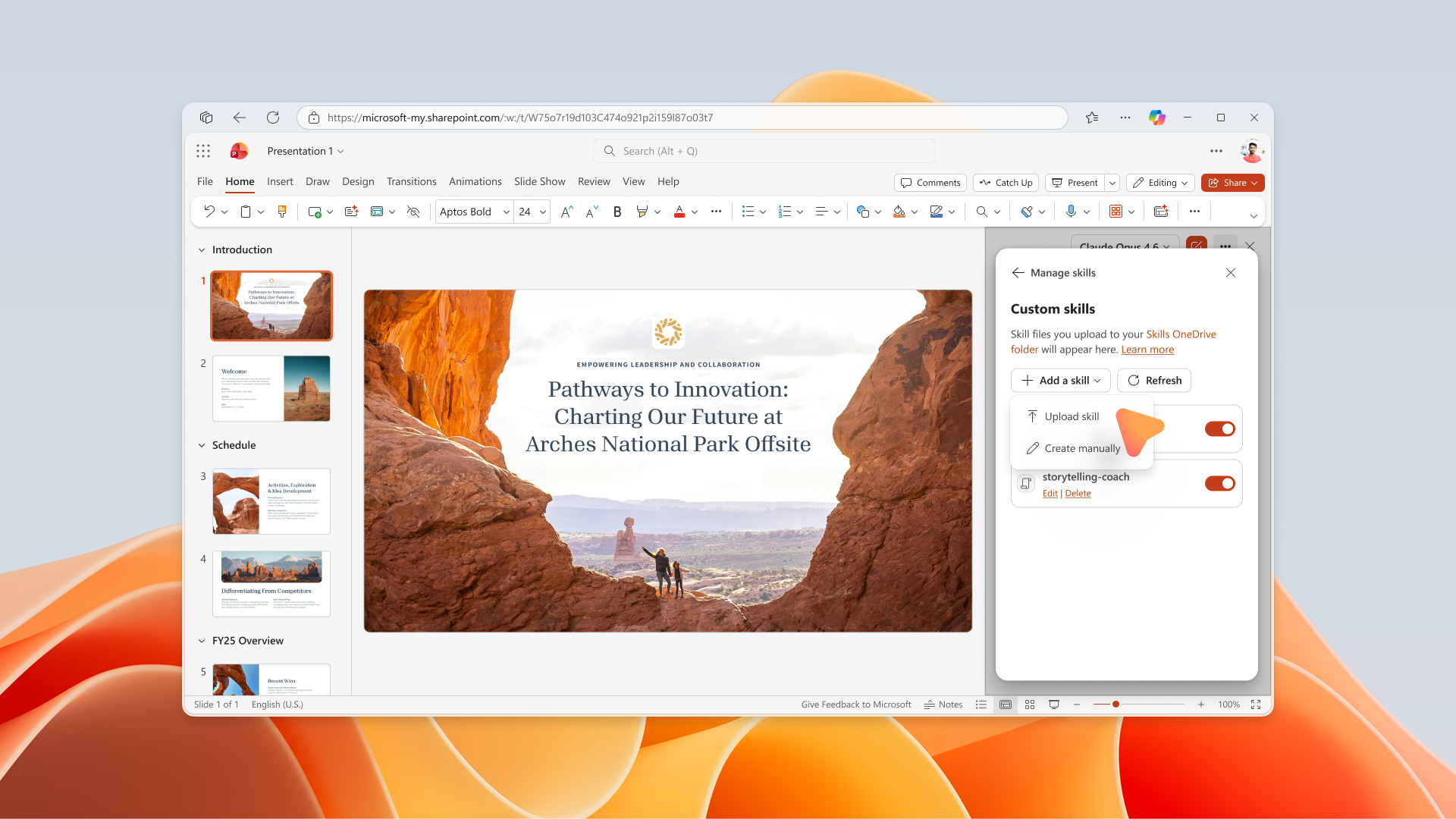
- Users can access a new Manage skills experience to view and manage their personal custom skills.
- Users will be able to upload custom skills directly from the PowerPoint Copilot experience.
- Users will be able to create custom skills directly within PowerPoint Copilot.
- Uploaded and added skills will be stored in the user’s personal OneDrive.
- Custom skills are personal and available only to the user who creates or uploads them.
- Created and uploaded skills will be available for use within PowerPoint Copilot.
- The feature is available by default for eligible users when rollout reaches the tenant.
Screenshot: Users can upload existing custom skill files from the Upload skill experience. Uploaded skills are stored in the user’s personal OneDrive:
[Action Required/Recommendations:]
No immediate administrator action is required.
We recommend that you:
- Review any internal governance processes related to user-created Copilot skills.
- Update internal documentation and training materials as appropriate.
- Inform helpdesk and support teams about the new skill upload and creation experiences.
Learn more: Use custom skills with Copilot in PowerPoint | Microsoft Support (will be updated before rollout)
[Compliance considerations:]
| Compliance area | Explanation |
| Stores new customer data | Custom skills created or uploaded by users are stored in the user’s personal OneDrive. |
| Changes data processing or access | Users can create and upload custom skills that are used by PowerPoint Copilot during Copilot interactions. |
| Introduces AI/ML capabilities | Custom skills extend how Microsoft 365 Copilot responds and interacts within PowerPoint. |
| New generative AI interaction | Users can create and upload custom skills to tailor their PowerPoint Copilot experience. |
| Admin or user controls | Users can create, upload, and manage their own personal custom skills. |
Source: Microsoft Message Center • Analysed by MWPro