

Local Uploads is now available in open beta. Enable it on your R2 bucket to improve upload performance when clients upload data from a different region than your bucket. With Local Uploads enabled, object data is written to storage infrastructure near the client, then asynchronously replicated to your bucket. The object is immediately accessible and remains strongly consistent throughout. Refer to How R2 works for details on how data is written to your bucket.
In our tests, we observed up to 75% reduction in Time to Last Byte (TTLB) for upload requests when Local Uploads is enabled.
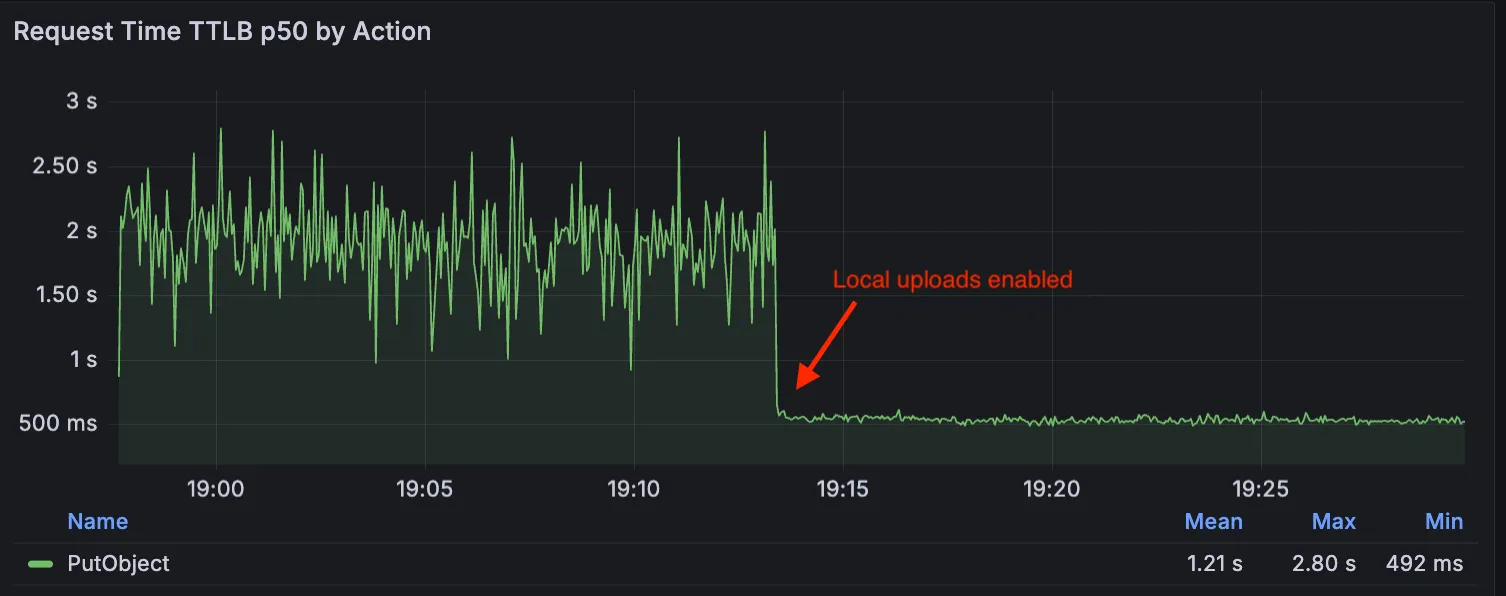
This feature is ideal when:
- Your users are globally distributed
- Upload performance and reliability is critical to your application
- You want to optimize write performance without changing your bucket’s primary location
To enable Local Uploads on your bucket, find Local Uploads in your bucket settings in the Cloudflare Dashboard, or run:
npx wrangler r2 bucket local-uploads enable <BUCKET_NAME>Enabling Local Uploads on a bucket is seamless: existing uploads will complete as expected and there’s no interruption to traffic. There is no additional cost to enable Local Uploads. Upload requests incur the standard Class A operation costs same as upload requests made without Local Uploads.
For more information, refer to Local Uploads.
Source: Cloudflare
Latest Posts
- Cloudflare Tunnel, Cloudflare Tunnel for SASE – Stream logs from multiple replicas of Cloudflare Tunnel simultaneously

- Microsoft Teams: Recently used emojis sync across devices [MC1256307]
- Microsoft Copilot Studio – Read only Analytics Viewer role [MC1255508]
- (Updated) Microsoft 365 Copilot: Introducing infinite scroll for chat history [MC1237701]




![People Skills on the profile card expanding to Microsoft Teams [MC1226221]](https://mwpro.co.uk/wp-content/uploads/2024/08/pexels-minan1398-1313817-150x150.webp "People Skills on the profile card expanding to Microsoft Teams [MC1226221] 7")