Review the update and plan any required actions before rollout.
Primary Audience
Why this score?
AT A GLANCE
END USERS
IT ADMINS
ROLLOUT TIMELINE
Mid–late September 2026
📢 Official Microsoft Message Center Announcement
(Updated) Microsoft Planner: Planner Agent chat in basic plans
Message ID: MC1443514 (Updated)
Updated September 1, 2026: We have updated the timeline. Thank you for your patience.
[What and why]
Planner Agent chat is coming to Microsoft Planner basic plans. This feature brings Planner Agent directly into the Planner experience, allowing users to ask questions about their plans, understand priorities, and take action without leaving Planner.
Planner Agent chat helps users stay organized by providing quick access to plan status, work that requires attention, and actionable insights. It can also help users create and manage plans using information from Microsoft 365 resources.
This message is associated with Microsoft 365 Roadmap ID 567671.
[Rollout schedule]
- Targeted Release: Beginning in early September 2026 (previously late August) and expected to complete by mid-September 2026 (previously early September)
- General Availability (Worldwide): Beginning in mid-September 2026 (previously late August) and expected to complete by late September 2026
[Impact on your organization]
Who is affected
- Users with an active Microsoft 365 Copilot license
- Organizations that allow access to Planner Agent
Platforms and services
- Microsoft Planner
- Microsoft 365 Copilot
- Web
What will happen
Eligible users will be able to access Planner Agent chat directly within Planner while working in basic plans.
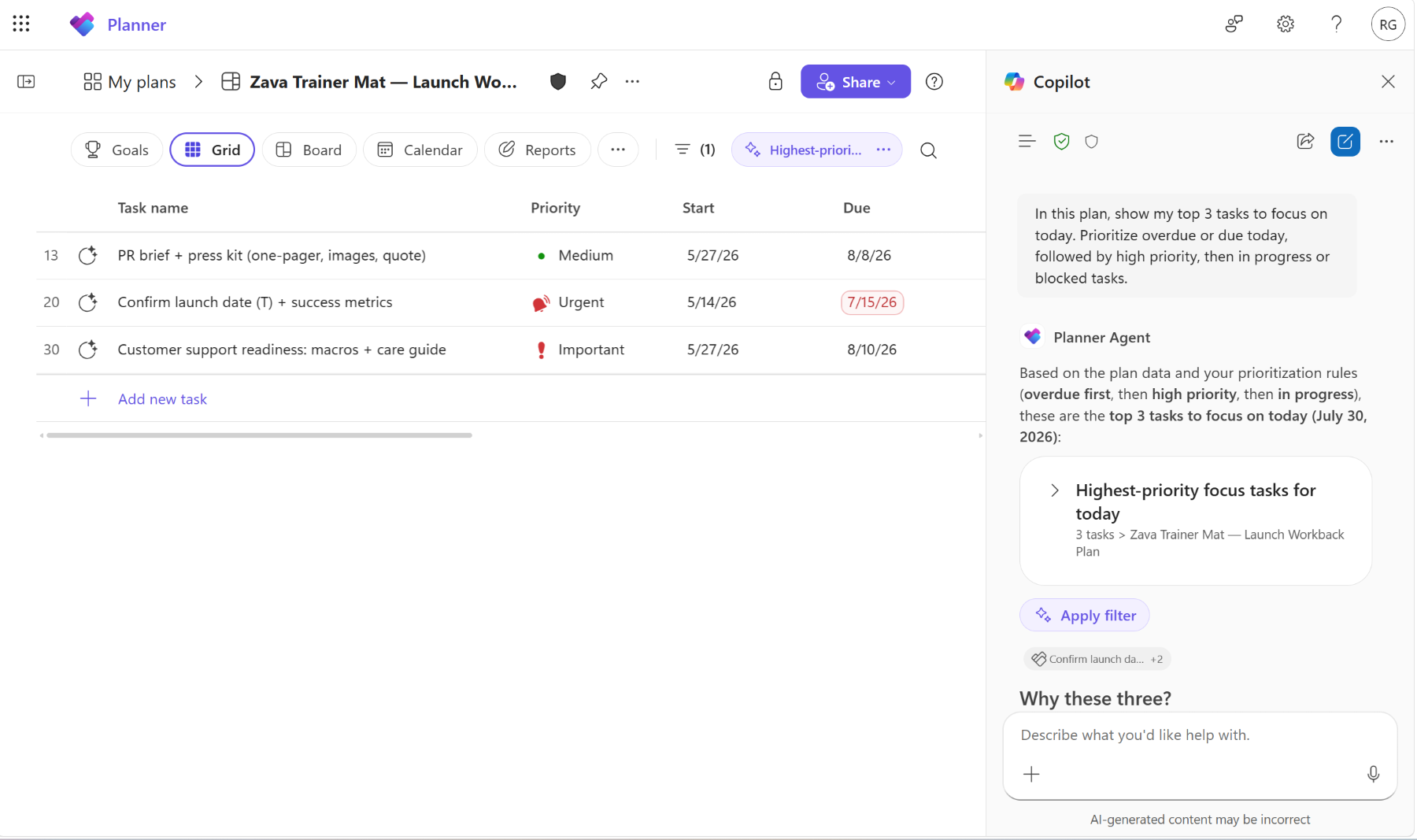
Users will be able to:
- Ask questions about plan status, priorities, and upcoming work.
- Apply AI-generated filters to identify important work more quickly.
- Use interactive task cards to draft updates, review tasks, and track progress.
- Receive insights about high-priority work, upcoming deadlines, and at-risk tasks.
- Create new Planner plans organized by goals and buckets.
- Use information from Microsoft 365 resources such as emails, meetings, and files when working with Planner Agent.
- Use natural language prompts such as: “Show me my recent high-priority tasks and what is due this week.”
[Action required and recommendations]
Review whether your organization wants users to have access to Planner Agent.
Confirm that users who should use this feature have an active Microsoft 365 Copilot license.
- Review Planner Agent settings in the Microsoft 365 admin center.
- If Planner Agent is blocked, users will not have access to this capability.
- Update internal documentation and user guidance as appropriate.
No additional action is required before rollout.
Learn more
- Chat with Planner Agent in basic plans | Microsoft Support
- Manage agents in the Microsoft 365 admin center | Microsoft 365 admin center | Microsoft 365 | Microsoft Learn
[Compliance considerations]
| Question | Answer |
| Does this change introduce or significantly modify AI, machine learning, or agent capabilities that interact with customer data? | Yes. This feature introduces Planner Agent chat, an AI-powered experience that interacts with Planner data and can use existing Microsoft 365 resources, including emails, meetings, and files, to provide insights, answer questions, and help users take action. |
| Does this change provide end users with a new way to interact with generative AI? | Yes. Users can interact with Planner Agent chat using natural language prompts to analyze plans, identify priorities, create plans, manage tasks, and receive AI-generated insights directly within Planner. |
| Does this change alter how existing customer data is accessed or processed? | Yes. Planner Agent chat can access and process existing Planner data and Microsoft 365 content that users already have permission to access in order to generate responses, recommendations, and insights. |
| Is there an administrative control available for this feature? | Yes. Administrators can control access to this capability through agent settings. Blocking the Planner Agent removes access to the feature. |
| Can this feature be enabled or disabled by administrators? | Yes. Administrators can manage availability of the feature through Planner Agent configuration and access controls. |
| Does this change affect how users access information within Microsoft 365? | Yes. Users gain a new conversational interface that enables them to access and interact with Planner information and related Microsoft 365 content through natural language requests. |
Source: Microsoft Message Center • Analysed by MWPro
<<< [MC1443514] Archive
Tooltip: View earlier revisions of this post